V20: 3CX Re-engineered

Status
Not open for further replies.
I think the new v20 is really cool :cool::cool:.
Unfortunately, we are still missing a few functions in the desktop client, such as chat or Yealink integration. I'm glad that you want to integrate these functions in the future :D.

I read somewhere that the v18 electron app still works with v20.
Is that true?
We would now upgrade the PBX to v20, but let the users continue to work with the Electron app for the time being. As soon as the required features are integrated, we would gradually switch the users over.
I would wait with the upgrade untill all your needed features are there.
 
@uptime1 you cant lock down by FQDN thats not how it works. You have to go to the FQDN but you can only do so from certain IPs.
Uptime1 means, add a hostname to the Allow list. Some firewalls (pfSense) allow putting a hostname in an alias which facilitates a rule allowing a device running a dynamic DNS client. The hostname is resolved every few minutes in the background. That device’s IP is allowed regardless of its location.
 
  • Like
Reactions: accentlogic
@SweetAction unfortunately it's against Windows UI policies and it's disallowed , so it's not an easy solution but we are seeing if there is a workaround, we might have found too.
Why is it no problem for the new teams app to stay in background (also a windows store app)? Is it different to 3cx windows app?

There must be something, as you say, the Teams App could do this also. A phone app without the capability to stay in background (Tray) simply won't be accepted by users. I think it will be 3CX PWA > 3CX APP (MS Store)
 
I would wait with the upgrade untill all your needed features are there.
Thank you for your reply.
We will soon be replacing our server. I would prefer to install v20 directly and import our v18 backup.
Alternatively, I would have to install v18 on the new server now and upgrade to v20 in a few weeks. This would not be the best way for me to proceed. So my question to @Nick Galea is whether I can start with v20 now and the users can continue to use the Electron application for the time being. :D
 
  • Like
Reactions: N_G
Thank you for your reply.
We will soon be replacing our server. I would prefer to install v20 directly and import our v18 backup.
Alternatively, I would have to install v18 on the new server now and upgrade to v20 in a few weeks. This would not be the best way for me to proceed. So my question to @Nick Galea is whether I can start with v20 now and the users can continue to use the Electron application for the time being. :D
You have a lot of time left before you have to upgrade to v20.
 
Hello all, can someone please confirm that this "final" release of v20 now passes the "<sip:3cx.pbx>;answer-after=0" header to the phone for paging auto-answer?
 
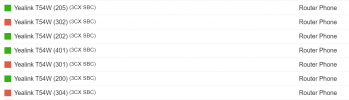
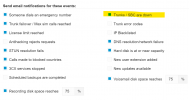
one of our 3cx hosted systems is not notifying us that SBCs are going offline even though the box is checked.
1709749835017.png
1709749855410.png

just for testing purposes we moved the SMTP over to one of our gmail accounts and still not getting notices when this customer flaps down/up (they're having internet issues today).

Any good ideas how to get these emails flowing? We rebooted all the services too and got those notices but still not getting SBC down alerts.
 
one of our 3cx hosted systems is not notifying us that SBCs are going offline even though the box is checked.


just for testing purposes we moved the SMTP over to one of our gmail accounts and still not getting notices when this customer flaps down/up (they're having internet issues today).

Any good ideas how to get these emails flowing? We rebooted all the services too and got those notices but still not getting SBC down alerts.
Do you receive other notifications to the configured admin email address? However, please note that notifications will only be sent if the SBCs are down for longer than 5 minutes.
 
Do you receive other notifications to the configured admin email address? However, please note that notifications will only be sent if the SBCs are down for longer than 5 minutes.
yep we are getting all the others. these SBCs have been going down for hour at a time so i should be getting emails.
 
I think the new v20 is really cool :cool::cool:.
Unfortunately, we are still missing a few functions in the desktop client, such as chat or Yealink integration. I'm glad that you want to integrate these functions in the future :D.

I read somewhere that the v18 electron app still works with v20.
Is that true?
We would now upgrade the PBX to v20, but let the users continue to work with the Electron app for the time being. As soon as the required features are integrated, we would gradually switch the users over.
Yes existing uses on desktop app will still work on v20. Though can not re-provision it.
 
  • Like
Reactions: Tyler.Calhoun
Started looking into upgrading after receiving the "3CX | V20 Final - Upgrade Today!" E-mail but immediately ran into confusion as I'm someone who has not followed any of the v20 betas and RCs so far...

The upgrade checklist linked in the email, https://www.3cx.com/blog/releases/v20-upgrade-checklist-faq/, talks about Departments yet Departments are not available in v18 so there is nothing to do, this seems to be something to do when v20 is installed, and not to "prep" for v20, this should be mentioned somewhere on this page

The page https://www.3cx.com/docs/manual/departments/ also doesn't mention that this is v20 only, seems like it should
 
Last edited:
  • Like
Reactions: NCIA
Just setup my first client on V20. I've previously done a test install and played around with it but this is the first live install. Did a PW reset and got the email, I notice this is at the bottom of the email.

The request to reset your password was sent from the following IP Address 119.18.x.x

That is very cool.

Good job team.
 
Started looking into upgrading after receiving the "3CX | V20 Final - Upgrade Today!" E-mail but immediately ran into confusion as I'm someone who has not followed any of the v20 betas and RCs so far...

The upgrade checklist linked in the email, https://www.3cx.com/blog/releases/v20-upgrade-checklist-faq/, talks about Departments yet Departments are not available in v18 so there is nothing to do, this seems to be something to do when v20 is installed, and not to "prep" for v20, this should be mentioned somewhere on this page

The page https://www.3cx.com/docs/manual/departments/ also doesn't mention that this is v20 only, seems like it should
You won't see it in the management console, but you can from v18u5 and up see the beginnings of the admin console and departments are there.
 
I think the new option for monitoring connection quality is really great :cool: .
Is there a way to start the monitoring as an admin and hide this function for users?
I'm afraid that our users will look at it after every call and immediately call our support team if there's the slightest problem:rolleyes:.
 
Is there a way to start the monitoring as an admin and hide this function for users?
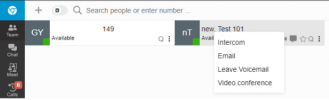
Yes, you can right-click a user on the Team tab or an active call in the Panel to enable monitoring.

But no you cannot hide it from users as it's the purpose of this to be easier for admins to troubleshoot intermittent issues.
 
  • Like
Reactions: accentlogic
Hi, thanks for your answer
I am logged in as the system owner and am on the Teams card. Unfortunately, I cannot start monitoring by right-clicking on a user. Is there anything else to configure?

1709813832563.png
 
Hi, thanks for your answer
I am logged in as the system owner and am on the Teams card. Unfortunately, I cannot start monitoring by right-clicking on a user. Is there anything else to configure?

View attachment 40159
You need to be in the same department
 
  • Like
Reactions: Tyler.Calhoun
I was looking around in v20 and I see that at a Digital Receptionist there is no Type for "DTMF Input" will this also come in U1?
 
Status
Not open for further replies.

Forum statistics

Threads
111,973
Messages
590,079
Members
164,899
Latest member
mazet