Solved v20 build 1620, DID incoming assignment not working

Status
Not open for further replies.

dkirk-ads

Customer
Joined
May 6, 2019
Messages
74
Reaction score
25
Debian installation of v20, upgraded all along from v18. Need to use two of my DIDs to direct dial two different user extensions. In the v20 interface I attach the DID number to each user extension where it shows "Assigned DID number(s). I have done this for two different users using two different DID numbers. I have bounced the SIP service. When either of these DID numbers are called the main IVR extension assigned to that SIP trunk answers, never the intended user extension; its not routing properly.

If I play with call handling, for example, and create a new Ring Group using either of those two DID numbers it correctly asks if I want to disassociate the number from the user, so it knows about the user and the DID assignment.

When I look at the IVR receiving the calls to these DIDs the only DID assigned is the correct corporate number, I'm not sure how this IVR is getting the DIDs assigned to users.

Is this a v20 bug, coming up from the various v20 builds? Should I remove the DIDs from the SIP Trunk definition and re-add them?
 
  • Like
Reactions: mullen
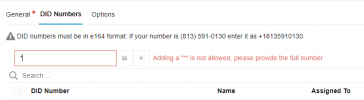
Just put a * in front of your local number. Instead of +6112345678 put *5678
tried that and this is what I still get - So not an option as far as I could see

1719905699587.png
1719905717346.png

Anyway

It works without the + in the E164 formatted number

Which goes against everything in the Alert words shown above
 
Thats strange, it works just fine on every pbx we have.
 
What is your PBX version?
 
  • Like
Reactions: bitn2
What is your PBX version?
SMB 3CX hosted V20 built from scratch on 14th May 2024, (I didn't note the build #) which was configured with extensions, users, vm's, call forwarding, outbound rules etc and tested for outbound calling using a spare fax line trunk (inbound was not possible) to ensure the basics were working before a full transition in June as a V18 upgrade from an AWS hosted to V20 3CX hosted upgrade or restore path using a V18 backup was not possible.

When the issues were observed mid June 2024
V20 Update 2 (Build 708)

It's now on V20.0 Update 2 (Build 715) which is working fine without the + being present as a live system.

V20 Update 2 Build 715
Still shows (Adding a "*" is not allowed, please provide the full number)
when I type an * into and of the trunks DID fields
 
SMB 3CX hosted V20
This is not the same like self hosted, 3cx hosted or on premise. This is a very restricted smal 3cx version. There it could be possible you cant use an non supported trunk.
 
This is not the same like self hosted, 3cx hosted or on premise. This is a very restricted smal 3cx version. There it could be possible you cant use an non supported trunk.
Understood re the small instance - 1 x ext for reception and 1 x mobile app extension with 1 sim call at any time.
Trunk is BreezeConnect - 3CX preferred trunk provider
Which needs to have the + removed which they seem to know about with V20
Not E164 as per the 3CX supported trunk provider web page settings. https://www.3cx.com/partners/sip-trunks/australia/
 
Thank you so much. You solved my problem!!!! Placing the asterisk instead of the + was just what I needed.
 
Thank you so much. You solved my problem!!!! Placing the asterisk instead of the + was just what I needed.

Note :
If you ever try to use SMS with 3CX, please note that starting your number with * does not work.
You must start with + if you want to use SMS.
 
Thank you so much for that information. Fortunately, I don't need SMS for the DIDs I need the asterisk for. But, it's WONDERFUL to know and I am grateful.
 
I believe this is the same as this forum post and it will be marked as Solved.
 
  • Like
Reactions: Guillaume Bourgeois
Status
Not open for further replies.

Forum statistics

Threads
111,974
Messages
590,081
Members
164,899
Latest member
mazet