V20 Caller ID Name non-supported providers

neville

Gold Partner
Advanced Certified
Joined
Apr 23, 2012
Messages
291
Reaction score
62
In version 18, I could change some inbound settings to display caller id name for non-supported providers and it worked as expected.

In the current V20 release, I do not see that option. Am I missing something or has that ability been removed.

Some clients are on generic providers and will never change.
 
  • Like
Reactions: Mike Hammett
We don't provide any advice on generic VoIP providers and only provide support when tested supported providers are used; please see our list of support providers to choose from: https://www.3cx.com/partners/voip-providers/
 
I do not need advice on configuring this. I just need to know if the inbound options on trunks is coming back as it is currently in V18. I know how to do the configuration as I have been doing it for years.
 
  • Like
Reactions: Mike Hammett
I do not need advice on configuring this. I just need to know if the inbound options on trunks is coming back as it is currently in V18. I know how to do the configuration as I have been doing it for years.
For now you will need to export your trunk, make your changes to the .xml and import it back in.
 
Has anyone made an progress with this? Support just keeps copy/paste the same response "do not support generic providers"... XML edits do not work - importing corrected XML files for a provider get ignored or reset in Version 20 - Sip, is SIP, is SIP -> all of our v18 deployments have always worked with the simple change in the sip settings caller id fields IE. From: DisplayName = "CallerName" default:From->display name...No longer in v20. We are also the sip provider and can see with 100% certainty that we are sending the correct formatted SIP information which every v18 system in the wild can understand and provide correct CID information to the end user AND the call records within 3CX.

When we run a capture from within 3CX - the correct sip information is also there with the correct caller id, in the message header, in the from field BUT the 3CX system just isn't interpreting the data... has anyone found a solution... we've tried setting up our SIP TNs as generic trunks and generic providers... both receive the same sip information at the 3CX but the system doesn't pass it through to the customer or even the call logs... We've rolled back other v20 upgrades to v18 (complete rebuild of the system and very unhappy customers) and v18 works, CallerID works and the customers are happy again with self management and the web portal.
 
  • Like
Reactions: Mike Hammett
I agree - it would be great to have some level of support to tweak this,especially when paying for subscription - I have the same problem.
 
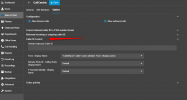
@jlwaller basic outbound parameters are available in V20:
1711512401092.png

Note that we cannot ensure the compatibility of an unsupported provider with 3CX as this require interop tests. We do recommend to use a supported provider to avoid any issues with your sip trunks.
 
I think issue we’re chasing is inbound caller id - is there no way to adjust the fields to match like happened in v18? Referencing jseguins post - I have same issue needing to map inbound callerid field
 
  • Like
Reactions: Mike Hammett
After some time and serious tweaking my engineer friends and I got a solution - which I will post here for everyone. Hopefully this will help! There are a few things to note to make this work - at least it's how it worked for us...
- Use Notepad++
- Once your done editing the file (the data to change is in all CAPS) save it as an XML file AND MOST IMPORTANT!!!
!!! Save the file without the ".pv" at the end of the name - save it as an .xml - THEN once it's saved and you confirm the
data is correct THEN rename the file with the ".pv" at the end - only change the name NOT the file type... you'll see it on the
file I attached.

Ok, here are the same instructions I left for myself and any of my team. (If the bus hits me and backs up)

1. Verify CNAM is enabled on the provider for the TN
2. 3CX - Trunks or "Voice & Chat" -> IMPORT PROVIDER
3. Upload the "EC Working Trunk Provider.pv" XML file (Give it your own name that's easy to find)
3a -> Setup like normal within 3CX after upload is confirmed...
-name
-default route
-fill in trunk number & Authentication ID
-password
DO NOT SAVE YET....
4. Click DID Numbers - enter DID (no leading 1, unless you need it) - Click the SAVE Icon -looks like a floppy next to the DID
-check to make sure it is correctly listed under DID Number
---DO NOT SAVE YET----
5. OPTIONS
-Caller ID Control
-Verify "From: Display Name" => "CallerDispName" Display name of a caller as it is in From Header - Provided by...
-Verify "Remote Party ID - Calling Party : Display Name" => "OutboundCallerID" Outbound caller Id taken from Extension Settings...
-Verify "P-Asserted Identity : Display Name" = DEFAULT
6. Click Save and call to Verify CALLERNAME delivery is working...(Depending on your provider and if you just enabled CNAM it might take a minute - just start a capture during the tests to make sure CID is being sent in the SIP Header)

This is what worked for us. We have a number of different providers and brands of SIP switches we connect to - all using basic
SIP messaging. If ANYONE needs help with this after being dooped into upgrading to v20 for some customers let me know.

Also, if anyone has any clarification recommendations to help make it easier and more clear for anyone please do so.
This issue has been a huge annoyance and a problem that could have been handled easily from support but wasn't.

Thanks again to everyone who helped!
 

Attachments

I agree - it would be great to have some level of support to tweak this,especially when paying for subscription - I have the same problem.
I posted the solution that works for us but still waiting for "admin approval" for the forum - if you want I can send along the details and the file that we used....
 
that would be awesome - oddly enough, i think I got a copy of your steps in my email when you replied, but did not have the xml file - if you could DM would be awesome!
 
that would be awesome - oddly enough, i think I got a copy of your steps in my email when you replied, but did not have the xml file - if you could DM would be awesome!
Here ya go - If you run into any issues shoot me a message!
 

Attachments

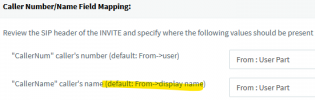
@jseguin Hi Justin just to double check, you're talking about this field in v18(?):
1713394993944.png
(...where "display name" is not actually the default for a new trunk, it's User Part?) :)
 
Sorry - this applies only to v20 - v18 works beautifully even for a basic CLEC like us..
 
I was unclear, I meant, you're changing it in v20 because that field is no longer available?
 
Yes sir - it's there kinda in v20 but to get Caller name delivery to work you need to edit the xml
 
Yes sir - it's there kinda in v20 but to get Caller name delivery to work you need to edit the xml
Thanks for the info; maybe they will add a drop down menu for this one specific need in a future update. I wonder why you have to save it then resave it and rename it. That sounds like a headache appreciate the share!!
 
Not everyone has the luxury of being in an area that supports porting to a supported provider. Why are we moving backward and dropping features that worked in v18. I feel like Caller ID is a basic thing, that's going to piss a lot of my customer off, and force them to move to other solutions. The local carriers all have hosted phone systems and they wont have this issue, so we are just going to lose out. Please bring this option back on generic trunks, we don't all have choice.
 
  • Like
Reactions: Mike Hammett
+1. Thanks for the solution
 
Thanks for the Solution
 
Last edited:

Forum statistics

Threads
111,973
Messages
590,071
Members
164,892
Latest member
Phone1stStop