Yes, "Allow Direct SIP calling" is checked. Setting carried over from v18, but its not working.Hi, could you please check that the Allow direct sip calling is enabled as shown in the pic below:
View attachment 40256
Yes, dummy extension is '100' and the SIP ID is set to '0' for this dummy extension.ok and the user has the SIP 0?
I have tested this scenario and it works.
by chance could you please validate that in parameters ----- sipdomain --- it is configured with the pbx fqdn.
so the direct sip dialing works as expected.so dialing 0 is routing to dummy extension '100'
Can you provide an example on how to forward the dummy extension directly to IVR? The only way I was able to make it work was to forward the dummy extension to a DID and the DID is tied to the operators IVR. Not the most elegant workaround…so the direct sip dialing works as expected.
You have another issue that is not related to the direct sip dialing.
The parameter Rebound must be used only when you are forwarding a call to an external number or mobile, when enabled the system will ring that number for 30 seconds, if the call is not answered in the destination, then the call is back but to the user's voicemail.
If you are going to use the rebound, then voicemail must be enabled and set in that user.
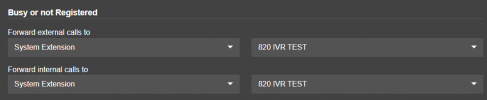
If this a dummy extension without registration, then configure the forwarding rule when not Registered to your IVR for both internal and external calls.
Have a good day!

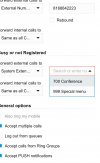
My ivr (digital receptionist) is not under system extension. Only 700 and 999 appear in the drop down as options. How can I make my ivrs available for forwarding from the dummy extension. Screenshot attached.You have dummy unregistered extension. In the available status --- configure the not registered destination to system extension and select your IVR
View attachment 40271
If an internal or external user calls this extension, then it forwards to the IVR.
Now, I don't know what is your call flow and where or what escenarios you will use this dummy extension.
That did the trick. Thanks for your help!That is because the system extensions are hidden.
Go to system —- options and disable the parameter Hide System Extension, apply the changes.
Once done you will see the IVR available as system extension to forward calls.
No problem, have a good one!That did the trick. Thanks for your help!
Founded in 2005, when VoIP was an emerging technology, 3CX has gone on to establish itself as a global leader in business communications.