v20 no more per-office holiday voice messages

Status
Not open for further replies.

stijngruwier-leiedal

Customer
Joined
Dec 28, 2023
Messages
1
Reaction score
7
after upgrading from v18 to v20 (update 0 build 1458) we noticied multiple holiday schemes can be set per department (which is great), but ont he other hand we are missing the function to link specific voice messages to holidays.

in v18 you could register/pre-record a different office holiday voice message for each holiday. something we only had to do once a year and could then forget about it.

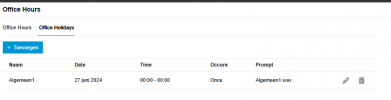
in v20 you can only specify which days are holidays but you cannot not pre-record the individual messages for each holiday.
so now each time a holiday comes up we have to think about it to record the specific message , something that is easily forgotten ...

I hope the v18 handling of office hoidays can be brought back in v20 as it was much better than how it is now.
 
+1 , semplicemente inaccettabile
 
Hi Nick,

This is awesome for people who like the older way of doing things.

Quick question, it says that the prompt name should be equal to the holiday name, but in the example the holiday is "Santa Maria" and the file name is "santamaria.wav".

Does the system automatically remove the space between the name, or should the file be "santa maria.wav"?
 
Hi Nick,
we need this feature back. Scripting is no option for us.
The way it is now is not practical anymore.
 
  • Like
Reactions: lbfealex
We have just come across this issue too...
The script is great but I have a team of engineers and the UI is the only real way we could do this.
Having to delay V20 or roll back unfortunately as a lot of dental practices need this function.
 
Same here. It doesn't make sense to remove features when updating to a new version. It's like getting a smaller french fries size when you super-size your combo meal. We really love 3CX, but these kinds of things make us start thinking about suggesting another system to our future customers.
 
So it's kind of a pain but I think I figured out how to do it. If night mode goes to an IVR, then you have to create a 2nd night move IVR that is the same but with a different recording. This is basically copying how HOL would work.
 
Hello, I follow what the other users just say.
It's very very very very important to have this function: there is no sense to can do something with V18 and cant't do the same thing with V20.
Give it back again, please.
Bye.

Lorenzo
 
  • Like
Reactions: moniputerPBX
So it's kind of a pain but I think I figured out how to do it. If night mode goes to an IVR, then you have to create a 2nd night move IVR that is the same but with a different recording. This is basically copying how HOL would work.
Can you please elaborate?

Thanks
 
So it's kind of a pain but I think I figured out how to do it. If night mode goes to an IVR, then you have to create a 2nd night move IVR that is the same but with a different recording. This is basically copying how HOL would work.
This doesn't work when you have multiple destinations with different phonenumbers. You then have to change the destination for the holiday routing at every department/queue/IVR/ringroup.

The function we are missing is the global holiday. It would be amazing if you have an option you can enable underneath 'Play Announcement' to enable the global holiday message. After the message has been played, it would follow the set destination, that could be an 'End call' or forwarded to a voicemail box etc etc. The global holiday message could be set in the office hours settings.

I attached a screenshot with how that would look like
 

Attachments

  • Screenshot from 2024-06-27 13-22-17.png
    Screenshot from 2024-06-27 13-22-17.png
    70.1 KB · Views: 29
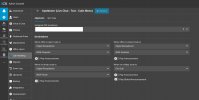
This is what i see in the Version 20.0 Update 2 (Build 708 Beta), Prompt !!!! happy dance.... but.... how to get this effective i can't figure out. I can't find the " Play holiday prompt when it's a global holiday" checkbox.

Someone?

1719525017369.png
 
Saw this post and immediately upgraded my system to the 708 build. I see it too!! :D This is fantastic, I will now be able to upgrade some users that I've been holding off (once it's out of beta). I haven't tried it yet, but I would assume it would just "kick- in" when the holiday time starts.

Now we just need to be able to record the prompt from a user's desk phone for this and IVRs, as you could in v18, and all will be good with the world .;)

dancing-dance.gif
 
Last edited:
Why these kind of downgrading is done, I don´t understand. It seems that the developer(s) who did this, don´t use the system, and certainly do not think from the user point or from maintance point. This "reform" causes too much work. Just bring back the way it was done before.
 
Now we just need to be able to record the prompt from a user's desk phone for this and IVRs, as you could in v18, and all will be good with the world .;)

Agreed.
 
Saw this post and immediately upgraded my system to the 708 build. I see it too!! :D This is fantastic, I will now be able to upgrade some users that I've been holding off (once it's out of beta). I haven't tried it yet, but I would assume it would just "kick- in" when the holiday time starts.

Now we just need to be able to record the prompt from a user's desk phone for this and IVRs, as you could in v18, and all will be good with the world .;)

View attachment 42215
it does not kickin, If the Trunk points to a default route IVR then in that IVR there is no option under "When on holiday rout to".
I would expect there something like "Play holyday prompts"
 
Hmmm, yes I tried it and when the holiday starts, the extensions switch to out of office hours and calls then go to the normal VM destination, instead of the HOL IVR (which doesn't appear to exist anymore). Might take a bit more "playing", or another update, before it works as it should...
 
Yeah it looks like it's not ready yet. Spent some time trying to figure it out, but so far there is no way to play the holiday prompt when calling.
 
  • Like
Reactions: RogierP and rayt
Hi @Nick Galea , there are so many features missing (or removed) on V20 that it looks like the product has not been finished. I do not understand the reason of removing features like: multiple holiday prompt, inbound routes (now is a real pain in the rear find out what numbers go to which extension, on previous versions everything was on one screen), and others.

Additionally, when you guys announced the V20, as a full 3CX renovation, I was very excited; I was expecting a lof of new features in ADDITION to the great features of V18, however, your organization decided to remove several of those great V18 features.

Finally, I was expecting a renewed UX, instead V20 still keep and outdated UX from the 90s/early 2000s. Take for example the UX screen for office hours configuration; I don't understand why I have to enter one day at the time, there should be a simple check mark on each day that I want to configure with the same hours, most of the business/department use the same hours every day of the workweek; I used to program computers during the 90s and early 2000s and 3CX UX is a direct reflect of that time; I used to say to my fellow programmers, if you let an user repeat a task you are failing as a developer, the principle #1 of software development if to minimize repetitive task to the users. Please take my two cents' comments in the most positive way, I like your product, so, I would love to see 3CX outshine its competitors.
 
Status
Not open for further replies.

Forum statistics

Threads
111,972
Messages
590,065
Members
164,887
Latest member
KrishnaMR