V20 Out of Office Hours

Status
Not open for further replies.

Glenn Challen

Joined
Jun 26, 2018
Messages
1
Reaction score
4
Hi there,

We've only rolled out a couple of clients on V20 but we're getting some resistance from our clients in the way out of hours is toggled on/off.

Previous versions were simple. Any handset or App connected to the phone system could simply dial *640,*641,*642 and control this function quickly and easily.
The best part was that they may have left the office and forgotten to switch the system and could do it in seconds from the car.
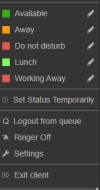
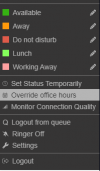
Now it appears in V20 they must use the override the Office hours function from the web client or desktop. This isn't exactly quick and easy.

Can we please have the old function brought back in future releases.
 
Definitely +1 to this - My Director has asked me to Shop for a replacement to 3cx - He will not accept the removal of Night mode from our system - It just does not work for our organisation Our office is 90% Desk phones and our opening hours are fluid.. Looks like i have the headache this evening, of Trying to restore our 3cx Snapshot from V18 so that we can have our original functionality back.
 
  • Like
Reactions: david90
Definitely +1 to this - My Director has asked me to Shop for a replacement to 3cx - He will not accept the removal of Night mode from our system - It just does not work for our organisation Our office is 90% Desk phones and our opening hours are fluid.. Looks like i have the headache this evening, of Trying to restore our 3cx Snapshot from V18 so that we can have our original functionality back.
Im not sure you'll be able to activate your license if it's already gone to v20
 
  • Like
Reactions: Glenn Challen
Im not sure you'll be able to activate your license if it's already gone to v20
That could be a problem - I've already had a difficult conversation with the director this morning about missing features - and the fact we had to upgrade our AWS instance to handle this new cut down version!

If we can't restore these features i get the feeling We'll be going back to something Asterisk based, which will be it's own headache for me!

- suppose thats my own fault for not feature testing V20 before pressing upgrade on our production system.
 
That could be a problem - I've already had a difficult conversation with the director this morning about missing features - and the fact we had to upgrade our AWS instance to handle this new cut down version!

If we can't restore these features i get the feeling We'll be going back to something Asterisk based, which will be it's own headache for me!

- suppose thats my own fault for not feature testing V20 before pressing upgrade on our production system.
Give this a try..

Go to parameters and search for "DIALCODEOUTOFFICE" click it and type your prefix and give it a try.
 
Give this a try..

Go to parameters and search for "DIALCODEOUTOFFICE" click it and type your prefix and give it a try.
Thanks - I did check that in case the Prefix had changed - But nope. Still set as V18 was.
1702546671548.png
 
Strange, when I call *64, *641, *642 it works as expected. (is *65 on my system)

have you got something else on *64 too? Search for that in parameters
 
Strange, when I call *64, *641, *642 it works as expected.

have you got something else on *64 too? Search for that in parameters
have you tested the Switching is working? I get the announcement that Office is in Night mode... But in effect it makes 0 changes to the call handling. - Our "on call" queue is ignored and our "in office" queue is left as the one handling the calls
 
  • Like
Reactions: Alroger
Let me try and come back to you.. i only called it and got the prompt.
 
Yeah looks this way.. Because of the depts you've got to manage it via 3CX client now.
 
Yeah looks this way.. Because of the depts you've got to manage it via 3CX client now.
Yeah it appears that way - This won't work for us.... Shame i much preferred 3cx over VitalPBX - but no way am i going to sell the director on more cost for a complete change to how we handle interaction with our Phone system.
 
  • Like
Reactions: Alroger
Yeah it appears that way - This won't work for us.... Shame i much preferred 3cx over VitalPBX - but no way am i going to sell the director on more cost for a complete change to how we handle interaction with our Phone system.
Give it some time, this might change. Just need to wait to hear back from someone at 3CX.
 
Give it some time, this might change. Just need to wait to hear back from someone at 3CX.
My issue is - As this is non- reversable, I am the only user that uses Web Access - 3cx Android App does not have the ability to set the office in or out of hours - Only the Browser app does - Which no one other than me uses. Which means everytime someone want's to override the office hours (which happens almost daily) - I will be getting a phone call. Until today - We have never used office hours.. When someone comes in to the office - They "open Lines" - When the last person leaves - they "close lines".. THis was all done by a Speedials on their desk phones, or by dialling *641 and *642 from their Android 3cx App.... I cannot understand why 3cx made these core changes - And then made it so you have to login via a browser. We do not use Chrome or Edge. So Browser extensions are useless to us.... Even if i set a schedule for office hours - These are probably going to cause us more issues than not having a schedule - as no one "on the road" is now going to be able to Set Out of office - if it's forgotten.

I'll try and bare with it for a week or so, But i think for sanity's sake, i'm going to start spinning up and alternative PBX to take over just-in-case.
 
  • Like
Reactions: david90 and Alroger
You could try and revert back to v18 but ultimately you'll end up on v20.

I can see why they've removed the option to close the PBX now that departments are able to manage their own office hours. Last thing you want is someone from DptA closing the whole system, especially if you set up dpts based on country.

1702548403881.png

Give your user the receptionist role and she can do it from the 3CX client, which can be a desktop app.
 
You could try and revert back to v18 but ultimately you'll end up on v20.

I can see why they've removed the option to close the PBX now that departments are able to manage their own office hours. Last thing you want is someone from DptA closing the whole system, especially if you set up dpts based on country.

View attachment 38686

Give your user the receptionist role and she can do it from the 3CX client, which can be a desktop app.
- then a Dialing code for Department Override would be fine - It's no different to that user being able to do it from the app.

And unless i'm missing something - it cannot be done from the 3cx desktop app. I am the system owner - and i can't do it.
Unless there's a new version of the App that i can't find?
1702548632028.png

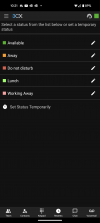
I cannot do it from my Android App either!
Screenshot_20231214-102111.png

But from the Browser Console i can
1702548671791.png

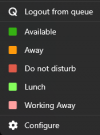
The only Windows App offered for V20 is a "windows Store" app - and that's even worse for lack of features
1702548852151.png

In principle I have no Issue with the department system - in fact other than it being a bit less tunable for a small business like us I think it's a decent change - But taking away the ability to interact with it from your desk phone makes it unviable for the type of use case we have and for our user base.. This could be somewhat forgiven if the Android App would allow the department office hours to be overriden but it doesn't.
 
  • Like
Reactions: Alroger
Have you tried using the PWA app?
 
Have you tried using the PWA app?
Nope - it doesn't seem to mention the PWA app on my Pixel 8 at all - Just keeps directing me to the Android App - Even if i go to the Web console..... I'll hunt it out and try it.
 
PWA only works on desktop, dont think you'll be able to do it in mobile app.
 
PWA only works on desktop, dont think you'll be able to do it in mobile app.
Then again - this is useless to us.... We need the ability to set Out of office, when out of office. If this cannot be done from a deskphone Or at the very least the Android app - It's not useable.

There are regular occasions, when at any point during the day - our whole office will be on the road within about 10 mins of each other - and if the last one out forgets to switch to the "on call" queue, They're going to either Mess around trying to log in via a browser on their phone with 2FA enabled - Or return to the office, to use their PC to log in.

I appreciate your suggestions - But i think this is something 3cx need to take a serious look at - some legacy features are very important to places, and based on the OP it appears many partners customers are feeling the same.
 
  • Like
Reactions: Alroger
feature testing V20 before pressing upgrade on our production system
I totally get your point about removing features*, but, v20 isn't even released yet so I'd expect some rough edges. There is a list of things they've said won't be there until update 1 or 2. So...maybe?


* one needs to have the Receptionist role (or another) to use shared parking.
 
Status
Not open for further replies.

Forum statistics

Threads
111,953
Messages
589,914
Members
164,849
Latest member
BillyAkansel