[V20] Recording voicemail prompt from desk phone

Status
Not open for further replies.

EWS

Customer
Joined
Dec 15, 2023
Messages
26
Reaction score
5
Hello everyone,

one of our customers would like to record voicemail prompts from their desk phone, as they don't have a proper microphone or headset at their desk. I recall this being a feature in V18, where an admin could choose where to record voicemail prompts from.
In V20, I cannot choose where I'd like to record the prompt, I can only give it a name, hit record, and then it starts recording directly at my machine.
Is that a bug or a feature coming back in a future update?
I know of a workaround where someone could call outside of office hours and record the prompt via mailbox, download it, and then upload it back to the PBX. But as I said, that's just a workaround and not something I'd like to bother our customer with.

Looking forward to hearing from y'all.
 
It’s come up a few times here. Future development unknown, there are a lot of things to be added by release and the first few updates, but I don’t recall that specifically listed.

The person should be able to leave themselves a voicemail..? Or a dummy extension set to email voicemails to an email alias that delivers to them.
 
It’s come up a few times here. Future development unknown, there are a lot of things to be added by release and the first few updates, but I don’t recall that specifically listed.

Good to know, thank you. I really hope this is coming back soon.
I'll let them know of the workaround for now.
 
In the meantime, we set up a dummy extension where you can record voicemails like ext:789

Recorded messages for this extension are forwarded to our service department. We can extract this .wav file and add it to 3cx.

It's surprising how many receptionists do not have speakers or even a microphone jack on their computers.
 
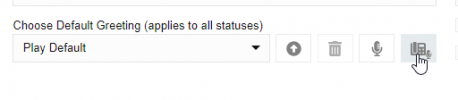
RC3 brought back the feature I believe

1709577029581.png
 
  • Like
Reactions: Samuele - Eurocom
V20 doesn't have this option when recording Intro prompt for a queue, but if recording a voice mail for extension it is available. Is there a reason for this?

Because when I tested recording using my microphone the sound was not as clear as when recording via the phone. I have a decent Yeti microphone. But in V18 all recording was always done via a mobile phone and was never an issue. is this no longer possible?
 
But in V18 all recording was always done via a mobile phone and was never an issue. is this no longer possible?
unfortunatelly for now V20 on that point is not at V18 level, so feature is for now missing, we hope it back as for us too it was used by customers alone so no way for me to explain this feature is gone since V20 has been applied.
also on V18 it was possible to choose an extension to listen wav file once set in pbx, but this is no more doable too and so you can't playback the file in situ to hear quality and check things you did.
 
unfortunately for now V20 on that point is not at V18 level, so feature is for now missing, we hope it back as for us too it was used by customers alone so no way for me to explain this feature is gone since V20 has been applied.
also on V18 it was possible to choose an extension to listen wav file once set in pbx, but this is no more doable too and so you can't playback the file in situ to hear quality and check things you did.
You raised another very valid point. These features will be missed if not included in future releases. I am very concerned with the quality of the recordings. I just did recording for client V18 and it was crisp and clear. V20 seems to be patchy and not as clear audio. I think I'll have to record to PC first on V20 and then upload the file instead.
 
I think I'll have to record to PC first on V20 and then upload the file instead
Yes this is a way but you'll need to use an extension you have access on and then call the IVR or QF to listen real audio rendering on pbx. it was nice to use the management button to select a callback to whatever extension from the pbx and listen the audio from where you are located without generating any perturbation for the customer.
All is located in the details that finally give us all a handy and very loved pbx.
 
Status
Not open for further replies.

Forum statistics

Threads
111,953
Messages
589,913
Members
164,847
Latest member
mike.carter.991