V20 U2 Alpha - AI, Microsoft Teams & Admin Control

N_G

Founder
Joined
Jun 6, 2006
Messages
4,857
Reaction score
9,290

AI meets 3CX, 3CX does Teams and Admins control all!​

V20 Update 2 delivers a host of new features that help companies get the most out of their 3CX install. Our focus is now on advancing our AI feature set, as well as beefing up 3CX enterprise features. Separately, we’ve greatly advanced our Windows softphone app as well as o...
Continue reading the Original Blog Post.
 
Last edited by a moderator:
  • Like
Reactions: Evolute IT
In Update 2 it’s now possible (...) to have 3CX target an agent regardless of whether they’re on a call.
Great ! Thank you very much !
No further logic is applied, it simply does not check whether the agent is on a call. So you have to choose your queue strategy accordingly, because if most of your agents simply ignore the call it will increase wait time.
Important note :)
Let's test this !
 
I was hoping that Update 2 would also bring back the ability to use CFD apps in forwarding rules, as discussed here: https://www.3cx.com/community/threa...-as-a-destination-in-forwarding-rules.125544/

However, the Update 2 changelog does not mention any Call Flow related changes. Is there an ETA for this feature?
You can do so in Update 1 as well.
Just set the forwarding rule to forward calls to "System extension" and you will find your CFD in the dropdown to the right.
 
Nice changelog! Many features that are frequently asked and we can mark several points on the wish list.

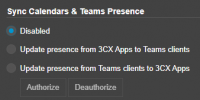
For the Teams presence sync

1718197623040.png

Was there a technical reason, that both way is not possible? Or is it just an interop nightmare like Teams vs WebHID.

Priorization is great, both-way-sync could be usefull aswell
 
Nice changelog! Many features that are frequently asked and we can mark several points on the wish list.

For the Teams presence sync

View attachment 41904

Was there a technical reason, that both way is not possible? Or is it just an interop nightmare like Teams vs WebHID.

Priorization is great, both-way-sync could be usefull aswell
Just one way? That doesnt make sence...
 
  • Like
Reactions: bitn and Gasha
@Nick Galea Any reason for OpenAI over Copilot you had mentioned before, was it ease of deployment or technical benefits?

Looking forward to testing and getting back to SharePoint. Thank you!
 
Impressive upgrade.

We would like to know if there are hardware specifications for a private conference server?
 
Impressive upgrade.

We would like to know if there are hardware specifications for a private conference server?
Debian 12 64 bit VM: 4-24 vCPU, 4-16 GB RAM, 50 GB storage, 50-500 Mbps down/200 Mbps-1 Gbps up depending on your usage. More detailed documentation and info will be out at a later date.
 
Awesome! Love how 3cx keeps the updates coming with feature enhancements. The AI stuff is great as we have had our supervisors asking about that technology.
 
Setup OpenAi created the key saved in 3cx and even rebooted OS not working ideas?
 
  • Like
Reactions: ZDN Consulting
Damn, what a super impressive update. Then you relise it's an alpha and theirs more to come.
Great work team.

Please, oh please, bring back multi user edit. Such a missed feature when you program 3CX all day.
 
  • Like
Reactions: illcsales
Should we see the Alpha release available in Admin Console? I am not seeing it yet. Thanks all.
 
  • Like
Reactions: daniel-fv
Nice, Activity logs are back - but no INVITE in Medium level, only in Verbose with all other :(
 
I still miss the mass editing of extensions and the fact that you can't give DID a name. Otherwise, most of the features are back.

I still would have found it better if the V20 had at least all the features of the V18 plus a few new features.
 
Setup OpenAi created the key saved in 3cx and even rebooted OS not working ideas?
Hello,

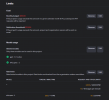
it looks like the OpenAI requirements are updated very dynamically, we will update our documentation to specify everything in detail so please bear with us. To start using OpenAI you need to set the Limits and Model Usage in your project settings. I have attached screenshot of a working configuration for those limits. Try this and let us know if this works for you

1718206394083.png
 
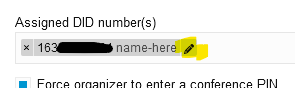
can't give DID a name
It's on the DID assignment itself:
1718207939577.png

(then Save)

Edit: interestingly in v20u1 it appears the name is no longer shown on the Conferencing page, once you leave that page. It stays on the trunk > DID tab but apparently I can't remove it.
 
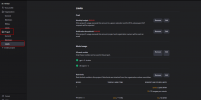
@AndreasP_3CX looks like you have different screens. Still not working after going in and checking are there other requirements? 1718208954353.png
 
you are looking at Organisation >> limits
@AndreasP_3CX looks like you have different screens. Still not working after going in and checking are there other requirements? View attachment 41917
you are looking at Organization>> Limits to the left column , Select Project >> limits from your column to the left
 

Attachments

  • Project-Limits.png
    Project-Limits.png
    45.6 KB · Views: 17

Forum statistics

Threads
111,973
Messages
590,070
Members
164,890
Latest member
James Hacker