V20 U8 BETA: AI Chapter Like a Boss!

Is there any plan to allow IP phones to read the company contacts in Multi Company mode?
Hi,

They do show them. You need to wait until the phone refreshes its contact list or you can force a phonebook update through the phones interface.

Exact details on when/how differ by device and you will need to check the phones manual for that. Most phones tend to refresh once a day.
 
Morning,

Quick question regarding the new phonebook features in U8, specifically in Multi Company mode. As we know the Department phonebook becomes the users Company phonebook when in multi Company mode which works great, but a users IP phone in this case a Yealink will show the contacts as empty.

Is there any plan to allow IP phones to read the company contacts in Multi Company mode?

Thanks!

This is already implemented but please make sure to update/refresh the phonebook on the Yealink after switching to MCM, or wait until it refreshes automatically.
 
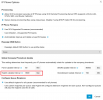
The automatic periodic update interval can be changed in Admin > Phones > Options >Global Company Phonebook Update:1764166895252.png
 
200-300 would be a no-brainer.

For EU customers – is there (or will there be) an option where all 3CX AI-related processing (transcription, summaries) is handled fully within the EU, meaning full EU data residency? Sorry for the boring question, but it’s the first thing our customers will ask us.
yes all EU transcriptions get done with EU machines in Google Cloud EU

However, if its really a concern then setup your own AI transcription and have full control of the data. Nobody except the person running the network sees it. For me this is an amazing feature.
 
Last edited:
The automatic periodic update interval can be changed in Admin > Phones > Options >Global Company Phonebook Update:View attachment 50316

Hi, thanks for the update!

The phones were using an older custom template which was missing some of the Remote Phonebook settings of the newer templates. All sorted now!
 
yes all EU transcriptions get done with EU machines in Google Cloud EU

However, if its really a concern then setup your own AI transcription and have full control of the data. Nobody except the person running the network sees it. For me this is an amazing feature.
for me too! I’m getting conflicting information regarding Local Transcription. Some resources say it’s available from 16 SC, others say from 32 SC. What is the correct requirement?
 
We are going to unlock it for 16Sc+ now
 
  • Like
Reactions: PaulC_3CX and N_G
Its great feature to enhance.
Boss-Secretary function should have more relative user setup.
Boss or Secretary should have access to enable or disable this function. Remember, some time or some calls are not allow to handle by secretary. It will be good if features code and app to disable or enable this feature.
 
@clive_chanbw We are doing these enhancements - first the ability for the user to be able to toggle this on and off from the web or app and by BLF at some point. Secondly the ability to configure exceptions that will bypass the feature.....
 
8 and 16SC customers can buy transcription packages, at a cost of about $200-300 per year.
Will 32SC and more also have to buy these $200-300 a year transcription packages ?
So that we have the full picture.
Thank you again !
 
No, with the transcripting service you don't need to buy anything. You just need to have two gpus.
 
  • Like
Reactions: Evolute IT
I did not catch the fact that transcription through your cloud would only be available to 8 and 16SC customers.
Thank you !
 
I did not catch the fact that transcription through your cloud would only be available to 8 and 16SC customers.
Thank you !
We might offer it for bigger licenses but for now we want to go step by step as it takes significant cloud resources to transcribe. We need to see uptake first and see available capacity. Big installs its better to run your own transcription and save thousands per year to be frank. A desktop GPU box you can get it for 2-4K one time purchase.
 
Just tinkering with the shared voicemail box, from what I can see, this is only on a Queue of Ring Group.
How would we be able to do a Business Hours, After Hours, Holiday VM so that customers can do different messages based on the time of day rule?

At the moment, we often end up with a few users "VM BH" and "VM AH" so that we can have these two separate messages.
Something to consider for the next release to make it consistent with how all other rules work with "Business Hours, After Hours, Break Hours, Holiday Hours" perhaps?
That's a good point, the majority of our clients have Day voicemail and night voicemail. It would be amazing to have open, closed and break voicemails. Have to add new things to wish for, lol.
 
Last edited:
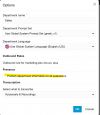
A questions around department phonebooks, as it's just come up for a build I'm running (but I haven't had a chance to check it in U8): Is it possible to limit the phonebook that's presented to a device provisioned device (ie a Yealink) to only the internal extensions in that department in normal (non MCM) mode? I'm setting up a business that has some internal privacy concerns and I'm needing to limit specific extensions from having visibility of other internal extensions in the remote phonebook.

Right now my workaround is to use a custom template to stop specific devices from pulling the phonebook at all
 
Last edited:
Maybe crazy idea but for me magic - extension user can make voice sample to have voice cloned like AI agent. With this feature - unbetable.
 
Maybe crazy idea but for me magic - extension user can make voice sample to have voice cloned like AI agent. With this feature - unbetable.
That's creepy
 

Forum statistics

Threads
111,990
Messages
590,165
Members
164,929
Latest member
Cloudstar