V20 Update 3 Alpha

Status
Not open for further replies.

AshleyPhones

Silver Partner
Joined
Aug 20, 2024
Messages
15
Reaction score
1
I just wanted to share some bugs that we have come across with Update 3 Alpha:

  1. Users cannot hear the callee after taking the call off of hold.
  2. Building a Default Outbound Rule can no longer have a blank Outbound Caller ID.
    1. On V20 U2, if the rule was blank, it was used to take the main trunk number from the trunk for display.
    2. As this is now needed, it overrides DDIs assigned to a user.
I'm sorry if this is the incorrect place to raise these, but I want to ensure that they are raised and that other community members are aware of the challenges in the Alpha.
 
  • Like
Reactions: PhoneMan123
  • Like
Reactions: AshleyPhones
Hi Ashley,

1. Thanks for reporting, we are aware and will be fixed in the next release

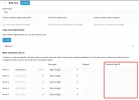
2. What you do mean by that? The Outbound Caller ID field is not mandatory when creating a outbound rule:
1724226896919.png

Can you elaborate on this?
 
Hi Ashley,

1. Thanks for reporting, we are aware and will be fixed in the next release

2. What you do mean by that? The Outbound Caller ID field is not mandatory when creating a outbound rule:
View attachment 43324

Can you elaborate on this?
Of course,

We create a catch-all rule at the bottom of "Outbound Rules" in case no specific Outbound ID is needed or a user has a DDI. This catch-all rule has no "Outbound caller ID" set. When users try to call, they get the error message that no outbound route can be found. However, the same setup on Update 2 works fine.

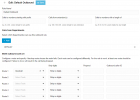
This is the rule we create:
1724228525205.png
 
Of course,

We create a catch-all rule at the bottom of "Outbound Rules" in case no specific Outbound ID is needed or a user has a DDI. This catch-all rule has no "Outbound caller ID" set. When users try to call, they get the error message that no outbound route can be found. However, the same setup on Update 2 works fine.

This is the rule we create:
View attachment 43326
Just deleted the restriction to the department and it should work.
 
Just deleted the restriction to the department and it should work.
This does not work either. Even on V20 Update 2, we have to select a department; not having a department selected has the same outcome.

And the user trying is within the Default department.
 
Than you did something wrong.. we have no restrictions on any rule and it is working on every v20.
 
  • Like
Reactions: Evolute IT
Than you did something wrong.. we have no restrictions on any rule and it is working on every v20.
It wouldn't be because I haven't set a "Default Outbound caller ID" on the Trunk Options, would it?

**Edit:
Nope not that either.
 
Me neather, it should take the main trunk number. Maybe post some logs so wie can see why it didnt take the outbound rule.
 
Please see log below. It just cant find the route.

Code:
21/08/2024 09:48:22.449    C:327 % TargetFailed EndCall:EndCall{0bac657db58f}, fail code TargetNotFound
21/08/2024 09:48:22.449    L:327.1[Extn:100{88bfee5e72ea}] Dialed number '07xxxxxxxxx' has no route!
21/08/2024 09:48:22.449    Found 1 contacts for EndCall
21/08/2024 09:48:22.449    C:327Failed to build target endpoint to Unk?.07xxxxxxxxx for L:327.1[Extn:100{88bfee5e72ea}]
21/08/2024 09:48:22.449    [Flow] Target endpoint for 07xxxxxxxxx can not be built!
21/08/2024 09:48:22.449    Rule Default Outbound: mask=; exts=; prior=11; numlen=; type=0; from: 100
21/08/2024 09:48:22.449    Caller '100' does not belong to any of allowed groups: [36]
21/08/2024 09:48:22.449    Rule 8: mask=; exts=; prior=10; numlen=; type=0; from: 100
21/08/2024 09:48:22.449    Caller '100' does not belong to any of allowed groups: [35]
21/08/2024 09:48:22.449    Rule 7: mask=; exts=; prior=9; numlen=; type=0; from: 100
21/08/2024 09:48:22.449    Rule 6 Outbound: mask=9*; exts=; prior=8; numlen=; type=0; from: 100
21/08/2024 09:48:22.449    Rule 5 Outbound: mask=5*; exts=; prior=7; numlen=; type=0; from: 100
21/08/2024 09:48:22.449    Rule 4 Outbound: mask=4*; exts=; prior=5; numlen=; type=0; from: 100
21/08/2024 09:48:22.449    Rule 3 Outbound: mask=3*; exts=; prior=4; numlen=; type=0; from: 100
21/08/2024 09:48:22.449    Rule 2 Outbound: mask=2*; exts=; prior=3; numlen=; type=0; from: 100
21/08/2024 09:48:22.449    Rule 1 Outbound: mask=1*; exts=; prior=2; numlen=; type=0; from: 100
21/08/2024 09:48:22.449    Looking for outbound rule: dialed = [07xxxxxxxxx], processed: [07xxxxxxxxx]; from-ext: 100
21/08/2024 09:48:22.449    [Flow] Building target endpoint to 07xxxxxxxxx from "IT Support" <sip:[email protected]:0> on behalf of 100
21/08/2024 09:48:22.449    L:327.1[Extn:100{88bfee5e72ea}] from extn 100 (Extn:100)
21/08/2024 09:48:22.449    L:327.1[Extn:100{88bfee5e72ea}] build target endpoint to Unk?.07xxxxxxxxx from Extn:100{88bfee5e72ea} using source "IT Support"<sip:[email protected]>;tag=515e544a
21/08/2024 09:48:22.449    C:327 + Call started +
21/08/2024 09:48:22.449    L:327.1[Extn:100{88bfee5e72ea}]: CONNECTION ID updated: 0 => 692
 
You restricted the rule to the default department and the extension 100 isnt in there, thats why it is not working.

Caller '100' does not belong to any of allowed groups:
 
  • Like
Reactions: Evolute IT
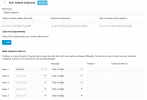
There are no restrictions set:

1724230806166.png
 
In which department is the extension 100? Did saved the rule after changing this option?
 
In which department is the extension 100? Did saved the rule after changing this option?
Ext 100 is in DEFAULT, and yes, no PICNIC here :)
 
Are there any other outbound rules or just this one? Did reboot the services or pbx? Maybe something hangs somewhere. It clearly states the extension doesnt belong to the allowed group from rule default outgoing.
 
Are there any other outbound rules or just this one? Did reboot the services or pbx? Maybe something hangs somewhere. It clearly states the extension doesnt belong to the allowed group from rule default outgoing.
As per the logs, there are other rules, but I haven't tried restarting. Let me delete the rule and recreate it as well.

**Edit:
Deleting the rule and recreating did not work either. I truly believe this to be a bug and not a configuration issue.
 
Is this rule on top? Are the extension in any other departments? Try to restart the services or the pbx. We have a lot of pbx on v20 and no problem at all like this.
 
Usually this can happen when

1. Either the user is not in group DEFAULT

2. or there is a rule above the one you mentioned where the user matches, and the there is no route defined (so the message is played)
 
Is this rule on top? Are the extension in any other departments? Try to restart the services or the pbx. We have a lot of pbx on v20 and no problem at all like this.
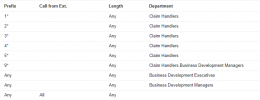
The rule is at the bottom as a catch-all rule. As stated, this worked on Update 2 but now only stops on Update 3 Alpha.
 
These are all of our rules. Ext 100 is in Default only and there are no rules applying to the Default department::

1724231728149.png
 
Status
Not open for further replies.

Forum statistics

Threads
111,970
Messages
590,058
Members
164,885
Latest member
webcom2000