V20 upgrade result

Status
Not open for further replies.

anthony.labrador

Premier Customer
Joined
Dec 18, 2023
Messages
18
Reaction score
6
Hello Community,

I'd like to ask, after the upgrade to v20. I observed that dashboard from previous version is not displayed same to the v20 new dashboard.

Previous version of Dashboard.
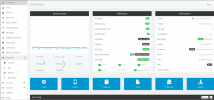
1704817845327.png

Sorry for posting the example Management console dashboard where I get this to google image search since I can't post our dashboard environment here.

Management consolde dashboard is different from the v20 dashboard.
I need to know. In the v20 is it was replaced?


Thank you community.
 
Yes, v20 merges the admin console into the Webclient. Login on the Webclient (no need for /webclient anymore either) using a System Owner (required for the upgrade) and you'll see the Admin section bottom-left.
 
Hello @ConceptsWeb,

Thanks for this info, and how about the graph? like the image shown I posted?
Do you mean the graph from the Management Console is not available in the v20?

Thanks
 
tbf did you ever really look at that? it must have been using some resources duplicating what the OS can do.

Only thing I miss from the front page is the "number of calls in use" view. Was good for testing.
 
  • Like
Reactions: Evolute IT
It is not.
Hi, still confused and still looking for the dashboard where in I can see the graph percentage like CPU Usage, Memory usage, etc..
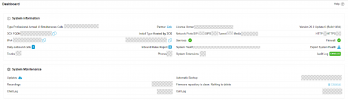
Here is mine after Upgrade to v20, I need help if this is the new look of v20 upgrade?
1704819630972.png
 
That is gone.

I think theres a few hyperlinks in system health you can get text based info. apart from that, i guess thats the OS's job now.
 
Hi, still confused and still looking for the dashboard where in I can see the graph percentage like CPU Usage, Memory usage, etc..
Here is mine after Upgrade to v20, I need help if this is the new look of v20 upgrade?
View attachment 39063
There are not graph anymore. They may add them in a future update (v20 is still beta/RC.)

However, you can view most information via the System Health links in the right column.
 
  • Like
Reactions: anthony.labrador
That is gone.

I think theres a few hyperlinks in system health you can get text based info. apart from that, i guess thats the OS's job now.
Yes, I already saw it the text based like a report.

So I confirmed from the community that the dashboard system health status graph like cpu, memory utilization is gone in v20 and I'm on the right track executing the upgrade.

Thanks, big help!
 
  • Like
Reactions: Evolute IT
tbf did you ever really look at that? it must have been using some resources duplicating what the OS can do.

Only thing I miss from the front page is the "number of calls in use" view. Was good for testing.
Agree on the "Number of calls in use" items now missing. Not really a fan of this new integrated admin page because I have always separated myself from my administration account so now I need to be logged into two different accounts or make my personal extension an administrator too.
 
  • Like
Reactions: anthony.labrador
If you click on Services, you can get a quick glance on the total CPU/RAM usage in V20.
 
Status
Not open for further replies.

Forum statistics

Threads
111,973
Messages
590,078
Members
164,896
Latest member
sameage