Version 18 Update 6 Simplified. Modernized.

N_G

Founder
Joined
Jun 6, 2006
Messages
4,857
Reaction score
9,290
The final release for Version 18 Update 6 is now live. By introducing SBC-capable IP Phones, new group features, and seven user roles in rights management, we’ve worked hard to simplify your setup, and modernize your configuration. The result? A 3CX fit for the next generation. Let’s take a look at what we’ve achieved, as well as what’s nex...
Continue reading the Original Blog Post.
 
How can i disable show presence to group members for the new system owner extension?
Tried to make a new group with show presence disabled and put the system owner extension in that group. But cannot remove the system owner from the default group.

Do i have to make a new group called users or something and put all the users in that group and then remove them from the default group so that only the system owner extension is in the default group?

Just want to disable the check box "show presense to group members" for the system owner....
 
Last edited:
  • Like
Reactions: mb042
How can i disable show presence to group members for the new system owner extension?
Tried to make a new group with show presence disabled and put the system owner extension in that group. But cannot remove the system owner from the default group.

Do i have to make a new group called users or something and put all the users in that group and then remove them from the default group so that only the system owner extension is in the default group?

Just want to disable the check box "show presense to group members" for the system owner....

I have the same question
 
Any specific date that service on the old SMS proxy will stop? I know converting them should have already been done but I've got a couple left I've been putting off.
 
  • Like
Reactions: N_G
This update is a monster... With everything included, this could have been a Version Update. Thank you to the team at 3CX for their dedication and commitment to this product. Groups with Hours and Permissions are a Game Changer for us. On-Board SBCs (Router Phones) are the icing on the cake. Thanks again!
 
V6 is not just a feature update, but a strengthening of the architectural vision for the product. The relocation of administrative controls and richness of group attributes make this a very attractive enterprise PBX. The embedded SBC is incredibly timely in a world where Raspberry PI's are being sold like collector's items. Getting Yealink & Fanvil to participate with the embedded SBC was Big Think at its best. Excellent product stewardship and excellent industry leadership. We're very proud to be a 3CX Partner Thank you for a great start to 2023.
 
How do you add a Remote "Router Phone" to an Extension that already has a Local Desk Phone?
I understand the process if No Phone has been configured.
 
How do you add a Remote "Router Phone" to an Extension that already has a Local Desk Phone?
I understand the process if No Phone has been configured.
As far as I know, you have to delete the existing phone, add the router phone via the web client, and then add the original phone back in via the management console.
 
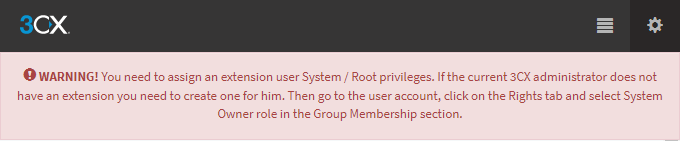
I noticed on the update, it has a a message about assign your system owner now and a screenshot:

Important! Assign your System Owner Now​

Warning to assign your system owner


  • At least one user must be assigned the role of System Owner
  • An extension must also be assigned or created for the user System Administrator / Owner
We're running 18.0 Update 5(Build 418) and have automatic updates on, I'd imagine we will be pushed to 19.0.6.908 automatically. But even if we don't, I am not seeing any way to do this in our current build, through the web console or the webclient/desktop client. We only see User/Manager/Receptionist roles.
Is this maybe a popup/message that will come up on first login after the update? Sorry if I missed some article somewhere, but didn't see any reference or anything.
 
  • Like
Reactions: Hertek
I noticed on the update, it has a a message about assign your system owner now and a screenshot:

Important! Assign your System Owner Now​

Warning to assign your system owner


  • At least one user must be assigned the role of System Owner
  • An extension must also be assigned or created for the user System Administrator / Owner
We're running 18.0 Update 5(Build 418) and have automatic updates on, I'd imagine we will be pushed to 19.0.6.908 automatically. But even if we don't, I am not seeing any way to do this in our current build, through the web console or the webclient/desktop client. We only see User/Manager/Receptionist roles.
Is this maybe a popup/message that will come up on first login after the update? Sorry if I missed some article somewhere, but didn't see any reference or anything.
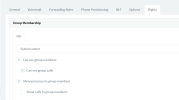
on the original management console, logged in as the system admin you setup during install, you have to select system owner on an extension (or set one up)

1675368608667.png

then the message goes away.
i do wish though that 3cx would allow us to uncheck the "show presence to group members" as that would be handy for a sys admin (no phone) extension.
 
@network

You should be able to achieve this by putting your system owners in their own group. :)
 
  • Like
Reactions: Colorado VoIP
on the original management console, logged in as the system admin you setup during install, you have to select system owner on an extension (or set one up)

View attachment 33937

then the message goes away.
i do wish though that 3cx would allow us to uncheck the "show presence to group members" as that would be handy for a sys admin (no phone) extension.
This does not exist in Update 5, logged in as the admin account, the only Roles are User, Manager and Receptionist. Update 6 has this, but I'm trying to make sure if there is something that needs to be done before hand, or we push to Update 6 and then we just make the system owner extension after the fact
 
This does not exist in Update 5, logged in as the admin account, the only Roles are User, Manager and Receptionist. Update 6 has this, but I'm trying to make sure if there is something that needs to be done before hand, or we push to Update 6 and then we just make the system owner extension after the fact
correct, you have to update to SP6 first.
 
  • Like
Reactions: ChrisC_3CX
@network

You should be able to achieve this by putting your system owners in their own group. :)
yeah we're going to do that for customers as we deploy later in the month. the extension won't show up after a few minutes of being logged out anyway. but if you log in to change something, you go green for everyone.
 
Last edited:
@SethB
Nothing you need to do before hand, as @network51 said, just apply the update and then with your main admin account, log in to the Management Console and create your System Owner extension. No need to do it straight away either but as long as you don't have one that message will be there so keep that in mind.
 
  • Like
Reactions: N_G
For some reason when I open the "other Ideas" section of the forums it says I have insufficient privileges to post there.

SOOO I'll post it here:

I'd like to see an option to block connections by device type; for instance, if we only use polycom phones, I'd like to block YeaLink phones from attempting connections. This could further help with the antihacking.
 
A great new update, the upgraded groups are going to be very useful for larger organisations with delegation etc. Looking forward to more phones getting inbuild SBC support, we provide mainly T4xU phones.

At the moment, I can only seem to send calls to groups from inbound rules and I'd very much like to send calls to groups from digital receptionists and also user forwarding rules. For example, press 1 for sales will go to the sales group, 2 for the support group etc.
Another thing that would be nice is the ability to transfer an active call to a group, say if someone called the wrong department or branch you can just transfer the caller to the correct one and it can then follow that groups office hours and routing etc.

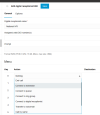
Send to Group not in IVR:
1675379175812.png
 

Attachments

  • 1675378890343.png
    1675378890343.png
    27 KB · Views: 2
  • Like
Reactions: MarkNAS
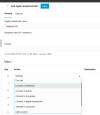
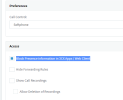
If I choose "Block Presence information in 3CX Apps / Web Client" in 3cx app phone provisioning tab. The user cannot login to the webclient interface.

Was trying to make admin account as stealth as possible to other users when I came across this.

2023-02-02 16_17_02-3CX Phone System Management Console.png

Webclient login gives no error, it just refreshes back to the same login prompt
Remove the "block presence" checkbox and they can immediately login. If already logged in it will quickly kick you back to the login prompt if you add this checkbox and save.
Nothing shows in event log when I login and get kicked back.
 
  • Like
Reactions: Christian_B
If I choose "Block Presence information in 3CX Apps / Web Client" in 3cx app phone provisioning tab. The user cannot login to the webclient interface.

Was trying to make admin account as stealth as possible to other users when I came across this.

View attachment 33942

Webclient login gives no error, it just refreshes back to the same login prompt
Remove the "block presence" checkbox and they can immediately login. If already logged in it will quickly kick you back to the login prompt if you add this checkbox and save.
Nothing shows in event log when I login and get kicked back.
This has always been the case, at least since v16 days.
 

Forum statistics

Threads
111,973
Messages
590,078
Members
164,896
Latest member
sameage