Version 18 Update 6 Simplified. Modernized.

Thanks for the awesome update and the hard work by the 3CX team!

We did notice that when a new user is created, the "Send email notification on missed call" option is enabled by default. That is a change from previous versions, but I did not find anything in the blog posts, or the change log about that change. Did I miss an announcement about that somewhere?

Thanks!!!
 
  • Like
Reactions: cross@roads and N_G
Sad to see that extentions like 000 can't be created anymore on new installs. This was kind of easy for system owner/admin users.
Especially in hotel environments where 100 (and up) extensions are used often.
 
If I choose "Block Presence information in 3CX Apps / Web Client" in 3cx app phone provisioning tab. The user cannot login to the webclient interface.

Interesting. If it's not a bug, it's at least a very misleading phrasing. I don't find anything about this if I click on the Help button in this section.

The similar phrased option "Hide this extension from 3CX company phonebook and 3CX Apps" doesn't have this effect and is probably sufficient.
 
Hello,

What happens to the extensions with number 0xxx? We won't be able to create more?
 
Hello,

What happens to the extensions with number 0xxx? We won't be able to create more?
Hi,

The first extension must start from 1xx, or 1xxx etc. starting from Update 6 onwards.

Pre-existing 0xxx extensions coming from older systems will still work.
 
  • Like
Reactions: mcsphones and lmb
Interesting. If it's not a bug, it's at least a very misleading phrasing. I don't find anything about this if I click on the Help button in this section.

The similar phrased option "Hide this extension from 3CX company phonebook and 3CX Apps" doesn't have this effect and is probably sufficient.
Hi Christian,

Just fyi presence is what our webclient and desktop apps rely on to be able to talk to the system. If you disable this they will not be able to work.
 
Last edited:
Hello all,

I would have posted this where it should go, but the forums are mostly blocked to me. I think that there is a step missing in the Facebook tutorial.

https://www.3cx.com/docs/manual/facebook/

I think that there should be a repeat of step 6 in the Application review section for setting up Facebook integration between step 17 and 18.

Step 6. Now search for ‘Business Asset User Profile Access’ and again click on “Request advanced access”. Click on the button that has now changed to “Edit App review request”.

Step 17. Check the confirmation box and click “Save”.

Need to do step 6 again here.

Step 18. Now click the blue arrow in the section entitled ‘How will your app use the advanced access Business asset user profile access feature?’.

Maybe this will save someone else the trouble of trying to figure out why there is no option to click the blue arrow.
 
Last edited:
I have a concern that I believe is update 6 related, apologies if it was like it before but either way I think it needs addressing. I fairly quickly entered the wrong password but a password I use for other things, it is now displayed in plain text for anyone else to see in the event log in the admin console. Luckily I'm the only one with access to the admin console but in larger environments this won't be the case. I would have thought passwords should never be displayed in clear text whether they are legitimate attempts or not and should be either partially or fully starred out. Finally are they stored in a DB in plain text where in a Windows environment someone may have access to the file system and if you are part of the 3CX Global Blacklist is this info being sent to 3CX?
 
re: "Block Presence information in 3CX Apps / Web Client" in 3cx app phone provisioning tab.
https://www.3cx.com/community/threads/version-18-update-6-simplified-modernized.118910/post-552483
If I choose "Block Presence information in 3CX Apps / Web Client" in 3cx app phone provisioning tab. The user cannot login to the webclient interface.


This has always been the case, at least since v16 days.
Ok, thanks for noting that it's not exactly new.

Interesting. If it's not a bug, it's at least a very misleading phrasing. I don't find anything about this if I click on the Help button in this section.

The similar phrased option "Hide this extension from 3CX company phonebook and 3CX Apps" doesn't have this effect and is probably sufficient.
Yes, the documentation / UI likely needs an update to more accurately reflect this. If required for webinterface it likely should not be allowed to be toggled on system owner level extension if it has potential to lock the admin out of the system.

Hi Christian,

Just fyi presence is what our webclient and desktop apps rely on to be able to talk to the system. If you disable this they will not be able to work.

The technical reason might make sense to the developers of the software. To the average outside user though it should be made more clear. And as mentioned if it can lead to an admin locking themselves out of the system in some way it likely should not be something that should be allowed going forward.
 
@RichB I agree with you. We will address this...
@QueBall Yes the option name needs to be changed I agree...
 
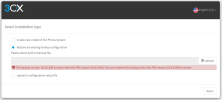
I try to Restore an existing backup configuration. and upload Backup file. it show
"The backup version 18.0.6.908 is newer than the PBX version 18.0.4.965. You can restore this backup only with PBX version 18.0.6.908 or newer."
How do i recovery or solve it?
 

Attachments

  • Screenshot_20230206_104135.png
    Screenshot_20230206_104135.png
    30.8 KB · Views: 14
Try updating 3CX first.
 
I try to Restore an existing backup configuration. and upload Backup file. it show
"The backup version 18.0.6.908 is newer than the PBX version 18.0.4.965. You can restore this backup only with PBX version 18.0.6.908 or newer."
How do i recovery or solve it?
It looks like you are trying to restore a newer backup to an older installation which is not supported. Older backups work on newer installations but not the other way around.
You should upgrade your 3CX to version 18.0.6.908 and restore your backup there.
 
I have a concern that I believe is update 6 related, apologies if it was like it before but either way I think it needs addressing. I fairly quickly entered the wrong password but a password I use for other things, it is now displayed in plain text for anyone else to see in the event log in the admin console. Luckily I'm the only one with access to the admin console but in larger environments this won't be the case. I would have thought passwords should never be displayed in clear text whether they are legitimate attempts or not and should be either partially or fully starred out. Finally are they stored in a DB in plain text where in a Windows environment someone may have access to the file system and if you are part of the 3CX Global Blacklist is this info being sent to 3CX?

It also should be hidden here, encrypted or removed from the console all together as stated in post below:
https://www.3cx.com/community/threads/update-6-beta-available-now.118217/post-549054
 
This update is a monster... With everything included, this could have been a Version Update. Thank you to the team at 3CX for their dedication and commitment to this product. Groups with Hours and Permissions are a Game Changer for us. On-Board SBCs (Router Phones) are the icing on the cake. Thanks again!
Thank you too Brian for taking the time to provide your great feedback. I'll pass this on to the team.
 
V6 is not just a feature update, but a strengthening of the architectural vision for the product. The relocation of administrative controls and richness of group attributes make this a very attractive enterprise PBX. The embedded SBC is incredibly timely in a world where Raspberry PI's are being sold like collector's items. Getting Yealink & Fanvil to participate with the embedded SBC was Big Think at its best. Excellent product stewardship and excellent industry leadership. We're very proud to be a 3CX Partner Thank you for a great start to 2023.
Thanks so much for your detailed feedback. I've passed it back to the team.
 
  • Like
Reactions: quadrant
I may be blind but I can't find the option to change my password anymor after update 6.
Im pretty sure it was under Settings -> General in update 5 or older.
Has anyone found out where it moved to?
 
I may be blind but I can't find the option to change my password anymor after update 6.
Im pretty sure it was under Settings -> General in update 5 or older.
It was. I believe I read in another thread that was removed. In the Admin section of the 18u6 web client one can edit a user and there is a Reset Password button, though not Change Password. Or set one in the management portal.
 
Last edited:
I may be blind but I can't find the option to change my password anymor after update 6.
Im pretty sure it was under Settings -> General in update 5 or older.
Has anyone found out where it moved to?
For the management console? In security -> root credentials
#/app/settings/security/2/credentials
 

Forum statistics

Threads
111,973
Messages
590,079
Members
164,896
Latest member
sameage