- Joined
- Nov 17, 2020
- Messages
- 9
- Reaction score
- 2
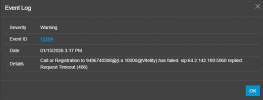
We're using Vitelity for some of our SIP trunks via IP auth. They have been having some issues with some of their trunks over the past couple of days. They've provided us with new inbound and outbound IPs for calling. In our existing Vitelity trunk, I only have an option to edit the primary registrar IP - nowhere is there an Outbound Proxy available to modify. I've edited the registrar server to the new IP, but our outbound calls are still trying to route out via the original outbound IP. How can I update the outbound proxy IP to the newly provided one? Right now, Vitelity is responding with a 408 timeout on outbound, and calls are routing out through our secondary trunk instead. Thanks in advance for the help!