Vitelity trunk issues?

whill

Bronze Partner
Advanced Certified
Joined
Nov 17, 2020
Messages
9
Reaction score
2
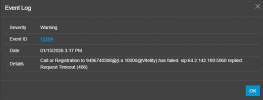
We're using Vitelity for some of our SIP trunks via IP auth. They have been having some issues with some of their trunks over the past couple of days. They've provided us with new inbound and outbound IPs for calling. In our existing Vitelity trunk, I only have an option to edit the primary registrar IP - nowhere is there an Outbound Proxy available to modify. I've edited the registrar server to the new IP, but our outbound calls are still trying to route out via the original outbound IP. How can I update the outbound proxy IP to the newly provided one? Right now, Vitelity is responding with a 408 timeout on outbound, and calls are routing out through our secondary trunk instead. Thanks in advance for the help!
 

Attachments

  • Screenshot 2026-01-15 151953.png
    Screenshot 2026-01-15 151953.png
    15.2 KB · Views: 5
Regarding your question, there are no outbound proxy settings in the trunk settings within the admin. This was the case prior to update v18, when the outbound proxy was available.

The best course of action is to delete the trunks and recreate with the default template in v20
 
Any other options available? That's going to be quite the undertaking with the number of DIDs we have. Any way to edit something in the backend to just change the outbound proxy IP? Makes sense that the OB proxy was available previously, since we've been using 3CX since at least v18, maybe longer.
 
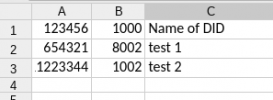
If your concern is the number of DIDs you have configured, please note that you can easily export your DIDs (Reports > System > Inbound Rules) before re-adding the provider. Simply create a CSV file with three columns (DID, Destination, Name of the DID), so the file should look like this

1768510658438.png

After re-adding the provider, you can import this CSV file, and all of your DIDs will be added back and automatically assigned.
 
I ended up rebuilding the provider as "Generic", and calls are routing correctly. However, I've noticed an issue: we have some extensions/DIDs that instantly forward out to a 3rd party call center we pay to handle some of our inbound support calls. Before rebuilding our Vitelity trunk, those calls used to forward the originating party's caller ID information. Since rebuilding, those same DIDs appear to be sending the CID info from the 3CX extension forwarding the call. I've already tried setting my "Caller ID Control" settings on the Vitelity trunk to "OriginatorCallerID", but that didn't change anything. I have a ticket open with Vitelity about this issue too, but I was hoping someone here might have some insight as to what might be causing this issue. Thanks!
 
I would suggest using the actual default supported template and not a generic template for a supported SIP trunk provider.
 
The actual default supported template did not allow me to change the outbound proxy, which is a requirement for our Vitelity setup. They explicitly provided a separate outbound trunk IP. I can't adjust that on the Vitelity template. Which was my entire initial problem.
 

Latest Posts

Members Online Now

Forum statistics

Threads
111,831
Messages
589,276
Members
164,660
Latest member
RJenkinsROCK