Alphabetic 3CX MVP Silver Partner Advanced Certified Joined Jul 1, 2016 Messages 6,533 Reaction score 2,558 Mar 18, 2022 #1 Hi all, Ive got a Yealink T54W running supported template and FW as of todays date. I've enabled VLAN from 3CX but it has not updated on the phone - am i doing something wrong? I have factory reset the phone and rebooted to no avail.
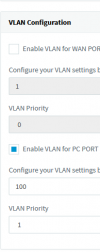
Hi all, Ive got a Yealink T54W running supported template and FW as of todays date. I've enabled VLAN from 3CX but it has not updated on the phone - am i doing something wrong? I have factory reset the phone and rebooted to no avail.
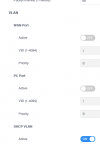
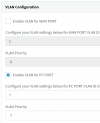
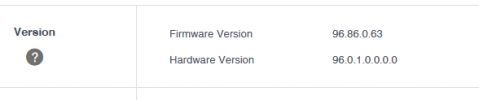
JohnS_3CX Support Team Staff member 3CX Support Joined Jan 4, 2019 Messages 14,523 Reaction score 3,694 Mar 18, 2022 #2 Hi @kieferschild I tried one now on V18 Update 3 + FW 96.86.0.63 and latest available official templates and then hit reprovision: Confirm the setting was saved under the extension? Are there two T54W phone entries on the extension perhaps?
Hi @kieferschild I tried one now on V18 Update 3 + FW 96.86.0.63 and latest available official templates and then hit reprovision: Confirm the setting was saved under the extension? Are there two T54W phone entries on the extension perhaps?
Alphabetic 3CX MVP Silver Partner Advanced Certified Joined Jul 1, 2016 Messages 6,533 Reaction score 2,558 Mar 18, 2022 #3 Yes under ext settings. No, just one phone. I tried 7 and 7 to no avail. Phone is on an SBC. 18.0 U3 B450
Yes under ext settings. No, just one phone. I tried 7 and 7 to no avail. Phone is on an SBC. 18.0 U3 B450
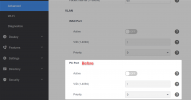
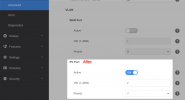
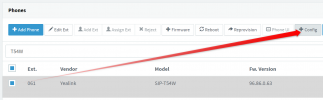
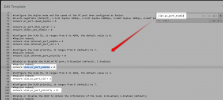
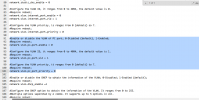
JohnS_3CX Support Team Staff member 3CX Support Joined Jan 4, 2019 Messages 14,523 Reaction score 3,694 Mar 18, 2022 #4 Check what 3CX is sending to ensure it is contained in the config according to what you selected in the extension settings: 1. Select phone and press +CONFIG 2. Click inside the test window and Ctrl+F for vlan.pc_port_enable
Check what 3CX is sending to ensure it is contained in the config according to what you selected in the extension settings: 1. Select phone and press +CONFIG 2. Click inside the test window and Ctrl+F for vlan.pc_port_enable
Alphabetic 3CX MVP Silver Partner Advanced Certified Joined Jul 1, 2016 Messages 6,533 Reaction score 2,558 Mar 18, 2022 #5
Alphabetic 3CX MVP Silver Partner Advanced Certified Joined Jul 1, 2016 Messages 6,533 Reaction score 2,558 Mar 18, 2022 #6 Ah F sake.. I just realised I've got 2 phones provisioned to my ext, didnt realise I was provisioning the wrong one.
Ah F sake.. I just realised I've got 2 phones provisioned to my ext, didnt realise I was provisioning the wrong one.
Alphabetic 3CX MVP Silver Partner Advanced Certified Joined Jul 1, 2016 Messages 6,533 Reaction score 2,558 Mar 18, 2022 #7 Its working now Reactions: JohnS_3CX
JohnS_3CX Support Team Staff member 3CX Support Joined Jan 4, 2019 Messages 14,523 Reaction score 3,694 Mar 18, 2022 #8 You probably missed the bottom line on my first reply https://www.3cx.com/community/threads/vlan-on-pc-port.112931/post-521777
You probably missed the bottom line on my first reply https://www.3cx.com/community/threads/vlan-on-pc-port.112931/post-521777
Alphabetic 3CX MVP Silver Partner Advanced Certified Joined Jul 1, 2016 Messages 6,533 Reaction score 2,558 Mar 18, 2022 #9 No i did see it, there is only one T54W phone but once upon a time I must have set up a T42S to test and never removed it from my ext.
No i did see it, there is only one T54W phone but once upon a time I must have set up a T42S to test and never removed it from my ext.
JohnS_3CX Support Team Staff member 3CX Support Joined Jan 4, 2019 Messages 14,523 Reaction score 3,694 Mar 18, 2022 #10 No worries, glad its all sorted!