Solved Voicemail transcription stopped working

Status
Not open for further replies.

SethTalley

Customer
Basic Certified
Joined
Oct 5, 2019
Messages
83
Reaction score
12
This might be partially my fault - I let my credit card to Google lapse because we were no longer hosting 3CX on Google. Silly me, we're still using that account for our speech-to-text. So I changed the credit card, Google billed me 44 cents and we're back up and running.

However, we're no longer getting voicemail transcription.

I had previously secured the API access by IP, whitelisting our hosted instance's IP address. That IP address changed at some point. I:

- Changed the whitelisted IP address to match our server instance. Did not fix the problem.

- Opened the API to any IP address. Did not fix the problem.

- Deleted the API key and generated another. Did not fix the problem.

- Restarted all 3CX services. Did not fix the problem.

What shall I check next? What shall I post? What log files would be useful? I see nothing in the console or activity log and we know we had a voicemail go untranscribed in the timeframe I'm looking at.
 
@SethTalley did you whitelist IPv6 of the pbx ?
You can see this in your portal for this particular key or your management console at the dashboard.
 
Last edited:
  • Like
Reactions: NickD_3CX
1649790793694.png

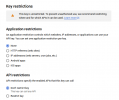
The key is currently unrestricted. Should I restrict it to the IPv4 and IPv6 addresses of the server?
 
@SethTalley its the bese practice to restrict it to your IPv4 and also IPv6.
Now the best thing is to setup the PBX in Verbose, restart the services leave a vmail to an extension and check the Management Console and System Service log and search for exceptions.
 
  • Like
Reactions: Evolute IT
Well that was exciting.

1) Switched to Verbose and restarted. Ran a voicemail. got a PCAP and a few logs that didn't say much. System worked as abnormal (no transcription).

2) Switched to Minimal and restarted. Looked over my logs and saw nothing useful, nor anything that seemed to indicate I was calling Google. System worked as abnormal (no transcription).

3) Switched to Verbose and restarted. Ran a voicemail. Got more logs that don't seem to say much. System worked as abnormal (no transcription).

4) Switched to Minimal and restarted. No system extensions came back up. 3CX restarted in non-functional status.

5) Restarted again. System came back up as abnormal (whew!)

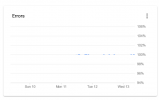
6) Logged into Google. Google reports API is running at 100% error rate since rebuilding the key:

1649864823827.png

7) Restricted API key to IPv4 and IPv6 addresses copied from the dashboard. Tested a call. 3CX cut me off after 10 seconds and asked me to press "0" to save my message.

8) Unrestricted API key. Tested a call. System worked as abnromal (no transcription).

I'll run logs again? But not until after close of business, 'cuz that whole "your phone system is dead BTW" interlude is not something I want to mess with. What, in particular am I looking for?

Also, I think it's noteworthy that the IPv4 address I whitelisted six months ago is not the one that my 3CX console is reporting now. I also think it's noteworthy that when I attempt to whitelist what 3CX is now reporting, my voicemail breaks entirely.
 
Last edited by a moderator:
I'm assuming this might be due to a recent update, as ours has recently fallen over also. We continue to watch this thread for updates, however. Cheers!
 
  • Like
Reactions: SethTalley
OK, let's back-track a bit. Let's take the guide from the top, so please go through the steps and make sure everything is set:
https://www.3cx.com/docs/voicemail-transcription/

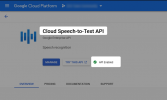
Is the Speech-to-Text API enabled?
1650010440321.png

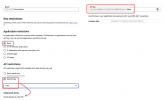
Then go to the Credentials, select the key you have created and temporarily, set the "Application Restriction" to "None" and set the API Restriction to the "Cloud Speech-to-Text API".
1650009986721.png

Also of course double-check that the API key in your 3CX settings is correct.

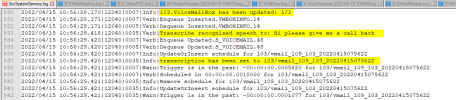
Now for the logs, you will find entries mainly in the "3cxSystemService.log" file, but also a few at the same time stamp in the "3CXConfService.XXXX-XX-XX.XXXXXX.log" file, but it should look something like this if it works:
1650010394908.png
 
I'm 99% certain it's Google nonsense.

1) Our Google-hosted 3CX instance refused to update from V16 without a reboot. I rebooted it, which is when I discovered that Google Cloud Platform will guarantee you the resources to run your instance, but not the resources to restart your instance. Thus did our Google-hosted 3CX instance die forever, in the middle of the day, with no way to restart it short of completely rebuilding it on an entirely new billing account.

2) I attempted to restart it on an entirely new billing account while simultaneously moving it to 3CX Hosted and rebuilding. 3CX hosted came up first, no surprise, and I migrated the system to 3CX hosted.

3) I rebuilt the speech-to-text API under the new billing account.

======= 2 years pass, we move banks, credit card expires =======

4) Google let me know that the credit card for my first billing account had lapsed. I was not using it for anything, so I did not care. Google did *NOT* let me know that the credit card for my second billing account had lapsed.

5) Transcription stopped working so I assumed I was, in fact, using that account. I paid them their $1.47. Transcription still doesn't work.

6) FIVE DAYS LATER Google let me know about the second billing account. I updated the card and paid them their forty two cents. After 90 minutes on chat, they have now determined that this issue may be resolved in "no more than less than 32 hours" in their colorful language:

022/04/13 08:14:22.162|18290|0033|Verb|SPEECH /var/lib/3cxpbx/Instance1/Data/Ivr/Voicemail/Extensions/401/vmail_xxxxxxxxxx_401_20220413151411.wav: Forbidden (This API method requires billing to be enabled. Please enable billing on project #4xxxxxxxxxxx by visiting https://console.developers.google.com/billing/enable?project=4xxxxxxxxx then retry. If you enabled billing for this project recently, wait a few minutes for the action to propagate to our systems and retry.)​
I'm not sure why changing out the API key didn't fix it, but it didn't. At this point it looks like I'm checking back in on Sunday to see if the problem has corrected itself. The system didn't come back up from Verbose mode 100% of the time the last time I restarted so I need to dig in outside of business hours anyway.
 
Forbidden (This API method requires billing to be enabled. Please enable billing on project #4xxxxxxxxxxx by visiting https://console.developers.google.com/billing/enable?project=4xxxxxxxxx then retry. If you enabled billing for this project recently, wait a few minutes for the action to propagate to our systems and retry.)
Well, the good news at this point is that we know where the error is coming from, so no more searching...

The system didn't come back up from Verbose mode 100% of the time the last time I restarted so I need to dig in outside of business hours anyway.
That is quite strange to be honest, not sure if this happened while on Hosted by 3CX.
Regardless though, now that you are on our Hosted platform I am sure that even in the unlikely event that something like this does happen, I am sure our Hosting Team will be able to help you restore it and get it up and running again.

Tip:
You never have too many backups, so I always recommend taking a backup of your 3CX and downloading to your local PC before starting any troubleshooting, even if you are doing the safest of actions like restarting the server or enabling Verbose logging.
 
  • Like
Reactions: SethTalley
So I've been fighting with Google for four or five days. Nothing has changed on my end but now it appears I'm not even calling for transcription on my side.

08:22:17.837|7fba96bde700|Debug|DBProvPostgress.cpp(1133): UPDATE SUCCEEDED:s_voicemail.771​
update s_voicemail set __name='401/vmail_206xxxxxxx_401_20220420152206',transcription='' where id=771​

08:29:15.762|7fba96bde700|Debug|DBProvPostgress.cpp(1133): UPDATE SUCCEEDED:s_voicemail.772​
update s_voicemail set __name='401/vmail_206xxxxxxx_401_20220420152908',transcription='' where id=772​

Those are the only results from searching "trans" for the whole file. I see no transcription at all.
 
...any thoughts, anyone? 'cuz Google ain't gonna do a thing if they ain't being called, and everything on the 3CX side is set up correctly.

So what do I do to fix this?
 
So just to put a button on this, after a week of Google going "we're still cogitating" they came back last night with "we're going to need another two weeks to investigate." I decided to trash the API and start over since they obviously weren't testing. When I did that, the console informed me that "billing has been disabled, would you like to enable it?" which, uhm, I thought Google spent 2 hours on chat investigating?

Regenerated the key and we're up and running again.

TL;DR: If you have ***ANY*** suspicion that your problems are related to a billing issue, disable the API, then enable the API, or you will not be able to re-enable billing no matter what Google tells you.
 
  • Like
Reactions: NickD_3CX
I am very surprised with this! I would have imagined that the person at Google you were talking to would have checked this as one of the first steps.

Regardless though, I am very happy to hear that you managed to sort things out, and also very much appreciate you sharing this here! :)

I will mark this thread as 'Solved'.
 
  • Like
Reactions: SethTalley
Status
Not open for further replies.

Forum statistics

Threads
111,974
Messages
590,081
Members
164,899
Latest member
mazet