Voipfone Query

Status
Not open for further replies.

Lusk

Forum User
Joined
Apr 8, 2018
Messages
68
Reaction score
1
Hi,

I have installed 3CX on a machine and the trunk is showing as registered with Voipfone. The issue I am having is that when making a call to a Voipfone registered number, the call is not coming through to 3CX but it is coming through the Voipfone system. In other words, Voipfone seems to be grabbing the phone before 3CX gget's to it.


What is the issue here, please?
 
You mean that it is going to a Voipfone voicemail before you can answer? If that is not the case, then you'll need to explain what the "VoIpfone System", is, exactly.
 
Apologies but here in the UK we have a VOIP provider called Voipfone.

Despite 3CX being registered with Voipfone, when an inbound call comes in, this call is directed via Voipfone and not 3CX.
 
If the call is not being sent to 3CX, and you can confirm this in the 3CX Activity Log, then you would have to contact Voipfone to see why this is happening. Perhaps they do not see 3CX as registered, 3CX is rejecting the call (see logs), or, there is some other forwarding option, still in effect, at the provider end, that needs to be disabled.
 
Last edited:
  • Like
Reactions: JohnS_3CX
Thank you and I’ll take a look tomorrow.

It’s like Voipfone is not releasing the connection or not allowing 3CX to take over the connection.
 
Have you got a virtual PBX set up as a service in Voipfone? If so, remove your number from it.
 
Thanks for the reply but how would I know this? - Voipfone is all web based.
 
All VoIP providers are web based, but they don't all provide the same services. Some simply route calls to your, registered device, other behave like a PBX, in that they will route calls to different destinations (sets/trunks), based on criteria, that you have provided them. What services did you subscribe to?
 
You dont want your inbound number in the PBX

1591349503941.png

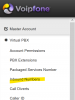
I would click on "Master Account" > "Manage My Services" and see what you've got set up.

If you havent got the PBX set up but calls are still going to VM outside of 3CX then I bet you've used the voipfone mobile app and set the trunk up in there and that's probably whats catching it.

Alternatively, reset your account password and re-enter it in 3CX only.
 
Hi,

If you do not see an invite coming in to 3CX, its almost certain that your provider forwards the call to another destination.
 
You dont want your inbound number in the PBX

View attachment 16391

I would click on "Master Account" > "Manage My Services" and see what you've got set up.

If you havent got the PBX set up but calls are still going to VM outside of 3CX then I bet you've used the voipfone mobile app and set the trunk up in there and that's probably whats catching it.

Alternatively, reset your account password and re-enter it in 3CX only.
Thanks for the reply.

When you say "You dont want your inbound number in the PBX", do you mean on 3CX?

So I've clicked onto the Manage My Services and it shows me the four inbound number, the extensions and then the groups.

When you say reset my account password, what good will that do as surely that will only mean that it will only change the login for the website?
 
An update here:

I have confirmed in 3CX the SIP is showing as connected and having rung the inbound number and checked under the call logs in 3CX, the call from my mobile has is showing up on there. In addition, the phone (which is connected to a Voipfone extension) is also ringing.
 
In addition, the phone (which is connected to a Voipfone extension) is also ringing.

Why have you got it registered in 3CX and on a phone connected to Voipfone?

Register the Voipfone SIP in 3CX and add your phone to 3CX.

Your phone connected to Voipfone must be answering first.
 
So I'm assuming this means you have a PBX (3CX) trunk, registered, as an extension, to another PBX. You might want to begin by removing all of the PBX functions, with Voipfone , if that's possible, or, seek out a 3CX supported provider, and have your numbers ported there.
 
Why have you got it registered in 3CX and on a phone connected to Voipfone?

Register the Voipfone SIP in 3CX and add your phone to 3CX.

Your phone connected to Voipfone must be answering first.
Thanks.

The Voipfone SIP is showing as registered in 3CX and when you ring the number the call logs actually show the call as incoming but for some reason the extension connected to 3CX doesn’t ring. The extension connected to Voipfone still rings and even when you turn this off it seems that Voipfone still registers and deals with the call.
 
So I'm assuming this means you have a PBX (3CX) trunk, registered, as an extension, to another PBX. You might want to begin by removing all of the PBX functions, with Voipfone , if that's possible, or, seek out a 3CX supported provider, and have your numbers ported there.
I think I see what you’re saying but I don’t believe 3CX is as another extension to a PBX.
What is needed is to be able to stop the PBX functionality on Voipfone and ensure that 3CX deals with everything; I’m just not sure how to accomplish this.

In terms of SIP trunks, can you recommend anyone for a small business?
 
Finally worked it out!

It seems that in order to get this to work, you need to add an extension as a trunk.
 
Please clarify, for the next 3CX forum member that encounters the same issue...you had to change settings at the Voipfone end?
 
Please clarify, for the next 3CX forum member that encounters the same issue...you had to change settings at the Voipfone end?
No, all you need to do is to add the extension which you have set up in Voipfone as a trunk which you need to set up in 3CX. So say your account number was 333333 and your extension was 200, you'd add 333333*200 as a generic SIP and then the password is the password for the extension.
 
Kind of assumed, that you had done something similar to begin with. The 333333*200 part is an unusual way of specifying the account/extension as the User., but then it is a provider that seems to be offering a vitrual PBX service, to a phone set, rather than a trunk to another PBX.
 
Status
Not open for further replies.

Forum statistics

Threads
111,953
Messages
589,908
Members
164,845
Latest member
tdzski5