WakeUp IVR and localized Prompts sets

Status
Not open for further replies.

Salva214

Bronze Partner
Basic Certified
Joined
Apr 29, 2022
Messages
3
Reaction score
2
Hi all,

i'm trying to configure an IVR for using it with a PMS but i'm encountering some issues on the prompts sets.
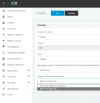
Right now the global language of the PBX is Italian, so when i create the IVR of type "wake up" i can choose between Italian or English prompts sets.
wakeup_prompts-png.30018

I also read ( https://www.3cx.com/docs/installing-hotel-pbx/ and https://www.3cx.com/docs/localize-promptsets/ ) that the prompts of the wakeup alarm IVR are managed separately from the system's prompts sets; I did some tests on that IVR but it always answer me in english language, so i'm a bit confused:

1- is it only possible to alter the wake up prompts editing the files in the opportune folders?
2- on the first link, at the end of the page, is written "3CX Ships these prompts in English Only." but i see two languages (ITA+ENG), but why not others too? is there a way for adding languages to that list?
3- Is there any way to do a multi-language IVR without using custom logics in Call Flow Design?
4- (little OT question) why i can't see italian as available language to update (or even know the installed version) in the System Prompts Settings page?

Thanks everyone in advance!

Some infos:
  • 3CX Version, Standard Annual 18.0 (Build 461)
  • Server OS, Debian 10
  • Is the 3CX Server Hosted and where? On-premises
  • IP Phone Make/Model/Firmware version, 3CX App
  • Provisioning Method: Local
  • Trunk Provider or VoIP Gateway Make/Model, TWT
  • Has the Firewall Checker passed: YES
  • Are custom Phone Templates being used: NO
 

Attachments

  • wakeup_prompts.png
    wakeup_prompts.png
    47 KB · Views: 59
Hi @Salva214,

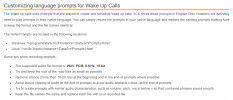
In the guide you posted it mentions:

1651822334454.png


1- is it only possible to alter the wake up prompts editing the files in the opportune folders?
So this is a yes.

2- on the first link, at the end of the page, is written "3CX Ships these prompts in English Only." but i see two languages (ITA+ENG), but why not others too? is there a way for adding languages to that list?
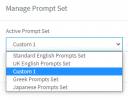
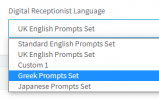
What you are seeing on the list, is a list of prompts you've installed on your PBX from the Management Console >> Settings >> System Prompts

1651822582946.png

1651822560996.png


3- Is there any way to do a multi-language IVR without using custom logics in Call Flow Design?
Why not have a IVR that asks users to pick their language, then forwards them on to the IVR in the language they selected? Each IVR can have it's own language so this shouldn't be a problem.

4- (little OT question) why i can't see italian as available language to update (or even know the installed version) in the System Prompts Settings page?
If you don't see it on the list, it's the latest version - which you can see what the latest version is, by checking the other non-installed languages.

Hope this helps!
 
Hi VasilisV,

first of all, thanks for your reply! I'll quote your answers per point

So this is a yes.
Ok thanks

What you are seeing on the list, is a list of prompts you've installed on your PBX from the Management Console >> Settings >> System Prompts
I know i can create/edit prompts in the settings but those prompts are not containing sentences about the "wake up" IVR, which have a dedicated folder for the WAV files.

Why not have a IVR that asks users to pick their language, then forwards them on to the IVR in the language they selected? Each IVR can have it's own language so this shouldn't be a problem.
Of course, this is a way, but even in this case you are forced to do custom "things"; I mean, you can create only 1 IVR of kind "wake up". So for doing what you say there are 2 ways:
1- using the WebUI but having all prone to error (imho) and fragmented
2- using CFD and custom components for having everything enclosed in an extension (you can thow it away if something doesn't work and the system will still be safe)
If you don't see it on the list, it's the latest version - which you can see what the latest version is, by checking the other non-installed languages.
Ok, thanks

Hope this helps!
Of course! A lot!
Thank you! :)
 
I know i can create/edit prompts in the settings but those prompts are not containing sentences about the "wake up" IVR, which have a dedicated folder for the WAV files.
There actually is no supported method of customizing the Wake-up Call IVR but you can always replace the .wav files with your own, then restart the IVR service and it should work. Bear in mind that, since this is not supported I recommend you take a backup before attempting anything and also creating a separate backup of the whole folder containing the the Wakeup call prompts. The .wav files you replace them with MUST have the exact same name and MUST be in the supported format and the rights must be:
rwxr-xr-x phonesystem phonesystem

The directory for these prompts is the following:
/var/lib/3cxpbx/Instance1/Data/Ivr/Prompts/Hotel

Note: Also bear in mind that as this is not a supported scenario we cannot guarantee normal functionality or that it will seize to work or get overwritten with future updates. Should you submit a Support ticket with 3CX you may be requested to revert this configuration but to the original state until progress on the ticket can take place.
 
Hi ChrisC,
and thanks again for the reply,

I think the "file way" is not profittable: as you were mentioning this not an officially supported scenario and because of that may be difficult to maintaing against future updates of 3cx.

I will follow the way of CFD because i feel it more durable.

Thanks again for the help!
 
Status
Not open for further replies.

Members Online Now

Forum statistics

Threads
111,831
Messages
589,277
Members
164,660
Latest member
RJenkinsROCK