Solved We cannot get the 3CX app on iPhones to ring

Status
Not open for further replies.

GenericAccount

Forum User
Joined
Jun 8, 2018
Messages
29
Reaction score
5
When you call a number or extension running the 3CX app on an iPhone, it WILL NOT ring unless you have the 3CX app open on the screen. If you exit out of it or minimize it, it refuses to ring.

Android devices running the 3CX app ring no problem whether the app is open or not.

We've just updated to the latest version on the server and the iPhone app but still no luck. Any idea what could cause this?
 
Assuming you are not using Windows 2012 because it is no compatible with new PUSH

Edit: Have you looked around the forums yet, what have you tried?
 
Im having a similar issue only the iOS devices do not ring whether the phone is asleep or not, you just get a notification to say you had a missed call. No push working either, was all ok until upgraded to 16.0.5.619 then it all went quiet. Androids work perfectly...really need help on this if possible...
 
Im having a similar issue only the iOS devices do not ring whether the phone is asleep or not, you just get a notification to say you had a missed call. No push working either, was all ok until upgraded to 16.0.5.619 then it all went quiet. Androids work perfectly...really need help on this if possible...
Can you provide the following information please, to help diagnose your issue?
  • Operating system 3CX is installed on
  • iOS App version
  • iPhone model
  • 3CX Version Number (check in the Dashboard on right in "License" field)
  • Do Outgoing calls work?
Also make sure that in the Extension Settings --> Forwarding Rules, that the "Accept Push Notifications" option is enabled and you are using that Profile Status. Reprovision the extension after the change if necessary, just to be sure.
 
Same here. A few of our iPhones are not receiving push notifications.
3cx running 16.0.5.619 on a windows 10 v1909 box
The clients are running v16.1.1.323.

Interestingly enough, some can receive push notifications, some will not, despite running same versions of the 3cx app.
 
Same here. A few of our iPhones are not receiving push notifications.
3cx running 16.0.5.619 on a windows 10 v1909 box
The clients are running v16.1.1.323.

Interestingly enough, some can receive push notifications, some will not, despite running same versions of the 3cx app.
Verify that:
1. Under Phone Provisioning -> 3CX App, make sure "Enable PUSH for smartphones" is enabled.
2. Under Forwarding Rules -> Available, make sure "Accept Push Notifications" is checked.
 
  • Like
Reactions: Bisher_
Verify that:
1. Under Phone Provisioning -> 3CX App, make sure "Enable PUSH for smartphones" is enabled.
2. Under Forwarding Rules -> Available, make sure "Accept Push Notifications" is checked.

I have verified that both were already checked and enabled. Thanks for the suggestion.
 
Can you provide the following information please, to help diagnose your issue?
  • Operating system 3CX is installed on
  • iOS App version
  • iPhone model
  • 3CX Version Number (check in the Dashboard on right in "License" field)
  • Do Outgoing calls work?
Also make sure that in the Extension Settings --> Forwarding Rules, that the "Accept Push Notifications" option is enabled and you are using that Profile Status. Reprovision the extension after the change if necessary, just to be sure.

Windows Server 2019
iOS App version 16.1.1
iPhone models range from iPhone 7 to iPhone iPhone 11 Pro
3CX version number: Enterprise 16.0.5.619
Outgoing calls do work successfully.

I have confirmed that Accept Push Notifications was already enabled. I'm unsure what you mean by making sure we're using that Profile Status? Could you elaborate?

Thank you!
 
we are having the same issue. Push on IOS not working.
Server 2019
Pro: 16.0.5.619
clients on newest available
 
  • Like
Reactions: GenericAccount
I'm unsure what you mean by making sure we're using that Profile Status? Could you elaborate?
That setting is tied to a specific Profile - or Status, such as 'Available', 'Away', 'Do Not Disturb' etc. It might sound obvious, and I apologise if so, but just make sure it's ticked on the 'Available' status and that your 3CX extension is set to Available.
 
@GenericAccount
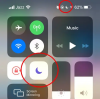
Your PUSH messages work fine then. Just make sure you did not put your entire iPhone in Do Not Disturb (a small half-moon icon will appear next to your battery indicator).
1593086424664.png


@completeit1 @Tim Bazzinett
Quick troubleshooting: Create a new extension (leave all settings default) and provision it on your iPhone. Call it from another extension and see if it rings
 
@GenericAccount
Your PUSH messages work fine then. Just make sure you did not put your entire iPhone in Do Not Disturb (a small half-moon icon will appear next to your battery indicator).
View attachment 16688


@completeit1 @Tim Bazzinett
Quick troubleshooting: Create a new extension (leave all settings default) and provision it on your iPhone. Call it from another extension and see if it rings

We have confirmed that all iPhone users are not in Do Not Disturb mode.

We have created a new extension, loaded the 3CX app on an iPhone and attempted calling. No ring. You can however, call from the app to an extension. You just can't receive.
 
@GenericAccount and if the app is open on the screen do you then get incoming calls?
 
@GenericAccount and if the app is open on the screen do you then get incoming calls?

I thought that was the case, but the users are now telling me that it won't even ring then. So it will not ring either way.
 
  • Like
Reactions: JohnS_3CX
Ok in this case we need to see whether the PUSH message leaves the server successfully and reaches Apple.

Please run a capture from your management console and call one of the iOS extensions (which we expect to fail to ring).

Then, end call and the capture and check it in Wireshark using the filter ip.addr==17.0.0.0/8 to see traffic to the apple servers. If the sessions does not complete or shows an error we can see what caused it at least so you can address it accordingly.
 
Here is the capture we have while experiencing the issue. Iphone did ring for just a moment but stopped before you could answer the call....less the 1.5 seconds
 

Attachments

Last edited:
@Kerby

Is this for the same case above from @GenericAccount or a different one?

Your capture looks good, the push message was received by the phone too (it rang, even if for a moment). This is not an iOS or 3CX issue, you will need to see why the call ends very soon.

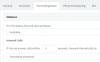
For one example if the call is answered elsewhere, or if I set a very short interval in my Forwarding rules like so:
1593414317236.png
.. then the phone will not have enough time to ring before the call gets forwarded (there's always a small delay until the push message arrives).


If you simply want to confirm the PBX and iPhone are ok, then create a brand new extension (all defaults) and provision it on the iPhone. If you ring it it should ring for about 20 seconds before it goes to voicemail.
 
This is for the same issue as above... We have made a new extension as well and get the same issue. We have checked and forwarding is set to 20 seconds
 
Is this still an issue?
 
Status
Not open for further replies.

Forum statistics

Threads
111,974
Messages
590,081
Members
164,899
Latest member
mazet