Windows 7 - Click to Call Desktop

Status
Not open for further replies.

joelucas

Titanium Partner
Advanced Certified
Joined
Dec 9, 2021
Messages
4
Reaction score
1
Hey 3CX

We have an issue with customer using the Desktop App on Windows 7.

They cannot use the click to dial feature with the desktop app. The 'Make a call from 3CX Desktop' App does not appear. I have an example of the desired prompt below from a Windows 10 PC.
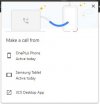
1639049664628.jpeg

It only works with the web client, which has other disadvantages, mainly the lack of a floating extension window.
 
Hi @joelucas,

Have you configured the default tel links to open with 3CX Desktop App?

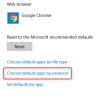
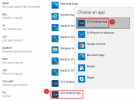
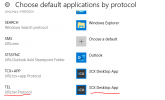
Hit your windows key and type Default Apps, from there scroll to the bottom and select 'Choose default apps by protocol', then scroll to the bottom and next to Tel, select 3CX:

1639054122654.png1639054184106.png

It should now appear when you click a tel link.
 
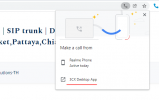
I have enable tel url to 3cx Desktop app , still after click on website/CRM it give me below pop up

1639752361415.png

So I have to always click 2 time.

1639752455954.png
 
Hi @Goga,

Yes, it will pop up the option to select the 3CX Desktop App to call from.

This is a Google specific issue, I've investigated this and some people have achieved automatically dialing from the option selected for default TEL links by editing Google Registry items. You'll have to investigate this yourself and do so by your own discretion, it is not a supported way of resolving the issue.
 
  • Like
Reactions: Goga
Status
Not open for further replies.

Forum statistics

Threads
112,349
Messages
592,027
Members
165,514
Latest member
megalmazan