- Joined
- Mar 11, 2019
- Messages
- 288
- Reaction score
- 37
Hi Team,
We have two on-premise setup of 3CX V20 Update 7, with one running on Debian(for testing) and other one on windows.
We are experiencing issues with the Debian install.
The only difference in the settings between these installs is that the windows install uses http and https ports as 5000 and 5001.
For Debian Install, the http and https ports were set as 80 and 443.
We are able to register extensions on desk phones and android app with both the installs.
The issue that we are facing is with web client, windows apps and pwa app.
Since 443 is given as the default port for https, while providing the 3cx url on the windows app,
we give "https://companyname.co.uk" followed by the extension number and password.
when we click on login, It gives the error message "Request Failed" after a few seconds.
But if we login to the web client and use provision option from there, it registers as shown in the image below.
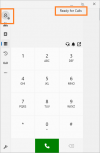
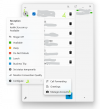
The issue here is that the user is greyed out(as shown in the pic), but the app says "Ready for calls". If I click on the Manager Panel, it doesn't show any users.
I can however dial any extension and the call will go through, and once the call is answered there are no issues with the call quality. It behaves as a normal call.
The only issue with the call is that I don't get any options on the app while on call.
It doesn't show the call is connected, or how long the call has been on for, or the simple option to disconnect the call.
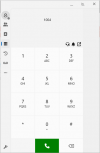
It just shows the extension number of the other party that we dialed(see image below).
The incoming calls on the other hand never come through. Let's assume the App has 1001 registered(but greyed out as shown in pic).
If we call 1001 from another extension 1004, the app doesn't give any kind of notification that there is an incoming call but at the caller side we can hear the extension 1001 ringing.
Now coming to Web client.
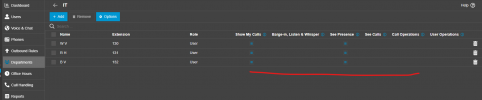
We are able to login with the extension and password. Once logged in, this gives contradictory information as shown in the image below.
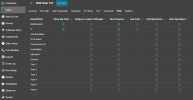
I've logged as 1001, but in the user list, it shows as "not registered".
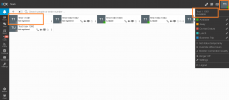
However in Web Client, when we make a call, we get all the options unlike in Windows App. In Web Client, outgoing calls have no issues. It works normally.
But incoming calls are never displayed, same as like in Windows App.
The caller can hear the extension ringing but the extension never rings.
If i click on the option "Open in App" available on the web client, then the PWA app is launched but here also it has the same issues as Webclient.
If i go to the "Apps" option available in web client and click on Windows App and click on provision button, the windows app is launched (but with the extension greyed out).
But the surprising thing is that, now when i check the user list in Web client, i can see that the user 1001 is now showing as Available instead of Not registered.
Now if i make the call to 1001, the incoming calls are displayed in web client but with the accept call button greyed out. We can only reject the call and not answer it as shown below.
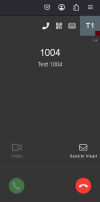
And if i exit from the windows App, the users goes back to being shown as "Not Registered" in webclient and the incoming calls will no longer be displayed.
Has anyone come across these issues?
Could the port number change(https 443) while installing this instance be the reason for this?
What ports does the Webclient,PWA,Window App use to register? or for presence?
Is there any dependency on the port 5001?
For me this looks like a partial registration.
Could someone shed some light into this? or what to look for?
Thanks in Advance!
We have two on-premise setup of 3CX V20 Update 7, with one running on Debian(for testing) and other one on windows.
We are experiencing issues with the Debian install.
The only difference in the settings between these installs is that the windows install uses http and https ports as 5000 and 5001.
For Debian Install, the http and https ports were set as 80 and 443.
We are able to register extensions on desk phones and android app with both the installs.
The issue that we are facing is with web client, windows apps and pwa app.
Since 443 is given as the default port for https, while providing the 3cx url on the windows app,
we give "https://companyname.co.uk" followed by the extension number and password.
when we click on login, It gives the error message "Request Failed" after a few seconds.
But if we login to the web client and use provision option from there, it registers as shown in the image below.
The issue here is that the user is greyed out(as shown in the pic), but the app says "Ready for calls". If I click on the Manager Panel, it doesn't show any users.
I can however dial any extension and the call will go through, and once the call is answered there are no issues with the call quality. It behaves as a normal call.
The only issue with the call is that I don't get any options on the app while on call.
It doesn't show the call is connected, or how long the call has been on for, or the simple option to disconnect the call.
It just shows the extension number of the other party that we dialed(see image below).
The incoming calls on the other hand never come through. Let's assume the App has 1001 registered(but greyed out as shown in pic).
If we call 1001 from another extension 1004, the app doesn't give any kind of notification that there is an incoming call but at the caller side we can hear the extension 1001 ringing.
Now coming to Web client.
We are able to login with the extension and password. Once logged in, this gives contradictory information as shown in the image below.
I've logged as 1001, but in the user list, it shows as "not registered".
However in Web Client, when we make a call, we get all the options unlike in Windows App. In Web Client, outgoing calls have no issues. It works normally.
But incoming calls are never displayed, same as like in Windows App.
The caller can hear the extension ringing but the extension never rings.
If i click on the option "Open in App" available on the web client, then the PWA app is launched but here also it has the same issues as Webclient.
If i go to the "Apps" option available in web client and click on Windows App and click on provision button, the windows app is launched (but with the extension greyed out).
But the surprising thing is that, now when i check the user list in Web client, i can see that the user 1001 is now showing as Available instead of Not registered.
Now if i make the call to 1001, the incoming calls are displayed in web client but with the accept call button greyed out. We can only reject the call and not answer it as shown below.
And if i exit from the windows App, the users goes back to being shown as "Not Registered" in webclient and the incoming calls will no longer be displayed.
Has anyone come across these issues?
Could the port number change(https 443) while installing this instance be the reason for this?
What ports does the Webclient,PWA,Window App use to register? or for presence?
Is there any dependency on the port 5001?
For me this looks like a partial registration.
Could someone shed some light into this? or what to look for?
Thanks in Advance!