- Joined
- Jul 6, 2023
- Messages
- 2
- Reaction score
- 1
Hi All,
Hoping someone here might be able to kindly assist us or point us in the right direction
We are currently running 3CX Professional V18.0.7.312 (Latest Non Alpha Update)
Our Wordpress Site Version is 6.2.2 AU Latest Version + 3CX Plugin Version is 10.0.9 Latest
Here is our conumdrum
We can get the live chat plugin working when we are in the wp-admin mode - We can actually use it, send chat and everything works. However once we are logged out of wordpress admin / or on the public view of the website, the chat plugin does not appear at all. Example: if we browse the website from our mobile laptop just like on the public internet, the chat plugin does not appear, but works fine locally when logged in as Wordpress Admin / Viewing the site as admin.
Things we have tried:
1. We have tried x 2 differnt wordpress sites (Completely different sites) , thinking one of the sites might have been the issue.
2. We have ensured all the correct ports are open to the 3CX Self Hosted Server
3. We can manually use the Chat URL Link created in the Web Client Admin Section and it all works directly confirming its not a firewall issue.
4. We have Cleared Cache on wordpress Site, bypassed all security, and also disabled a few plugins (Thinking a plugin might be causing the issue)
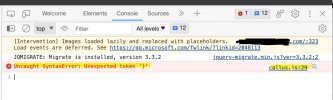
One thing we have noticed in the output script when browsing the site is some kind of token error (See attached screenshot) that comes up in relation to accessing the callus.js file on the site -
We have checked and this file does have read and write access. Not sure if this has anything to do with it at all,
Any help would be greatly appreciated or leads in the right direction.
Many Thanks
Hoping someone here might be able to kindly assist us or point us in the right direction
We are currently running 3CX Professional V18.0.7.312 (Latest Non Alpha Update)
Our Wordpress Site Version is 6.2.2 AU Latest Version + 3CX Plugin Version is 10.0.9 Latest
Here is our conumdrum
We can get the live chat plugin working when we are in the wp-admin mode - We can actually use it, send chat and everything works. However once we are logged out of wordpress admin / or on the public view of the website, the chat plugin does not appear at all. Example: if we browse the website from our mobile laptop just like on the public internet, the chat plugin does not appear, but works fine locally when logged in as Wordpress Admin / Viewing the site as admin.
Things we have tried:
1. We have tried x 2 differnt wordpress sites (Completely different sites) , thinking one of the sites might have been the issue.
2. We have ensured all the correct ports are open to the 3CX Self Hosted Server
3. We can manually use the Chat URL Link created in the Web Client Admin Section and it all works directly confirming its not a firewall issue.
4. We have Cleared Cache on wordpress Site, bypassed all security, and also disabled a few plugins (Thinking a plugin might be causing the issue)
One thing we have noticed in the output script when browsing the site is some kind of token error (See attached screenshot) that comes up in relation to accessing the callus.js file on the site -
We have checked and this file does have read and write access. Not sure if this has anything to do with it at all,
Any help would be greatly appreciated or leads in the right direction.
Many Thanks