Wordpress plugin, transfer conversation

Status
Not open for further replies.

elodie_scn

New User
Joined
Jan 27, 2022
Messages
3
Reaction score
0
Hello,
I don't have the buttons to transfer the conversation to another agent or to take control.

Can you help me ?

Thank you.
 
Hi @elodie_scn,

Once you start a chat with your agent in the Web Client, can you show me a screenshot of what you see? Paste it here.

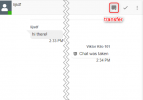
After taking the chat, you should see this:

1643287165436.png
 
  • Like
Reactions: NickD_3CX
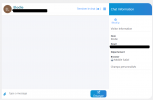
No, this is what I see :
Screenshot.png
I don't have the button "Transfer"
 
Hi @elodie_scn,

Right, you're using the Standalone version of Live Chat, I should have asked that first. The standalone does not have the option to transfer chats.

You can however transfer chats using our 3CX version of Live Chat. If you're interested in setting up the 3CX version of Live Chat, feel free to check this guide: https://www.3cx.com/docs/manual/live-chat/
 
Great, thank you.
How can I access the Management Console to make the first step ? Is it on WordPress?
 
Hi @elodie_scn,

To access the Management Console you'll need to sign up with 3CX for a Free Licence: https://www.3cx.com/phone-system/download-phone-system/

Once you do this, you will receive an email with all the information you need to access your Management Console. Let me know if you run into any issues while setting this up.
 
Status
Not open for further replies.

Forum statistics

Threads
112,149
Messages
590,965
Members
165,171
Latest member
Mahlon