Yealink CA Certificates

Status
Not open for further replies.

Craig Catlow

Silver Partner
Advanced Certified
Joined
Apr 20, 2021
Messages
42
Reaction score
4
Hi, we are having problems with a secure site where periodically our Yealink phones fail to auto provision. It looks like a CA problem. We can get the phones to provision if we disable 'accept trusted certificates' in the phones themselves. This is on a version 18 3CX hosted system.

Can we get a copy of the latest CA for Yealink to manually put them into the phones as a quick work around?
 
You just have to run the latest firmware which updates it. Which model phones and what firmware are they on?
 
Thanks CentrexJ. We are running the latest 3cx software on the phones 96.86.100.5 on 53W handsets.
 
Are you using a 3CX FQDN (where we provide Let's Encrypt) or is it a custom one?
 
Are you using a 3CX FQDN (where we provide Let's Encrypt) or is it a custom one?
I would guess this is could certainly be one part of the issue. I've ran into this exact issue before when I was rolling my own Let's Encrypt solution but gave up and switched to 3CX's FQDN. It just works without all of the headaches.

If you don't use the 3CX FQDN then you can run into intermediate certificate issues. While it is possible to upload certs, I could not get this to work on the Yealink phones that I use. On older Yealink's there was an option to force option to accept the cert, however, that might not be what you want with a secure site. It could be an option to test. I can find the exact option if you want later.
 
Hi, thanks for all you suggestions. Sorry been away. The FQDN is custom in the sense it has been setup using the wizard (company name.3cx.com.au:5001). Its hosted by 3CX. Turning only use trusted certificates off on the phone works but then it gets turned back on when provisioned meaning you can't log off without disabling it again or re-booting the phone.
 
Hi, thanks for all you suggestions. Sorry been away. The FQDN is custom in the sense it has been setup using the wizard (company name.3cx.com.au:5001). Its hosted by 3CX. Turning only use trusted certificates off on the phone works but then it gets turned back on when provisioned meaning you can't log off without disabling it again or re-booting the phone.
Bring the phones to the supported firmware (linked above) and the issue will be resolved.

3cx names use LE and that 76 firmware has the LE CA in it.
 
Sorry, I should also add I downgraded the phones to 96.86.0.96 and now in the phones table in 3cx they now appear as unsupported. 3cx is at Ver 18 update 9 build 20
 
.76 or .96?
3CX doesn’t account for “future” firmware, only the current version.
 
.76 or .96?
3CX doesn’t account for “future” firmware, only the current version.
Yes Steve, seems that way thanks. They are actually .74 (my mistake, just need to read better). Currently looking for a .76 file
 
Found .76. I will install and home it fixes it.
 
Ok, I have removed the phone from the phones list in 3CX. Removed it from the Hot desk list and factory reset the phone. 'updated to 96.86.0.76. Went through the provisioning process from scratch (adding it into the hot desk list) and still have the same issue. I'm thinking its a network problem but I don't have access to any of it (medical centre).
 
Do they have a proxy or something doing SSL inspection?
 
No, nothing like that. They have a windows based SBC?
 
When you visit the 3cx admin page on the same network as the phones, what cert is presented?
Note down the thumbprint.

Does this match if you check the cert thumbprint from your office PC (or other machine not in the affected network)?
 
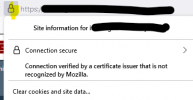
^ That's where I was going to go next. Firefox may tell you if there is a MITM cert, for instance this is from our antivirus (running on each PC so does not affect other devices). Click the lock:
1705936873706.png
(Chrome doesn't display this warning, perhaps they've approved the a/v vendor?)
 
Status
Not open for further replies.

Latest Posts

Forum statistics

Threads
112,274
Messages
591,622
Members
165,388
Latest member
alberic