Yealink Logo Bug v15.5 SP6

Status
Not open for further replies.

Michael Ruffolo

Joined
Jun 14, 2018
Messages
7
Reaction score
0
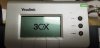
The 3CX phone logo flashes every 15 seconds or so on my Yealink T26 phones since updating to v15.5 SP6. It's very annoying. I see this error in the logs
3CX Template Parser
Unknown variable '%%logo%%' in template yealink.ph.xml at position 31967
 

Attachments

  • 20180831_084837.jpg
    20180831_084837.jpg
    216.3 KB · Views: 12
Did you update templates to latest version as well?
I do not see a %%logo%% in the T2x template file.
T26/T22 use same file:

lcd_logo.url = %%PROVLINKLOCAL%%/logo/yealinkt22.dob
 
Yes, I ran all updates and I seem to remember the Yealink template was included. I think I have a work around, I can manually disable the Logo setting in the Yealink phones, but I suspect 3CX will re-enable the setting when it pushes updates to the phones.
 
Yes, I ran all updates and I seem to remember the Yealink template was included. I think I have a work around, I can manually disable the Logo setting in the Yealink phones, but I suspect 3CX will re-enable the setting when it pushes updates to the phones.
Hi Michael Ruffolo,
Are you sure that you are running the SP6 version of 3CX PBX V15.5? Did you fully update your PBX to SP6 version or just downloaded the new templates to your existed old installation?
I'm asking because the logs that you published ("3CX Template Parser: Unknown variable '%%logo%%' in template yealink.ph.xml at position 31967") indicates that your PBX can't understand what is the "%%logo%%" parameter in the provisioning template, which is not possible if you are running the SP6 version of 3CX PBX V15.5.
I already have running the SP6 version on the multiple customer's PBX's and have no any logo issue on T26 and T28 models that we are using. Some of them are using 3cx logos and some of them are using the custom logos that we created for them using this guide.
Have a look, probably you have missed something on updates...
 
I'm ran the update last night and install all available updates. It look like I'm running 15.5.15502.6, how do I verify the version I'm running?
 
The last digit would seem to indicate you are running Update 6.
 
I came back from being off for a few days to find this error in our logs (running same version as you with recent update). We were also missing the new logo settings on the phone provisioning page.

Restarting services didn't make any difference but a full reboot of the server seems to have fixed the spurious log entries and made the new options appear.
 
I spoke too soon... The log entries have started again...

I've never amended the default templates so not sure what the cause is (unless it's by design).
 
I came searching for this. I updated the templates on our T46s phones on Friday, today seeing "Unknown variable '%%logo_filename%%' in template..." and all the phones defaulted back to the 3CX logo.
My issue is probably because I updated the templates and not the service pack. I'll update that tonight report back tomorrow.
 
Did you reach any resolution with this?
 
Status
Not open for further replies.

Latest Posts

Forum statistics

Threads
111,893
Messages
589,599
Members
164,763
Latest member
Techmansam