Yealink T23G not Auto Provisioning

Status
Not open for further replies.

colbyco

New User
Joined
Sep 21, 2021
Messages
8
Reaction score
0
I am try to auto provision my 2 X T23G Phones & My W60 and nothing happens........even though on the phone gui it says working..........can some one point me in the right direction here
i am using a hosted solution


Any help would be appreciated.

Peter Potamianos
Montreal,Canada
 
Last edited by a moderator:
i am using the hosted version
i followed the instructions on the links you sent me........on my phones gui it says working but nothing is happening
 
Do you have an local sbc server, or are your trying to configure using stun ?
 
trying direct-sip stun
 
Last edited by a moderator:
i did that
 

Attachments

  • Untitled.png
    Untitled.png
    136.4 KB · Views: 15
i tried installing sbc on my windows computer.........still unable to provision phones
 
Hi Peter,

If you use hosted, then SBC is indeed the way to go.

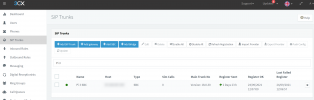
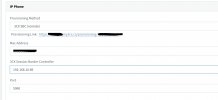
1. Once you install your SBC and you see it turn green in your SIP Trunks section, it is now time to reset the phones.
1632730577046.png
2. Hold the OK button down on the Yealink T23G until you see the prompt to factory reset.

3. Once you proceed and the phone resets, it will boot up back to its main screen.

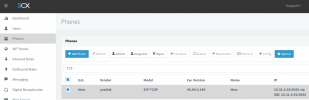
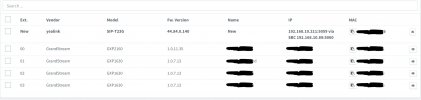
4. You now have to go into your 3CX "Phones" page and see if the Yealink showed up in bold.
1632730880973.png
5. If it has, then you tick to select it, and click the "Add Ext" or "Assign Ext" buttons to assign it to a user.
Note: The SBC should be on the the same subnet as the phones for this to work. Also you must not be blocking multicast messages.

6. This takes you to the provisioning tab of said user, where you finally just press OK and then wait about 1-2 mins for the phone to provision itself and reboot automatically.

If you still have trouble with this, you could always contact one of our experienced 3CX Partners who can help you get up and running in no time.
https://www.3cx.com/ordering/find-reseller/
 
I finally see my phones on the phone dashboard.........but i can not assign them to an extension i select them but the option to assign them is greyed out.
 

Attachments

  • Untitled99.png
    Untitled99.png
    138.3 KB · Views: 8
Are you logging in the console as the admin user, it will shown you uppercase A in top right if you have ?

Looking at the screen shot you are looking in as admin.

What happens if you create the extension first, then try 'Add to Ext'

Have you already configured the phones within 3CX, if so delete the phone settings under provisioning tab for the extension.
 
Last edited:
yes as admin user
 
i deleted the phones from the dashboard and tried to reprovision them again no dice
 
Hi Peter,

That's good progress so far!

For the T23G, you first need to upgrade the rom to the latest one we offer. You will then be able to assign it.
Please read this guide and go step by step to upgrade, then provision. You should be up in no time
https://www.3cx.com/sip-phones/yealink-t20p-t22p-t26p-t28p/

I also noticed a W60 there, that is a DECT phone and the assign buttons do not work for it. Follow these instructions instead and you should be able to get it up and running quickly.
https://www.3cx.com/sip-phones/yealink-dect-w52p/
 
Hello Thread...

I'm having same problem here... My phone was working fine until I tested a full reset of the phone after installing and testing 2 SBC on my lan.

Basically Each SBC have different names and different associated 3CX PBX (2 clients).

I wanted to test the simplicity of the switch from phone direct connection to the 3CX in the cloud to connecting the phones via a local SBC on their lan.

Anyway, at this point one both SBC are up and running and showing green to their respective 3CX servers.

My t23G is on the same lan (with multicast enabled) as the 2 SBC.

On one of the 3CX I can see the "New phone" but not on the second (thats ok for now)

I tried to Assign the phone to an existing extension but nothing is happening, as suggested here I did a full reset of the phone (press ok for 5 seconds..) and still no go... the phone still show as new but will not assign...

I tried disconnecting the second SBC as maybe it was causing interference... but same thing... I ran out of ideas.

Oh on the phone, after reset, it show "Updating config" ... then "Update skipped" (or something like that).
 

Attachments

  • 3cxsbc-1.jpg
    3cxsbc-1.jpg
    182.2 KB · Views: 7
  • 3CXSBC-2.jpg
    3CXSBC-2.jpg
    116.7 KB · Views: 7
  • 3cxsbc-3.jpg
    3cxsbc-3.jpg
    150.5 KB · Views: 7
Last edited:
Hello Thread...

I'm having same problem here... My phone was working fine until I tested a full reset of the phone after installing and testing 2 SBC on my lan.

Basically Each SBC have different names and different associated 3CX PBX (2 clients).

I wanted to test the simplicity of the switch from phone direct connection to the 3CX in the cloud to connecting the phones via a local SBC on their lan.

Anyway, at this point one both SBC are up and running and showing green to their respective 3CX servers.

My t23G is on the same lan (with multicast enabled) as the 2 SBC.

On one of the 3CX I can see the "New phone" but not on the second (thats ok for now)

I tried to Assign the phone to an existing extension but nothing is happening, as suggested here I did a full reset of the phone (press ok for 5 seconds..) and still no go... the phone still show as new but will not assign...

I tried disconnecting the second SBC as maybe it was causing interference... but same thing... I ran out of ideas.

Oh on the phone, after reset, it show "Updating config" ... then "Update skipped" (or something like that).
I found a way around it... the T23G by default does not accept any certificates and it seem that the 3CX v18 has one of those not accepted...
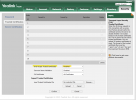
So I changed the phone setting to NOT accept Only Trusted Certificates and it works now!

1633346695542.png
 
  • Like
Reactions: AndreC
  • Like
Reactions: JohnS_3CX
Status
Not open for further replies.

Forum statistics

Threads
112,147
Messages
590,961
Members
165,167
Latest member
Finatra.us