Solved Yealink T42S Failed to Registed

Status
Not open for further replies.

Matt_AIT

Silver Partner
Advanced Certified
Joined
Oct 29, 2019
Messages
76
Reaction score
17
We have multiple Yealink t42S running 66.86.0.15 behind a Raspberry Pi SBC, the phone provision i.e. receive new admin password etc, but they fail to register. The handset do not appear in pnp on 3cx either. This is on a mulitenant. Any advice would be appreciated.
 
Hi,

Are the T42Ss on the same LAN segment as the SBC (Provisioning, the phones talk to mothership and 3CX provisioning servers over HTTP/S - Registering, they talk to the SBC)? Is the SBC showing Green? PBX firewall check Green?

You are choosing to add the phones via an/the SBC to each extension (Some steps missing below :) )? (If this is done they would not show as pnp since they are now known/configed phones).
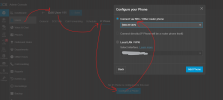
1752473177607.png

SBC/Phones getting setup with proper permissions for the same tenant?

Best,
KS.
 
  • Like
Reactions: JohnS_3CX
Hi,

Are the T42Ss on the same LAN segment as the SBC (Provisioning, the phones talk to mothership and 3CX provisioning servers over HTTP/S - Registering, they talk to the SBC)? Is the SBC showing Green? PBX firewall check Green?

You are choosing to add the phones via an/the SBC to each extension (Some steps missing below :) )? (If this is done they would not show as pnp since they are now known/configed phones).

View attachment 48607

SBC/Phones getting setup with proper permissions for the same tenant?

Best,
KS.
Hi,

Yes, SBC and phones on the same lan and can communicate. SBC is and firewall both showing green in 3cx portal.

Correct, I am adding under the extensions so I will ignore the fact they are not showing in pnp.

The handsets pick up the new web admin password, show the correct username, password, and extension number in the web UI but for some reason fail to register.
 
Anything in the Log showing failed registration and perhaps some reason?
 
Anything in the Log showing failed registration and perhaps some reason?
In event log,
"Provisioning file for MAC XXXXXXX of user 100XX requested by xx..xx.xx.xx was successfully generated"

and

"Provisioning file y000000000000.boot requested by xx..xx.xx.xx could not be generated"

Nothing else I can see.
 
Have you tried removing from user, factory resetting and adding fresh?
 
Have you tried removing from user, factory resetting and adding fresh?
Yes, I've created a brand new extension, factory reset the phone then added the MAC to new extension and having the same issue.
 
No custom templates for the phones?
 
No custom templates for the phones?
Nope.

So, I provisioned a new Windows SBC via laptop and this works. The issue seems to be with the Raspberry Pi SBC. Not sure what exactly, as it is showing green in the portal. Might format the SD and set it up from scratch again.
 
  • Like
Reactions: KyriacosS_3CX
Fresh install of the Raspberry Pi has resolved the issue. Not sure what the issue was with it, but it's working now. Thanks.
 
Status
Not open for further replies.

Members Online Now

No members online now.

Forum statistics

Threads
111,831
Messages
589,277
Members
164,660
Latest member
RJenkinsROCK