Solved Yealink T46U registration fail and IP blocked

Status
Not open for further replies.

meewah

Free User
Joined
Nov 20, 2024
Messages
3
Reaction score
1
Hello I am new to 3CX and as a reseller we started with our own 3CX install using the 3CX free hosted. Everything is working well with the softphone applications so we thought we would try a Yealink T46U router phone and updted the firmware to the latest version and factory reset then tried adding it to a admin user account. As soon as we chose the phone in the list and added direct it asked for the phone to restart to provision. On restarting it came up with 3CX logo and all looked well except is siad registration failed. I tried to check in our V20 admin console but then it said IP blocked. I rebooted our rooter to apply another public IP address and tried again but each time it blocks the public IP address. Error 12291 Reason: Block WAN requests is ON.

Can anyone help please or if I have posted in the wrong forum then please move it.
 
Hi,

I think the phone's router mode was not properly activated.

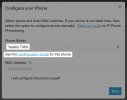
You need to put 108.86.0.93 on the phone here before adding it to 3CX, then when the phone is ready add the MAC in 3CX and choose connect directly. Afterwards, you should factory reset the phone and wait.

I think one of those steps was skipped or done in a different order leading the phone to try connecting outside of "router mode" and banned your IP. Please delete it from the user, then reset the device, then do as noted above and it should come online.
 
Hi,

I think the phone's router mode was not properly activated.

You need to put 108.86.0.93 on the phone here before adding it to 3CX, then when the phone is ready add the MAC in 3CX and choose connect directly. Afterwards, you should factory reset the phone and wait.

I think one of those steps was skipped or done in a different order leading the phone to try connecting outside of "router mode" and banned your IP. Please delete it from the user, then reset the device, then do as noted above and it should come online.
Hi John

Yes the provisioning guide just talks about the lateset firmware so the go to is the manufacturers downloads page. I was not even aware that 3CX also held firware for each model. I will give it a try and report back. Thank you sir.
 
Fantastic it worked. Spent hours on this. Thank you very much.
 
  • Love
Reactions: JohnS_3CX
Excellent news! We will mark this as solved then
 
Status
Not open for further replies.

Members Online Now

Forum statistics

Threads
111,832
Messages
589,286
Members
164,662
Latest member
DejanMDS