Yealink T54W SBC registered but extension wont register

Alphabetic

3CX MVP
Silver Partner
Advanced Certified
Joined
Jul 1, 2016
Messages
6,533
Reaction score
2,558
Version 20.0 Update 8 (Build 1121 Release)

FW: 96.87.0.22

Hello everyone.

I've had this installation in place for a few months working fine.

3CX in the cloud, handsets behind 1 SBC phone on a typical star network behind a Sonicwall.

They had a powercut over the weekend and since then I couldnt get the phones back online.

I've reset the PBX, phone and router.

Reset the phone and deleted/added the SBC.

I cannot see anything in the Sonicwall logs that would suggest SBC is being blocked.

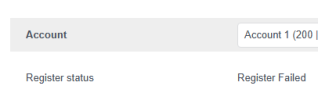
The phone SBC shows green but the extension is "Register failed" on the phone.

On the same network, I have successfully set up a Windows SBC (without having to modify firewall).

NB: When I first came to look at this, the extension in the phone said "Register Disabled".

Any ideas?

**Phone is on LAN
 
I have also experienced this issue, havent managed to find the cause or resolution. We ended up having to provision behind another sbc to get the device to register again.
 
Interesting.. Thought I was going crazy... are you still working on sorting it? Cos at this point imma just leave the Windows SBC doing its thang.
 
I thought the same we have left the devices provisoned behind other SBC's as we could not figure out the cause.
 
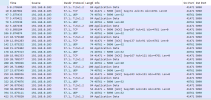
PCAP from the Yealink, when I filter by destination IP to the PBX shows the following but there are no SIP registration requests.

1777365368975.png
 
Latest findings....

Out of the 5 phones I have (all T54W) - The only one Im struggling to get SIP Registered is the one that was the SBC originally. All other phones are provisioning as SBCs.

The problematic extension (200)'s phone is registered as an SBC but the SIP account is failing to register..
 
1777366890682.png

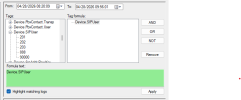
Bin log viewer doesnt show extension 200 hit the PBX to attempt registering..

Going to check phone/router logs now..
 
* is not extension specific
 
Yealink has suggested previously to people facing this issue to check their MTU values depending on their network, and that setting MTU 1452 appears to resolve this under such networks that have these restrictions.
 
I've figured out that when this phone uses a certain IP address, SIP registrations fail.

Im just trying to figure out what on the Sonicwall is preventing traffic.
 
  • Like
Reactions: JohnS_3CX
@JohnS_3CX

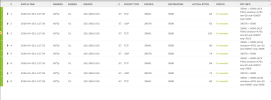
Im seeing the traffic from IP of phone via the Sonicwall.

the SBC is showing as UP in 3CX but extension doesnt register.

Is this gonna be a support ticket? Although the problem is fixed by changing IP, I would like to know the cause..

1777372174843.png

1777372190980.png

1777372201375.png

** I also changed the MTU
 
Last edited:
Well since you've isolated it to a firewall matter, I don't see any point in opening a 3CX ticket.

Maybe a Yealink ticket, but again I'm not so sure this type of issue is in their scope.

Everything you've described so far points to the firewall doing something that you need to figure out. You may see the traffic in the table above, you don't necessarily know that the content of the traffic is still in one piece.
 
Well since you've isolated it to a firewall matter, I don't see any point in opening a 3CX ticket.

Maybe a Yealink ticket, but again I'm not so sure this type of issue is in their scope.

Everything you've described so far points to the firewall doing something that you need to figure out. You may see the traffic in the table above, you don't necessarily know that the content of the traffic is still in one piece.
I've just had Sonicwall support go through the firewall and logs and he tells me he can see nothing blocking. Other than the traffic that shows to the tunnel port successfully. They've compared the packets between non-working and working IP and have said the same packets are being sent.
 
Last edited:
Brainstorming, have you tried restarting the firewall?

Using a different LAN IP the phone registers?
 
  • Like
Reactions: JohnS_3CX
Hi Steve,

as mentioned - restarted all of it.

The phone works fine on any other IP but 192.168.0.103.

Sonicwall have concluded it's not their device, waiting on Yealink support.
 
Yealink have passed on the logs from the phone (when its working and not working) over to their R&D to look at.
 
  • Like
Reactions: JoshWS

Members Online Now

Forum statistics

Threads
111,832
Messages
589,285
Members
164,662
Latest member
DejanMDS