Yealink W90B set up on Step 5 and 6

Status
Not open for further replies.

guzty

Customer
Joined
Aug 15, 2023
Messages
7
Reaction score
1
I am trying to set up Yealink W90B and I can't seem to find the same menu options from step 5 and 6 of the DECT Phones instructions.
https://www.3cx.com/sip-phones/yealink-dect-phones/

from step 5, I don't have “Settings” > “Auto Provision” > “Server URL” to be bale to put the provision URL.
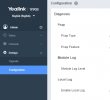
1710966468529.png


I also don't see this section on my side after I put the DECT Manager's IP, is this the same IP for the web interface of the yealink W90B?
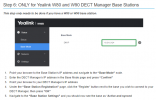
1710966836103.png
 
You need to switch to DM in order to get those options.
 
Hi,

You need to have a pair: W90DM + W90B

We provision the W90DM, and you connect as many W90B to it as you want to act as its

There is no support for a standalone W90B because the B device acts only as the wireless antenna for the DM device. Normally you would deploy one DM, and a few B devices across your building. This is the intended purpose.
 
a single W90DM cannot be used?

since it has antennas built in, and the area I will be using it won't need more range then a single unit.
 
a single W90DM cannot be used?

since it has antennas built in, and the area I will be using it won't need more range then a single unit.
Correct. A DM unit is just a controller, not a base station. This is per Yealink. While it may have external antennas on it, it won't support being a base station and DM at the same time. I'm surprised your distributor let you purchase just the DM without a base, ours would reach out to warn customers who make that error.
 
  • Like
Reactions: accentlogic
Correct, this is what vendor provide. You should check Yealink documentations as well for further clarification.
 
Status
Not open for further replies.

Members Online Now

Forum statistics

Threads
111,832
Messages
589,282
Members
164,662
Latest member
DejanMDS