Your 3CX Debian OS failed to update

Status
Not open for further replies.

sonnyh1

SOHO User
Joined
Jan 18, 2023
Messages
112
Reaction score
16
Hi,
Currently runnung:
Product Professional Annual
Version Number 18.0 Update 9 (Build 20)
Debian 10 Buster (AWS)

Update is showing:
Version 20 is now available. Before upgrading, take a full backup of 3CX and save it outside of the instance. This upgrade will also upgrade Debian from 10 to 12.

When I try to update I receive the following error:
Your 3CX Debian OS failed to update
3CX Phone System Management Console ID: 10012

Thoughts / suggestions?
 
I missed that. I have deleted several of the backups and regained disk space.
I will try the upgrade again
Thank you for pointing out my error
You are welcome.
 
Are your backup stored in same place as your PBX?
You said having removed some to regain some space, so are you sure you read 3CX prerequisite migration warnings before starting?

One of them and surely most important, is to store the 3CX backup out of the 3cx VM, did you ?
 
Last edited:
I missed that. I have deleted several of the backups and regained disk space.
I will try the upgrade again
Thank you for pointing out my error
Upgrade to V20 seems to have worked. Not sure I like the new interface. Seems my IP is blocked
 
Upgrade to V20 seems to have worked. Not sure I like the new interface. Seems my IP is blocked
The management of the system will be via the admin console moving forward, but what do you mean your IP is blocked?
 
Sure you have a choice, I use ESXI dedicated server, cost is very low and all clients on one platform. When needed shut down the instance, re configure to the new specks turn back on. Down time 0.001%. Think about it, Azure is not the only solution, in fact it is " Not Recommended"
We don't really have a choice as the whole reason for switching to 3CX was to save money for our church. It has, so far. But if we were to switch to some other provider besides Azure with their sponsorship, we'd end up paying more than we were before we had 3cx, so it would make no sense. Further, because we have Microsoft365 with a non-profit premium license, it again makes more sense to stay with Azure for integration. Further still, I am well versed in Azure, so if I knew what I needed to do to get the upgrade to work, I would/could do it.

I was even able to size up our VM to Standard B2s (2 cpu's, 4GB ram) with 30GB SSD so all recommendations match or exceed, and still stay within our sponsorship.

When I look at the error log, I see a single error concerning a package list file (microsoft-prod.list) which is automatically added when the Debian VM is created (I played no part in that file's existence). Initially, when I removed this file (per the error log's instructions), prior to recreating the VM, apt stopped working so no upgrades/updates could be done. I manually reinstalled apt and its dependencies, and the upgrade made it much further, but still failed.

The error log I receive is attached. This is from two days ago, the last time I attempted the upgrade. This attempt was done AFTER a complete deletion of the VM, a fresh new VM using the 3CX server setup from Azure Marketplace, following the instructions at https://www.3cx.com/docs/pbx-azure-marketplace/ to the letter, updating 3CX to 18.0 (Build 20), and then running the upgrade. The server is in un-edited, off the shelf state right now. Everything is working fine, save doing the upgrade.

Trying the upgrade again. This time, after backing up, I moved the microsoft-prod.list file out of the packages folder. I did this the first time too, but there were other problems with the Debian install (that apt was missing, for one) which made it fail. So far, it's been about 8 minutes and no emails showing failure. Maybe a good sign?
 
Last edited:
We don't really have a choice as the whole reason for switching to 3CX was to save money for our church. It has, so far. But if we were to switch to some other provider besides Azure with their sponsorship, we'd end up paying more than we were before we had 3cx, so it would make no sense. Further, because we have Microsoft365 with a non-profit premium license, it again makes more sense to stay with Azure for integration. Further still, I am well versed in Azure, so if I knew what I needed to do to get the upgrade to work, I would/could do it.

I was even able to size up our VM to Standard B2s (2 cpu's, 4GB ram) with 30GB SSD so all recommendations match or exceed, and still stay within our sponsorship.

When I look at the error log, I see a single error concerning a package list file (microsoft-prod.list) which is automatically added when the Debian VM is created (I played no part in that file's existence). Initially, when I removed this file (per the error log's instructions), prior to recreating the VM, apt stopped working so no upgrades/updates could be done. I manually reinstalled apt and its dependencies, and the upgrade made it much further, but still failed.

The error log I receive is attached. This is from two days ago, the last time I attempted the upgrade. This attempt was done AFTER a complete deletion of the VM, a fresh new VM using the 3CX server setup from Azure Marketplace, following the instructions at https://www.3cx.com/docs/pbx-azure-marketplace/ to the letter, updating 3CX to 18.0 (Build 20), and then running the upgrade. The server is in un-edited, off the shelf state right now. Everything is working fine, save doing the upgrade.

Trying the upgrade again. This time, after backing up, I moved the microsoft-prod.list file out of the packages folder. I did this the first time too, but there were other problems with the Debian install (that apt was missing, for one) which made it fail. So far, it's been about 8 minutes and no emails showing failure. Maybe a good sign?
I was able to do the upgrade successfully! Fundamentally, it had to do with the microsoft-prod.list file which Azure automatically adds at VM setup. There were other issues with the Debian install too, but a rebuilding of the VM fixed those. You should add to your https://www.3cx.com/blog/releases/v20-beta1-upgrade/ page to look for that microsoft-prod.list file on Azure and move it or remove it. This file is part of Microsoft Azure's environment which allows other packages and addons to be added to a vm so it's there by default.
 
  • Like
Reactions: ArneDery
i initially tried to upgrade our testing/demo system (the 2nd NFR key) and no matter what it failed. I just spun up a new machine since there was no important stuff in there and it worked great.

i am right now in the middle of the upgrade of our actual in-house primary NFR key'd system. I switched it to a 2 CPU 2 Gig ram google instance and it appears to be going, no warnings no error emails and we'll see. this system has been running since V15 back in the day and has been upgraded all along the way.
 
Distinctive Ringing by Group or Queue
I realize this is not the correct section of the forum, but I can not seem to post since I completely reinstalled 3CX.

I have setup distinctive ring for several call queues and set the rings on each Fanvil x5u,x6u, and H2U phones.
I have double checked all the settings.
Some phones ring with the default ring and some with the distinctive ring per call queue.
 
Disregard above, I was finally to post this in the proper forum.
 
3CX 18.0 Update 9 (build 31) to V20. Same problem. Google Cloud Instance, 4VCPU, 2 core, 15Gb RAM (n1 standard 4), running on a debian-9-stretch-v20191210. PBX appeared to come back online. Good because I am no expert and the attached log is 100% gibberish to me. Can you help interpret the log?
 
3CX 18.0 Update 9 (build 31) to V20. Same problem. Google Cloud Instance, 4VCPU, 2 core, 15Gb RAM (n1 standard 4), running on a debian-9-stretch-v20191210. PBX appeared to come back online. Good because I am no expert and the attached log is 100% gibberish to me. Can you help interpret the log?
The instance you are running for version 18 should be Debian 10 for version 18 and not 9. This will not work to update to 20 and Devian 12.

You will need to take a backup and download it to a safe location, switch off the current machine, deploy a new machine using the Google marketplace on v20, and restore the backup.
 
Thank you. I did this, and it was painless! The deployment on Google Marketplace is wonderful. I just made a full backup and transferred to my PC, followed the directions here, then uploaded my backup. All I needed to do was fix up the scheduled backup destination. Strangely it took an SMS message destination and turned that into my admin username. Everything is working though. Thanks again!

[edit] I see, it is the system owner's email, used as the admin login username. Strange but OK.
 
  • Like
Reactions: Charles_3CX
Thank you. I did this, and it was painless! The deployment on Google Marketplace is wonderful. I just made a full backup and transferred to my PC, followed the directions here, then uploaded my backup. All I needed to do was fix up the scheduled backup destination. Strangely it took an SMS message destination and turned that into my admin username. Everything is working though. Thanks again!

[edit] I see, it is the system owner's email, used as the admin login username. Strange but OK.
I'm glad this worked for you, and yes, management via the admin console is via extensions set as system owners in v20.
 
Hello,
I've been trying to upgrade our on-premise 3cx system to version 20 (currently version 18 with all updates installed)
1721819880218.png
We meet the minimum requirements (it has 2GB of RAM total and at least 2vCPU), have made an external full system backup, and appointed a system owner as per the instructions but every time we try installing version 20, the upgrade console returns the Error "Your 3CX Debian OS failed to update | 3CX Phone System Management Console ID: 10012". I've read every single post on this thread and visited all the mentioned articles. Nothing seems to shed light on my case.
 
Can you check the debian10to12.log file received by the admin when the update attempt failed? Search the word 'fail', from where you will see the reasons for this failed update attempted.
 
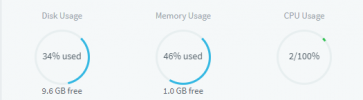
Deine knapp 10GB freier Speicher sind zu wenig für Debian 12 beim Upgrade.
 
Can you check the debian10to12.log file received by the admin when the update attempt failed? Search the word 'fail', from where you will see the reasons for this failed update attempted.
There is a concerning amount of mentions when you ctrl+f "fail". Most are repeating the same thing for different ports but the key values are: [33m====== [16:01:18] Failed: Output of ps aux[39m | kernel: pci 0000:00:15.3: BAR 13: no space for [io size 0x1000] | kernel: pci 0000:00:15.3: BAR 13: failed to assign [io size 0x1000] | systemd[1]: Failed to start nftables.
 
Deine knapp 10GB freier Speicher sind zu wenig für Debian 12 beim Upgrade.
How much will it need to run the update successfully? Can it be changed back to its original 15GB after the update is completed?
 
There is a concerning amount of mentions when you ctrl+f "fail". Most are repeating the same thing for different ports but the key values are: [33m====== [16:01:18] Failed: Output of ps aux[39m | kernel: pci 0000:00:15.3: BAR 13: no space for [io size 0x1000] | kernel: pci 0000:00:15.3: BAR 13: failed to assign [io size 0x1000] | systemd[1]: Failed to start nftables.
Search for "Upgrade Result:".
 
Search for "Upgrade Result:".
[33m====== [16:01:18] Upgrade Result: *******************************************[39m
{
"result": "aborted",
"time": "24-07-2024 16:01:18",
"title": "Unable to determine the PostgreSQL cluster version",
"message": "The script was unable to determine PostgreSQL cluster version. This may be a result of postgresql misconfiguration or service problem."
}
[31m[16:01] aborted: Unable to determine the PostgreSQL cluster version - 0[39m

WARNING: apt does not have a stable CLI interface. Use with caution in scripts.
 
Status
Not open for further replies.

Forum statistics

Threads
111,973
Messages
590,071
Members
164,892
Latest member
Phone1stStop