Your 3CX Debian OS failed to update

Status
Not open for further replies.

sonnyh1

SOHO User
Joined
Jan 18, 2023
Messages
112
Reaction score
16
Hi,
Currently runnung:
Product Professional Annual
Version Number 18.0 Update 9 (Build 20)
Debian 10 Buster (AWS)

Update is showing:
Version 20 is now available. Before upgrading, take a full backup of 3CX and save it outside of the instance. This upgrade will also upgrade Debian from 10 to 12.

When I try to update I receive the following error:
Your 3CX Debian OS failed to update
3CX Phone System Management Console ID: 10012

Thoughts / suggestions?
 
Can you please let us know how many CPUs your machine has?
 
Number of vCPUs 1
 
  • Like
Reactions: Evolute IT
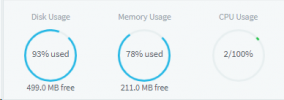
Also, not sure why my disk usage is high. I have deleted recordings.

1700608356324.png
 
You need a minimum of 2 CPUs and yes low disc space will also be an issue.
 
Ok, I will go to AWS and change the instance from t2.micro to t2.medium.
That will give me 2 CPUs and 4gb memory
 
Looks like my public IP changed, so I changed it in the admin console.
Took a while, but all phones / extensions seem to be connected.
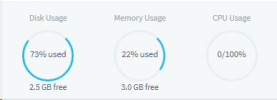
1700611782094.png
This looks better, but still getting
Your 3CX Debian OS failed to update
3CX Phone System Management Console ID: 10012
 
I'm having a similar issue, though for a different reason. I do have two CPU's on our Azure VM. I've completely rebuilt the VM and reinstalled the 3CX with Debian from the marketplace, updated to Build 20, and tried to do the upgrade. It fails every time, and the log "seems" to show the following cause:

Code:
"A third-party source list was found in /etc/apt/sources.list.d/: microsoft-prod.list. Please remove it and retry."

I did SSH into the VM and removed the microsoft-prod.list, but this caused all sorts of other errors during the upgrade, which led me to trash and rebuild the VM. But I'm back to a clean 3cx install, and this error comes right back. Not sure what to do.
 
Yes
 
Yes. As I said, I followed the instructions to the letter from the link you provided.
 

What to do if upgrade fails​

If the upgrade fails, check system requirements, fix and run again. If it still fails, you will need to do a full backup and restore to a new system

Ok, I setup a new instance on AWS per the directions, but how do I install the backup?
Do I have to setup a new 3cx system?
If I have to setup a new system it looks like I have to buy another subscription to get it started?
 
Last edited:
I've already read through all that, made sure the requirements are met. The only "iffy" thing is that it's on Azure which the page says, "Not Recommended." Well, we don't have a choice on that. Further the document says, "Number #2 - Source list has been edited". Well, I never edited the source lists. Not the first time, and not since I did a complete reinstall of the VM and 3CX from the marketplace. The updater fails because of "microsoft-prod.list" which seems to come with the Marketplace installation of Debian and 3CX.

So, what it sounds like to me is version 20 is simply not compatible with Azure...that is until 3CX creates a new Marketplace build and provisions it for Azure VMs. This is fine; the marketplace build is so out of date anyway that they really need to update it.
 
Azure which the page says, "Not Recommended." Well, we don't have a choice on that.
Sure you have a choice, I use ESXI dedicated server, cost is very low and all clients on one platform. When needed shut down the instance, re configure to the new specks turn back on. Down time 0.001%. Think about it, Azure is not the only solution, in fact it is " Not Recommended"
 
I am using AWS not AZURE.
Still to setup another instance of 3CX, I suppose i can go for the free and set it up to test. Then upgrade to PRO and restore from the original 3CX instance.
 
@sonnyh1
What was the pbx release and 3Cx licence you have tried to migrate V20?
Have been in failed scenario too and I did this 3 times on AWS so now I can do it nearly blindly
If you have a V18 backup that's ok to reinstall the same it was
 
Last edited:
I have 18.0 Update 9 (Build20) and trying to, as have others, to V20.
It keeps failing: Your 3CX Debian OS failed to update 3CX Phone System Management Console ID: 10012
I have increased 2 CPUs and 4GB for the V20.

I have been told, above that if it still fails that there must be something wrong with the original installation, and OS need to be reinstalled.
 
I have 18.0 Update 9 (Build20) and trying to, as have others, to V20.
It keeps failing: Your 3CX Debian OS failed to update 3CX Phone System Management Console ID: 10012
I have increased 2 CPUs and 4GB for the V20.

I have been told, above that if it still fails that there must be something wrong with the original installation, and OS need to be reinstalled.
Check the log received to the admin email for the failed update, then reference this guide: https://www.3cx.com/blog/releases/v20-beta1-upgrade/
 
  • Like
Reactions: illcsales
Status
Not open for further replies.

Forum statistics

Threads
111,972
Messages
590,062
Members
164,886
Latest member
784