




We did this poll 2 years ago, but we are keen to learn if the popularity of particular brands of IP Phones has changed. We would also like to know if you use 3CXPhone for Windows, iPhone or Android. Please let us know which IP Phones you use with 3CX Phone System: Do you use a VoIP Provider, Gateway or both? (polls) [...]

The powerful tool for creating voice applications for 3CX Phone System, the 3CX Voice Application Designer (VAD) allows you to record the audio of a call and store it as a file to disk. Sometimes, however, the default 3CX web server configuration can cause the recording of the file to disk to fail. This article explains why this happens and how to fix it. The Application Genera [...]

IMPORTANT: This device has been tested for Voice using Firmware Version Mobilink-IP-1.2.13-C2P-SDX Setting up the Topex Mobilink IP Insert a SIM card into the Mobilink IP by opening the simtray by pressing the small yellow button with (for example) a pen. Insert the SIM card in the tray and slide the tray back in. Also, ensure both antennae are connected to the device. Start up [...]
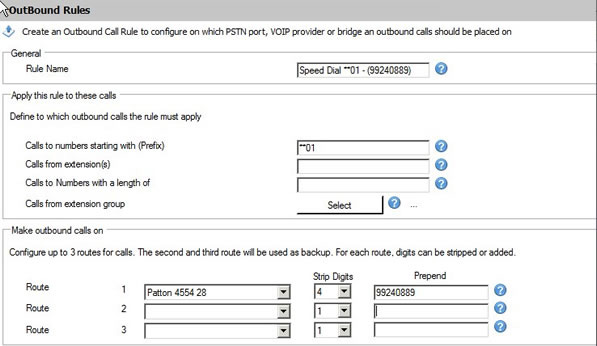
This step by step guide describes how to set up a speed dial, system based, using the "Outbound Rules" of 3CX Phone System. Open the 3CX Management Console and navigate to Outbound Rules. Click on “Add Outbound Rule”. Set the Outbound Rule as follows: Rule Name: "Speed Dial **01 – (Number)" Calls to numbers starting with (Prefix): "**01" Calls from Extensions: (use this only i [...]

3CX Phone System needs to be able to interact with services on the server where it is installed for proper functionality. In some cases, Anti-Virus software can stop 3CX Phone System from accomplishing this. This can cause certain issues where voice mails aren't recorded or saved properly. In this example we will configure AVG Internet Security 2012 so that it doesn't interrupt [...]

This article describes how to deploy "3CXMyPhoneDesktopComponents" via Group Policy Management Console in Windows Server 2008. Prerequisites Each client computer must have the following applications installed: Windows installer 4.5 or higher Microsoft .NET Framework 4 Extended (FULL) Microsoft Silverlight Visual Studio Tools for Office 2003/2007/2010. More information on VSTO i [...]
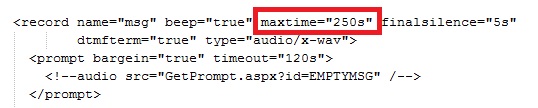
Introduction By default, 3CX Phone System has a limit of 2 minutes for callers to leave voice mails. However, there are many cases when people calling your company might want to leave voice mails that are longer than 2 minutes. This article will describe how to increase the length of a voice mail. Increase Voice Mail Length Log in to your 3CX Phone System Server. You will need [...]

This service is in deprecation state and will be replaced soon with Office 365 (azure) Sync. Below outlined guide only applies to Windows based Installs. 3CX Phone System has the ability to download all of your current user settings from your Active Directory Server via the LDAP protocol. All the user's data such as first and last names, mobile numbers, and email addresses will [...]
Installing 3CX Desktop components for 3CX MyPhone also installs a COM+ component that is used for communication between 3CX MyPhone and Windows. This is necessary to deliver features such as Hotkey support, stealing of focus, notifying external programs on incoming calls, and more. [...]
[...]
3CX Call Flow Designer (CFD), allows you to automatically send e-mails with or without attachments. In this article we'll show how to save the audio of a call to a file, and then send it as an attachment in an e-mail message. Step 1: Create the Project First, we need to create a new project. Open the CFD and go to "File" > "New" > "Project", select the folder where you w [...]

 Copyright © 2026