





Troubleshooting plugin errors in Outlook. What should you do when the plugin fails to load? There might be cases when the Outlook Add-in will not work. This guide will show you what you can do to enable debugging information in Outlook. This information will give more information on the error and will greatly assist 3CX Support. Step1. In Outlook 2010 go to "File" > "Options [...]
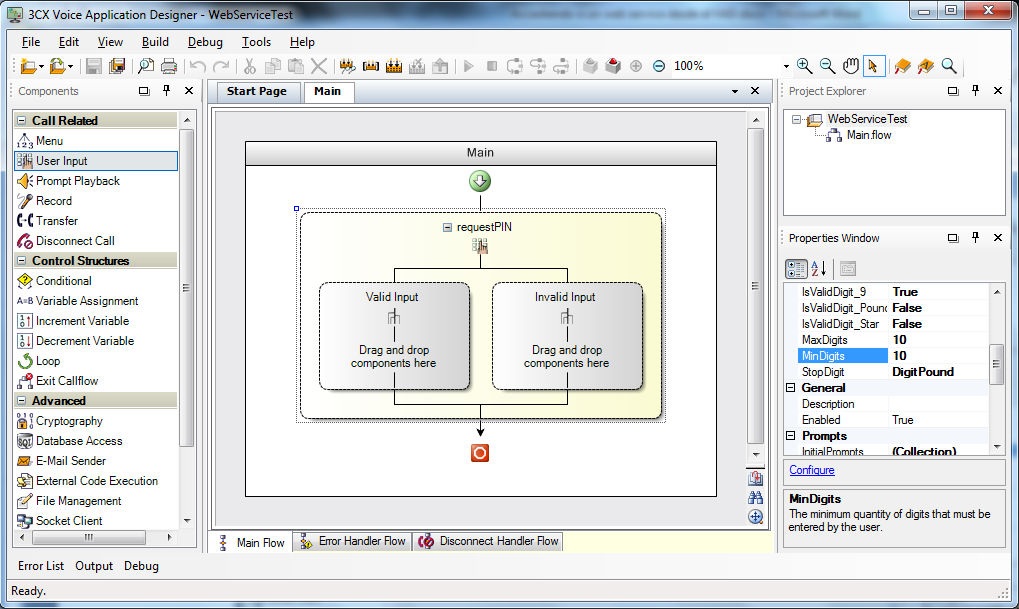
The 3CX Voice Application Designer allows simple access of web services. It is only necessary to enter the URI, the name of the web service to invoke and eventually the list of parameters to send. [...]
[...]
We have simplified the project configuration to successfully deploy it to 3CX Phone System. One of the improvements includes the support to deploy VAD projects to 3CX Phone System version 10. An incorrect configuration, however, may cause strange errors. Error During Deployment If we configure our project to be deployed to 3CX Phone System v11 and then we try to deploy it to 3C [...]
In this video, 3CX Partner, Kerry Garrison, shows you how to get 3CX MyPhone up and running in no time at all. 3CX MyPhone is a web-based utility that comes as standard with 3CX Phone System 10 and it allows you to: [...]
[...]3CX Partner Kerry Garrison from 888voip gives an overview of the features found in 3CX Phone System 10's user portal, 3CX MyPhone. [...]
[...]
Configuring DID with a VOIP Provider In some cases when you have a VoIP Provider with DID/DDI, you might encounter a situation when the VoIP Provider will not allow a call to go through. In the 3CX Phone System server activity log we can see the following message: "Review Invite and Adjust Source identification". You will need to configure the source identification section in y [...]

IMPORTANT: This guide is NOT a supported device. This guide is intended as a guideline only, and will NOT be updated. This test was performed using Firmware Version 01.00.04f04 and Bootware Version 00.91. These steps may not work for earlier or later versions of the firmware. Configuration is a 2 step process. First you need to configure 3CX Phone System for use with the GSM [...]
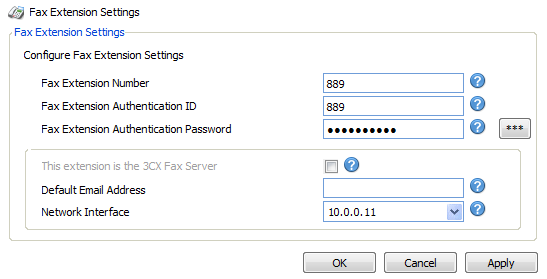
Important: This document was prepared and tested using GoldBolt FaxSkape Fax Server version 7.0 (Build 11307.5). If the GoldBolt FaxSkape Fax Server resides on the same machine as 3CX Phone System, you MUST ensure that this SIP Port is NOT THE SAME as the 3CX Phone System SIP Port. If this is the first time that the FaxSkape over IP is enabled, you must restart the GoldBolt Fax [...]

This guide describes how to configure an AlphaTech Door Phone (also known as Moshi Door Phones in the UK) with 3CX: Ensure you have created an extension in the 3CX Management Console which will be used for the door phone. It is recommended that for security purposes, you should disable outbound (external) calls for this extension. Open the IPDP door phone and view the back as p [...]
Purchasing a router may sound like a pretty simple task. This however can become somewhat challenging when VOIP comes into play. There a couple of core functions that your choice of router needs to perform so as to simplify your configuration for use with 3CX. Required Functionality for VoIP & 3CX Port Forwarding - The device must be able to handle port forwarding from WAN [...]

 Copyright © 2026