





JetPack CRM has been added to the list of 11 different 3CX developed and maintained CRM integrations that are easy and straightforward to set up. Perfect for any WordPress user, JetPack CRM is inexpensive and can be set up directly from the WordPress interface. Features include click2call straight from the CRM interface and journaling of calls and chat conversations. Check out our easy-to-follow JetPack server-side integration manual.
Call & chat journaling
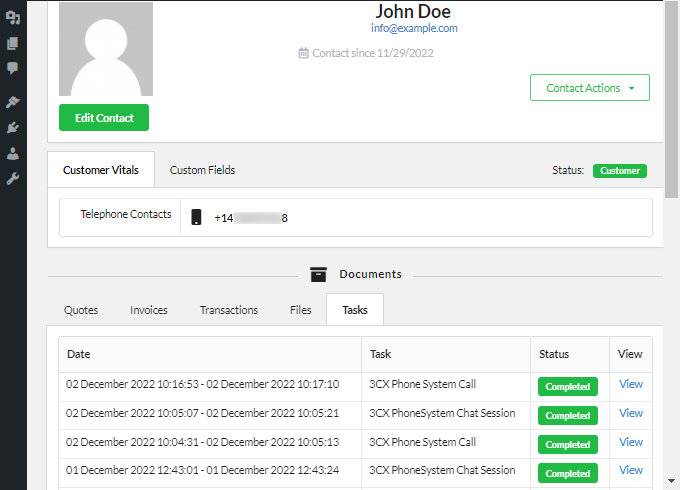
Keeping track of customer interactions is key to making sure that agents are fully aware of all customer calls, and chat sessions. By setting up the server-side 3CX integration, JetPack users can quickly check a contact's full history.
Personalized greetings with contact sync
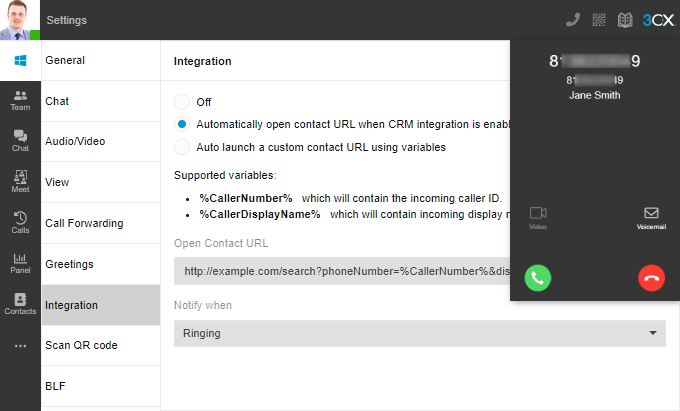
Answering a customer's call by greeting them by name will surely make them feel valued. Setting up contact sync between 3CX and Jetpack means that when a call is made or received, a ‘lookup’ is carried out to add the details to the 3CX directory. Web Client and Desktop app users can navigate to Settings > Integration to opt for the customer CRM record to be opened automatically.
How to get JetPack on WordPress
- Log in to your WordPress admin panel, navigate to ‘Plugins’ and click “Add new”.
- Search for ‘Jetpack CRM’, click “Install” and then activate the plugin.
- Once activated, navigate to “Core Modules > API” and click “Activate”.
- Now navigate to “CRM Settings” and click to expand the API section.
- Click to generate the API credentials and copy the API ‘Key’ and ‘Secret’.
- Finally, navigate to “Settings > Permalinks”, select ‘Day and name’ and then click “Save Changes”
Now you can proceed to follow the steps outlined in our Jetpack server-side integration manual.
With our CRM Wizard, any REST-API-supported system can be integrated with 3CX so that contacts can be matched and journaled.
Don’t forget to let us know what you think in the community forum and vote for JetPack to build a 3CX Live chat extension.









 Copyright © 2026