





If the Media Server needs to allocate a port for media transmission, and cannot bind, it will generate a log message such as:
MediaServerReporting:InitEndPoint [MS003003] C:179.1: RTCP socket 10.0.0.173:7023 binding failed with error code 10048
This is due to some other application already binding to some ports in the 7000-7499 range. This is typically due to the Microsoft DNS . To check which ports are bound at any point in time, you can run the following command from the DOS prompt:
netstat -ano -p UDP
Microsoft Windows allows you to define which port ranges will NOT be returned to any application/service that requests a random port number, via the following registry entry:
HKEY_LOCAL_MACHINE\SYSTEM\CurrentControlSet\Services\Tcpip\Parameters\ReservedPorts
To ensure correct functionality, you should add the following ranges, without removing whatever the value already contains:
- 5000-5100 - Management Console, FAX Server, SIP Port for 3CX PhoneSystem and Tunnel Ports, Other 3CX Components
- 7000-7499 - 3CX Media Server (RTP) – LAN audio/video/t38 streams
- 9000-9099 - 3CX Media Server (RTP) – WAN audio/video/t38 streams
- 40000-41000 - Conference, IVR, Parking Orbits
Screenshot for example purposes. Ports in the screenshot are not correct ports:
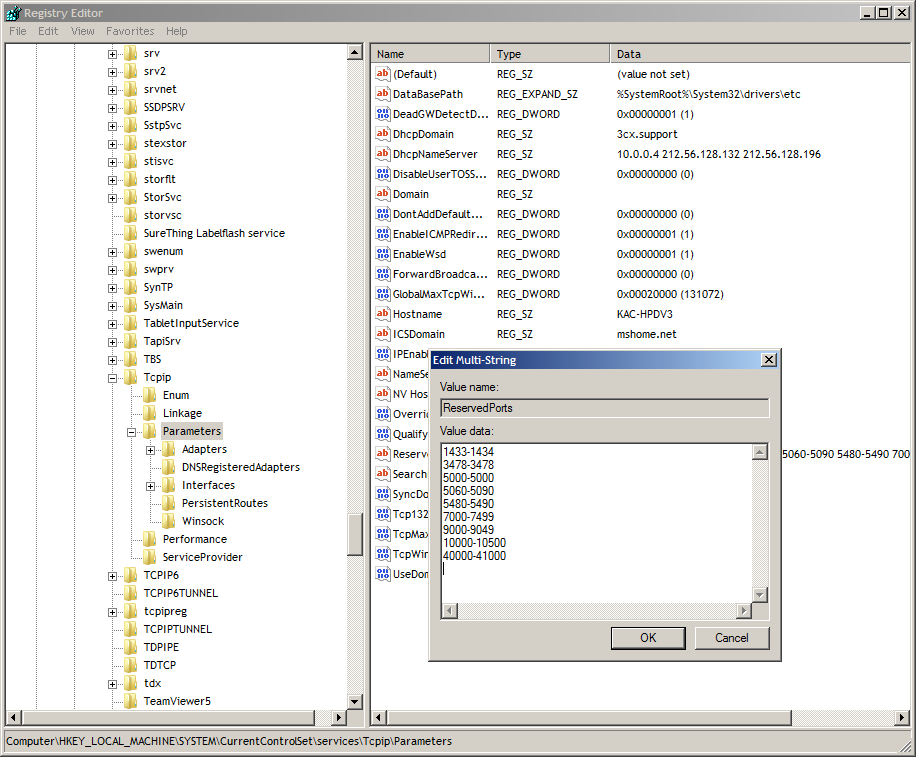
For more specific instructions regarding this registry entry, refer to: https://learn.microsoft.com/en-US/troubleshoot/windows-server/networking/reserve-a-range-of-ephemeral-ports









 Copyright © 2026