





Optimization strategies for effective deployment of the 3CX Customer Service AI agent.
The 3CX Customer Service AI Agent in V20 Update 10 can answer routine questions, collect information, guide callers through basic troubleshooting and hand calls to a human when needed.
Where you place the AI Agent in your call flow will depend on the type of support you want it to handle. It can either act as the first point of contact - supporting callers when human agents are unavailable - or answer general questions before transferring the call.
Before you deploy it, decide what the AI Agent should handle, what information it needs and where unresolved calls should go. Read on to learn more.
Plan the Customer Service AI Agent Around Your Call Flow
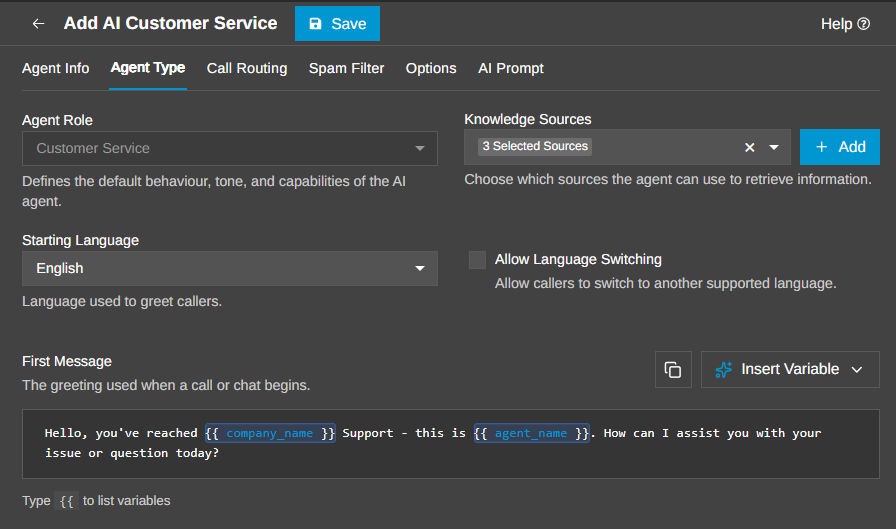
A good setup starts with a clear role for the AI Agent. Before deployment, decide:
- How do calls reach the AI Agent?
- What questions or tasks should it handle?
- Which Knowledge Sources should it use?
- Where should calls go when human help is required?
- Which escalation topics need a specific destination?
Keep the role focused so conversations stay clear and useful.
For most workflows, the aim should be to resolve the caller’s question or reach the correct handoff within a short interaction. Update 10 also allows AI Agents to perform web searches when enabled, giving them another source of information when answering callers.
Read the AI Customer Service Agent configuration guide for setup details.
Use AI Before or After the Human Queue
The Customer Service AI Agent can sit at different points in a call-centre workflow.
Use It for First-Line Support
As a first-line support option, the AI Agent can handle routine requests before a human agent becomes involved.
- Provide contact or support information
- Tell callers which documents or information they need before speaking to an agent
- Guide callers through basic troubleshooting steps
- Gather details about the issue before routing the call
- Send the caller to the most appropriate human destination when required
This gives human agents more context before they take over and leaves them more time for calls requiring specialist help.
Use It for After-Hours and Queue Overflow
The AI Agent can also provide an additional support option when human agents are unavailable or queues are busy. It can:
- Answer routine questions after hours or during holidays
- Give callers an alternative to waiting in a long queue
- Attempt to resolve the request before handing it back to a human queue
- Take over simple information requests from a human agent when no further human input is required
If the AI Agent cannot resolve the issue, Human Handoff can send the caller to the configured destination. For more complex setups, one AI Agent can identify what the caller needs before routing the call to a more specialised AI Agent or human queue.
Answer General Enquiries Before Transfer
The Customer Service AI Agent is not limited to traditional call centres. It can also act as a knowledgeable first point of contact for organisations such as schools, medical centres, warehouses or multi-site businesses. For example, a retail business could use the AI Agent to:
- Route callers to the correct location
- Give directions or opening information
- Answer questions from product catalogues
- Provide approved product, nutrition or allergy information
- Transfer the caller to a member of staff when more help is needed
The same approach can be adapted to other organisations. Give the AI Agent the right knowledge sources, define what it should answer and set a clear handoff destination for questions requiring a person. This lets callers get useful information immediately while keeping human teams available for more complex requests.
Start With a Focused Use Case
Start with a clear use case, give it the information required for that role and decide what should happen when the request falls outside its scope. The Customer Service AI Agent works best when it has a defined job. A practical first deployment could be:
- Routine first-line questions
- Basic troubleshooting
- Queue overflow
- After-hours enquiries
- General information before transfer
You can then expand the workflow as you learn which calls the AI Agent can handle effectively.
Join the Discussion
Join the 3CX discussion in our dedicated Partner or Customer Forums. Follow us on X and LinkedIn to stay-up-to date on latest news and feature releases.









 Copyright © 2026