





Have you upgraded to v16? And do you have an Office 365 account? Well then, read on to try out the updated Office 365 integration module and test-drive syncing users, personal contacts and 3CX extension statuses based on calendar entries:
- Office 365 users to 3CX extensions. Keep it simple, keep it tidy: No need to separately manage two systems and create Office 365 users as extensions in your 3CX Phone System. With the updated integration module in v16 your Office 365 users get updated as 3CX extensions in near-real-time!
- User personal contacts from Office 365 to 3CX phonebooks. Enable your users do more with the 3CX apps: Syncing their personal contacts from Office 365 with their 3CX phonebooks, lets them have the best of both worlds. They manage their contacts through Office 365 and call their synced contacts directly from the 3CX apps!
- 3CX users’ status based on their Office 365 calendar. Your own personal assistant: The new 3CX Office 365 integration syncs user calendar entries with their 3CX status and automatically switches forwarding profiles according to their schedule. Free your users’ hands with the Office 365 calendar to status sync!
See the Office 365 integration guide and get in sync!
Under the Hood
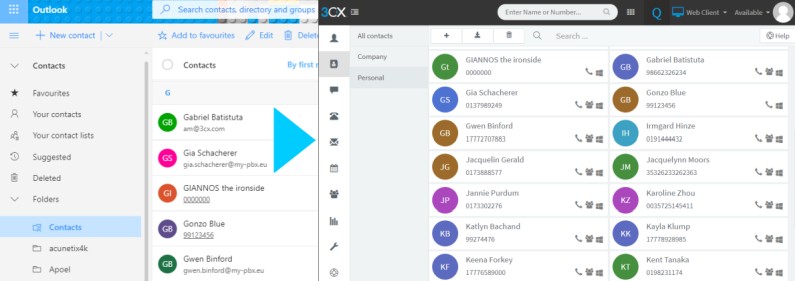
The 3CX v16 Office 365 integration module makes use of the Microsoft Graph API (Application Programming Interface), to securely access your account via REST (REpresentational State Transfer) calls and keep 3CX in sync in near real-time. Access security is handled through fine-grained, read-only app permissions to your Office 365 account data, granted to your 3CX install using standards-based OAuth protocols and public key cryptography. In this way, access can be revoked when and if needed, with no further syncing of data from your Office 365 account to 3CX.
Requirements & Known Issues
- Connectivity of 3CX host with the Office 365 service is required, for Office 365 changes to be broadcasted in near real-time to 3CX.
- Even when connectivity is not ensured, 3CX still performs a daily synchronization during off hours.
- The sync mechanism is one-way, from your Office 365 account to 3CX.
- Deleted or updated Office 365 synced users via the 3CX Management Console, revert to the prior state upon the next ad-hoc or nightly sync interval.
- The 3CX v16 integration module supports Office 365 Business (Business Premium, Business Essentials) and Enterprise (Enterprise E1, E3, E5) accounts with Exchange and a login with “Global Administrator” privileges.
Experience the power of integrating your Office 365 account with 3CX by upgrading to 3CX v16.
Download links:
- Windows: 3CX v16
- Linux: 3CX v16 on Debian 9 ISO - choose “Stable” on the “3CX Update Channel” screen.









 Copyright © 2026