





It is no secret that 3CX has been working very hard on developing and creating the coolest and most feature-rich, real-time live chat software out there. That journey has now brought even more features with the recent release of Version 18, Update 5. So let’s dive into those chat customization features in more detail.
It couldn't be easier to set up
Users signing up for StartUP will already be familiar with setting up their live chat configuration and chat widget, as it is included in the registration wizard. If you already have 3CX and want to add live chat to your website, the process is as simple as 3 steps:
- Create your chat window configuration in the 3CX admin panel
- Customize your chat form and chat window settings
- Enable it on your website and see customer service instantly improve
Our live chat guides are tailored for all users no matter if they are running StartUP or have a dedicated instance.
Match the styling of your site
Your choice of customer information
By offering multiple options, the pre-chat survey can capture certain visitor information such as name & email address. Agents can view this information in the live chat contact information shown when selecting 'Information' in the 3CX client. This information can then be used to send information or follow up on any potential customer interest.
Fully customizable colors
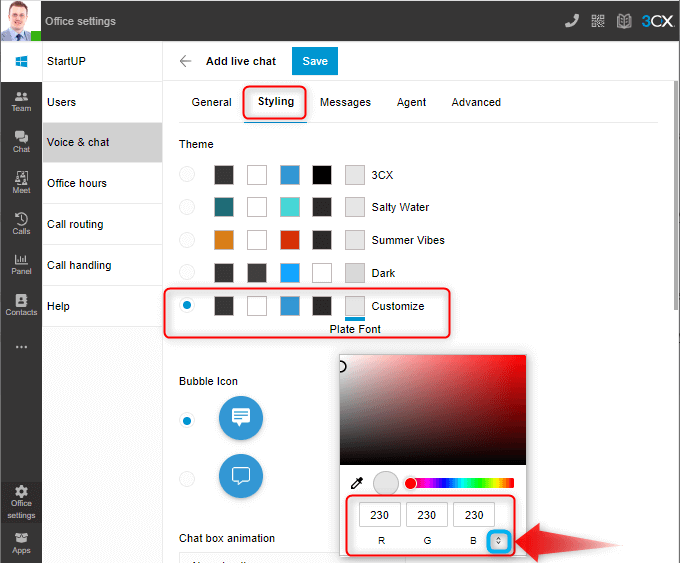
Website themes are so varied and different these days, placing a chat bubble on your site that has completely different colors can really look bad. That is why the new 3CX live chat styling offers 4 template color schemes but also a fully customizable option. Text color, background color, chat icon color, and welcome screen colors can all be customized. You can use the color picker or enter your RGB, HSL, or HEX codes. In order to swap between the code options, click the up/down arrow highlighted in the blue box. This means that no matter what information you have, you will be able to match the styling of the bubble to your brand identity.
Choice of bubbles

We believe that your live chat is just that…YOURS. That is why we are working hard to bring as much customization to your fingertips as possible, including the chat button that your live chat widget shows. Update 5 now offers the choice of 3 different bubble icons.
Fancy yourself as an animator?
If a career with Pixar is not on the horizon, how about setting up some animation for your live chat box? Choose from 4 animation options
- Slide up
- Slide from the side
- Fade in
- No animation
Your bespoke greetings avoid that “generic” feel
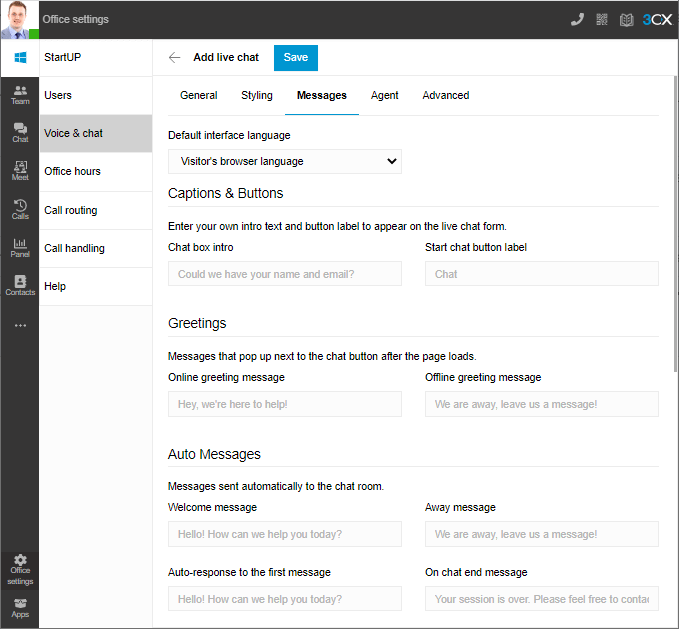
Sometimes live chat greetings can feel very ‘stale’ or ‘robotic’. At 3CX, we try to buck that trend with our default greetings but at the same time, we also know that everyone is different. So that is why you can now set up your own welcome message and other greetings that are triggered at different stages of a conversation. Depending on the tone of your website content, you can adjust the greetings to match your style of writing.
Protect your agent's identities

Not every company wants to allow a customer support agent's name to be displayed to the website visitor for fear of any repercussions. The solution to that is that a ‘default agent’ can be set up so that the visitor only sees the name as 'support team' or whatever you decide to set it as. This has far-reaching benefits including creating live chat instances for groups of users.
For example, you could create a separate live chat configuration that only appears on the support page of your website. The default agent name and avatar (e.g company logo) can be set accordingly. Then on the ‘new products’ page of your site, set up another live chat configuration which is directed to the sales team. The default agent name would be set as ‘Sales Team’ or similar.
Note: If no agent avatar image is used, the 3CX default image will be shown to the live chat window.
Ticks the compliance box
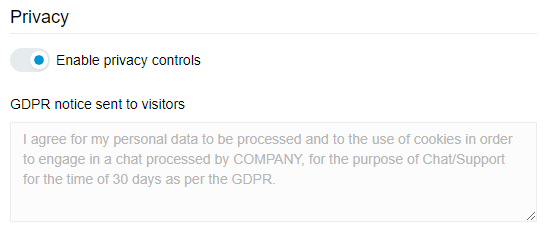
Ok ok, don't fall asleep! When someone starts talking about ‘compliance’ many will switch off, so we will keep it short. If your organization comes under the jurisdiction of Europe's GDPR laws, when customizing your live chat, click on the ‘Advanced’ tab and set up the privacy control. Customize the message. Job done.
Get live chat styling today!
Boost your lead generation for free and check out our live chat guide to help walk you through getting your live chat set up in no time.









 Copyright © 2026