





With the full release of Update 5, 3CX has taken yet another massive leap forwards in becoming the best multi-channel team communication system on the market. WhatsApp Business integration makes it super easy for customers to get in touch via yet another means of communication. Let's take a look at the integration in more detail and see what features and benefits it will bring you.
1, 2, 3, 4, and now 5 channels of communication
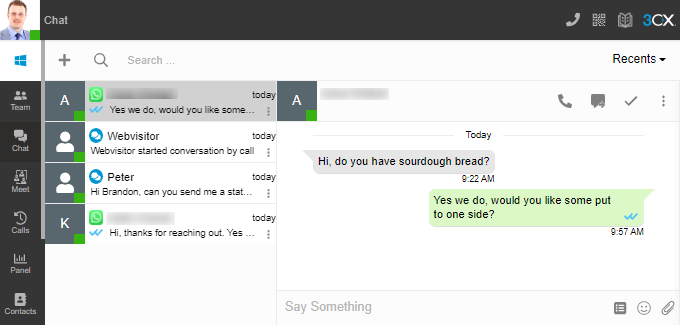
As customer expectations and requirements evolve, so must the organizations that serve them. It is with that in mind that 3CX has developed a simple and easy way to integrate WhatsApp into your contact center solution. Now, customer support can be obtained via a single 3CX interface using traditional phone calls, video, live chat, SMS/MMS, and WhatsApp messenger. This means that your agents or users will not have to navigate between multiple screens or apps to reply to customers.
Work together as a team
With 3CX WhatsApp Business integration, you’re not tied down with one person responding to incoming messages on a device - every single one of your users has the ability to reply to incoming messages. Or better still, you can route the messages to specific groups of agents, based on department or skill-set. That is huge!
What this means in the real world
Imagine an example, a contact center of 50 agents wants to add WhatsApp Business to the methods clients can get in touch with.
Initial setup
If they were using the WhatsApp Business app, only 5 agents would be able to respond to messages. This is due to the device limitation of 4 web browsers + 1 physical handset. Additionally, getting them set up can be very tricky as you need the physical phone handset to scan a QR code on another device’s browser to link the account. Imagine you have a distributed workplace like so many are these days with agents spread around the country and globe. The provisioning process of getting additional devices added is a headache.
In conversation issues
What happens when a customer asks a question that needs deeper insights not held by the responding agent? Well, that agent would then need to have an internal conversation with another more skilled agent to get the information to then pass onwards again. But wait, now the client asks a follow-up question. So the internal conversations continue. Wouldn't it be so much better if the original agent was able to just transfer that chat conversation including all of the previous transcripts to the higher-skilled agent?
Agent cover is a consideration
How about if your delegated ‘WhatsApp messenger’ agents are sick or on holiday? It could be a channel of communication that is neglected causing customer frustration at the lack of reply. Managers would need to ensure the physical phone device is available to scan the QR code of another agent's browser so that they can cover the gap in staffing levels. Let's not even think about the possibility of an agent accidentally taking the physical phone with them on holiday. You are completely stuck.
The 3CX solution
Initial Setup
That example is not even a consideration if you use the 3CX integration. There is no issue with the setting up of devices or agent limitations as the configuration is set up centrally on the 3CX system. Then users are easily added to the 3CX system via a welcome email meaning that there is no requirement for a physical phone to scan browser QR codes. 3CX mobile apps can be downloaded from Google Play and the Apple app store.
Simplify your contact information by receiving WhatsApp messages on your existing company's main phone number. It's a simple process of adding the number and verifying it via a phone call. This will really impress your customers and present that company image that you have worked so hard to build.
In conversation features
WhatsApp messages can be delivered to a group of users/agents for making sure the customer gets a quick reply. Once more information has been requested, an agent can use a simple ‘Transfer’ option to send the conversation to another agent.
In further releases of 3CX version 18, an agent will be able to transfer the chat to a group of agents who will all then be able to respond to the conversation and then take ownership of the chat if needed.
By setting up this integration, it means that you are taking the few benefits of WhatsApp Business and adding a whole heap of other features on top. That is truly awesome team collaboration.
Agent cover...SOLVED!
With zero reliance on a physical handset or WhatsApp web, managers and administrators can easily add and remove agents in queues that deal with WhatsApp messages. Larger businesses will not feel the pain of having to provision agents using the QR code method on a physical handset. Agents can respond from any of the 3CX clients including the mobile app making responses while out and about, possible. Customer service levels will not be affected and potential customers will get the best experience possible.
Ease the audit process and get automated reports
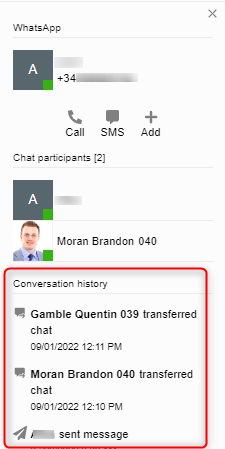
Keeping tabs on the customer experience can be incredibly important when you are adding another channel of communication to your system. WhatsApp is no different. With 3CX, a conversation panel can be expanded to show a history of when the chat was initiated by the client, which agent took ownership of the chat, and then any details about the conversation being transferred.
3CX dedicated customers have access to a full chat history via the Management Console (Navigate to ‘Reporting’ > ‘Chat Logs’) so any checks that need to be made can be done so easily.
But it doesn't stop there. 3CX offers additional advanced features such as integrating your 3CX with a supported CRM system. Your chat conversations can instantly update existing client records or create new ones if there is no contact match existing.
It's not just about the content of a conversation that might need to be trackable but also how the conversation performed against SLAs. By integrating WhatsApp with 3CX, there are 3 dedicated reports that can tell managers how the chat was dealt with by the agents. These are
- Queue chat performance
- Queue agent chat statistics
- Abandoned chats
The first two reports are especially useful as they will show how quickly chats are responded to and if any particular agent may be struggling with achieving quick responses.
One of the best things about setting up 3CX reports is that you can schedule them so that they automatically appear in your email inbox as often as you configure them.
How to get it set up
Setting up the integration does require a WhatsApp business account and a Meta developers portal account. Don't let the name 'developers' worry you, there is no coding required to set up the integration.
Step 1: Create your WhatsApp application & add a WhatsApp number
Step 2: Set up an admin role
Step 3: Generate a 'token'
Step 4: Configure in 3CX
Step 5: Configure a webhook
The steps are easy to follow and fully documented in our WhatsApp integration guide.









 Copyright © 2026