





Compare built-in AI Agents, PBX-local Call Scripts and externally hosted Programmable Extensions.
Want an AI receptionist to handle incoming calls? An AI Agent that follows your own call routing rules? Or a custom AI voice application that connects to your business systems?
Not every business needs the same level of AI customisation. Some want a solution they can configure directly in 3CX. Others need more control over how AI handles conversations or integrates with existing applications.
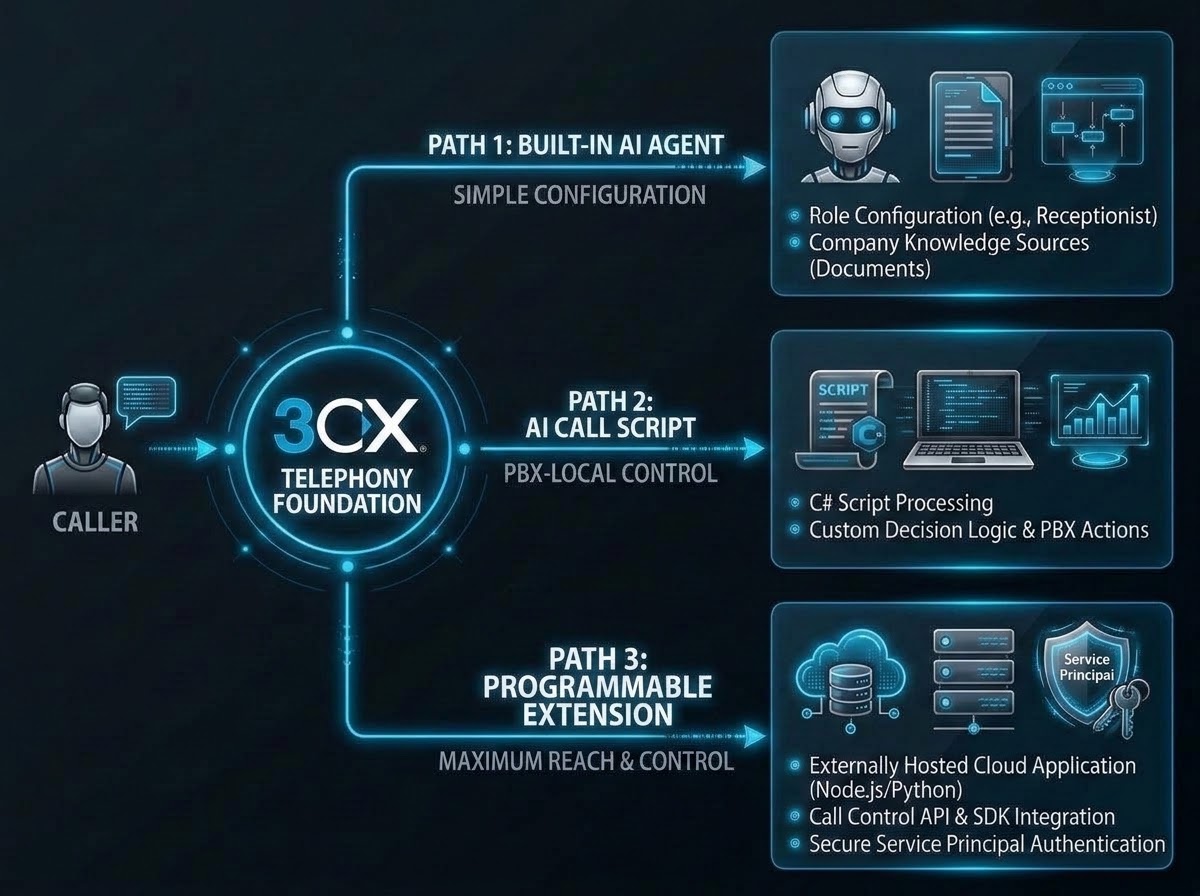
With V20 Update 10, 3CX offers three ways to add real-time AI Voice Agents to your phone system:
- Built-in AI Agents - configure an AI Receptionist, Personal Assistant or Customer Service Agent directly in 3CX.
- AI Call Scripts for OpenAI, Google Gemini and xAI Grok - customise how AI handles calls using scripts that run on the 3CX Server.
- Programmable Extensions - build and host your own AI voice application, connected to 3CX.
All three use 3CX for telephony and call routing. The difference is how much you want to configure, customise or develop.
Let's look at each option and when to use it.
Path 1: Built-In 3CX AI Agents: Fastest Route to Production
Built-in AI Agents are the best starting point when the required job already matches a 3CX role. Administrators can create a Receptionist for basic handling and routing, a Personal Assistant for screening a user's calls, or a Customer Service Agent that answers questions from company Knowledge Sources and escalates when necessary.
The administrator selects the agent type, extension, DIDs, departments, language, voice, welcome message and permitted Knowledge Sources. Depending on the role, 3CX exposes topic routing, name-based transfers, call screening, spam rules, failure handling and availability checks.
For customer service, Human Handoff supplies a safe default when the agent cannot resolve an issue or the caller asks for a person. Escalation Topics can send specific needs to users, queues or another specialised Customer Service Agent. This is the lowest-code option and the clearest choice when 3CX's built-in controls already describe the workflow.
Choose this path when: Your requirements are covered by the built-in Agent roles and you want to manage everything through the 3CX Admin Console.
Read our AI Agent Configuration Guide to get started.
Path 2: AI Call Scripts: PBX-Local Flexibility
New in 3CX V20 Update 10, an AI Call Script is a C# call-processing script that executes at a route point on the 3CX Server. It is not a built-in AI Agent profile with role-specific configuration and Knowledge Sources, and it is not a separate extension or externally hosted application. You add the provider-specific script from the Call Script store, configure its PBX parameters and route calls to it. Its code defines the prompt, permitted directory visibility, registered tools, transfers and fallback destination.
A practical example is an after-hours receptionist with a tightly defined prompt and custom decision logic. It can identify the caller's request, search only the contacts visible to its department, transfer to an approved destination, or fall back when the AI service is unavailable.
This places Call Scripts between the other two options: more code-level freedom than a built-in Agent, but without the Service Principal, Node.js host and separate deployment required by a Programmable Extension. Your team owns the script logic, provider parameters and testing, while execution stays inside the PBX. It suits focused call flows where custom call-processing logic and a small set of controlled actions make the difference.
Choose this path when: You need custom AI call handling and want the logic to run directly on your 3CX Server.
Read more about AI Voice Agents using Call Scripts.
Path 3: Programmable Extensions: Maximum Reach and Control
Also new in 3CX V20 Update 10, a Programmable Extension is an external application that connects to the PBX and operates like a native extension. Unlike a Call Script, its code does not execute on the 3CX Server and it is not installed from the Call Script store. The application runs on infrastructure you manage, authenticates through a 3CX Service Principal, and uses the Call Control API and SDK to receive calls, stream audio and control routing.
The split is deliberate: 3CX continues to provide telephony, trunks, DIDs, extensions and routing, while the external application manages its realtime AI connection and application logic. It can use the 3CX MCP endpoint and additional MCP servers for calendars, CRMs or other systems. Your team therefore owns the Node.js runtime, provider credentials, network access, deployment and monitoring. It is the strongest fit when the solution needs external services, broader application logic or an independent development lifecycle.
Choose this path when: You need greater control over the application, want to integrate with external systems or prefer to manage AI development independently of the PBX.
Follow our Programmable Extensions Guide to build your own AI voice application.
Which Option Is Right for You?
The right approach depends on what you want your AI Voice Agent to do and how much development you're prepared to manage.
- Start with built-in AI Agents if you want to answer calls, handle routine questions and route customers without coding.
- Use AI Call Scripts if you need more specific call handling rules while keeping the script running inside 3CX.
- Choose Programmable Extensions if you want to build an externally hosted AI application with your own integrations and business logic.
Whichever approach you choose, 3CX provides the telephony foundation, so you can focus on how AI should handle calls rather than building a separate phone system.
AI Call Scripts and Programmable Extensions require V20 Update 10 and 3CX AI Edition, together with suitable AI provider credentials.
Join the Discussion
Join the 3CX discussion in our dedicated Partner or Customer Forums. Follow us on X and LinkedIn to stay-up-to date on latest news and feature releases.









 Copyright © 2026