Feature not available. Professional or Enterprise license key required. Contact your administrator

Alexp

Free User
Joined
Mar 21, 2023
Messages
5
Reaction score
0
Hello,

Need assistance with an issue on new 3CX system.
Outbound calls are working correctly, but inbound calls fail. When calling the caller hears the following announcement:
"Feature not available. Professional or Enterprise license key required. Contact your administrator."

System is running with the following license:
3CX Basic Edition
4 Simultaneous Calls (4 SC)
License is active and valid.

Since 3cx using a Basic Edition license, I need to know which configuration or feature is causing this message? and disable it
 
Is your DID pointing to a queue or something like that?
 
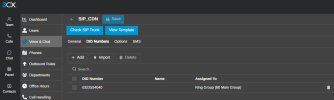
No, the DID is not pointing to a queue. As you can see in the attached screenshot, the DID 0322554040 is routed directly to Ring Group (80 Main Group), which should be fully allowed on our Basic Edition license.

Since the main route is pointed to a standard Ring Group, what else in the call flow could be triggering the "Professional or Enterprise license required" message?Screenshot 2026-07-17 155601.png
 
No, the DID is not pointing to a queue. As you can see in the attached screenshot, the DID 0322554040 is routed directly to Ring Group (80 Main Group), which should be fully allowed on our Basic Edition license.

Since the main route is pointed to a standard Ring Group, what else in the call flow could be triggering the "Professional or Enterprise license required" message?View attachment 52058
Do you have any call script setup? Was this always a Basic license?

If so, try simply refreshing the license then reboot.
 
I previously had a 3CX system associated with this account that had been running for approximately five years with a Pro license. Due to a two-month delay in renewing the license, all data was deleted. I have since rebuilt the system from scratch. There are no call scripts configured.
I also refreshed the license and restart using the circular arrows icon in Admin > System > License, but the issue still persists.
 
What is the default route of your trunk?

And what happens if you route the DID to a user extension. Do you still get the audio prompt?
 
Hello,

The default route of the trunk is set to a single User

I routed the DID directly to the same User in Call Handling and called it, but I still hear the exact same audio prompt: "Feature not available. Professional or Enterprise license key required."
 
Ok so it should not be related to the trunk.

Any forwarding rules for this user?

I assume you get the same audio prompt if you try to call this user extension from another internal extension?

Do you use the web client? And if so have you given the notification permissions?

My current guess would be that you call and the extension somehow is unreachable maybe missing permission inside the browser or state changed to something different.
Than the forwarding rules of the extension kick in and these are forwarding to something that is not supported with the basic license.

Hope this helps to pinpoint the cause of the audio prompt.
 
Thank you very much. I'll try everything you suggested, but now I have a small problem. I can't log in to the admin dashboard because I lost my password. I'm trying to recover it, but I'm not receiving any emails after requesting a password reset. I've tried many times, but still nothing. Who can help me solve this problem?
 
@Alexp

When you try to reset the password for a different extension, do you also fail to receive the password reset email?

Have you configured an SMTP server other than the default 3CX SMTP service?

Please verify that outbound access to the following SMTP service is allowed:
  • Host: mailproxy.3cx.com
  • Port: 443
  • Protocol: TCP outbound
Also, confirm that the system is using Google DNS servers:
  • 8.8.8.8
  • 8.8.4.4
At the beginning of this thread, you mentioned that a 3CX system had been associated with the same account for approximately five years and was later deleted. Are you completely certain that the previous system was fully removed and is no longer active?

I am asking because having two active systems using the same license could explain why the “Feature not available” announcement is being played.
 

Members Online Now

Forum statistics

Threads
111,831
Messages
589,277
Members
164,660
Latest member
RJenkinsROCK