- Joined
- Oct 26, 2017
- Messages
- 60
- Reaction score
- 13
Hello All,
Running 3cx v18 sp 1 on debian 10 hosted in AWS. We have 3 extensions that can not login to the call queues. One being mine own ext. I have tried the following
1. Updating to SP 1 last night, still fails.
2. Logged off any applications I was logged on with my extension number , removed myself from all the call queues, Add myself back to 1 queue. Restarted and update to the new windows app and test, still fails to login.
3. Closed the Windows app and tested from the webclient and test in the android app. Still fails to login to the queue.
For the option of logging in to the queue, tested using the Q button in the cell app, In the webclient>top left click person icon and select login to queue. and it switches to log out of queue - but fails. This option will toggle from login to log out but has no affect
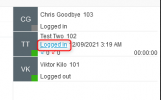
Next option was open the Panel click on the Queue and click Login OUT OF QUEUE - has no effect - it DOES NOT switch to Login to queue like other extensions - stuck on Logged in. I can change the status of other extensions, but not mine or the other 2 ext that are stuck.
Thanks
Clint
EasyIT
Running 3cx v18 sp 1 on debian 10 hosted in AWS. We have 3 extensions that can not login to the call queues. One being mine own ext. I have tried the following
1. Updating to SP 1 last night, still fails.
2. Logged off any applications I was logged on with my extension number , removed myself from all the call queues, Add myself back to 1 queue. Restarted and update to the new windows app and test, still fails to login.
3. Closed the Windows app and tested from the webclient and test in the android app. Still fails to login to the queue.
For the option of logging in to the queue, tested using the Q button in the cell app, In the webclient>top left click person icon and select login to queue. and it switches to log out of queue - but fails. This option will toggle from login to log out but has no affect
Next option was open the Panel click on the Queue and click Login OUT OF QUEUE - has no effect - it DOES NOT switch to Login to queue like other extensions - stuck on Logged in. I can change the status of other extensions, but not mine or the other 2 ext that are stuck.
Thanks
Clint
EasyIT