3CX App PWA auto switches from phone to dect

Alle CTEC

Silver Partner
Advanced Certified
Joined
Sep 11, 2023
Messages
366
Reaction score
47
I have a client using the 3CX PWA application in a Terminal Server environment. The user has an Snom D735 desk phone with a Jabra headset and an Snom M25 DECT cordless handset (paired with an M900 base). The user suddenly called me reporting that they could no longer transfer calls. They use the headset to answer and transfer calls via the application. I noticed—inexplicably—that the PWA application had switched control to the DECT handset. Consequently, when the user answers, the audio comes through the headset (which is odd, as it should be coming from the DECT handset), and subsequently, they are unable to transfer the call. Resetting the phone resolves the issue, and everything works perfectly.
 
Hello,

Can you please clarify some details, so we can be sure we are reading the post correctly?

The Jabra headset, is it connected to the PC/PWA or to the D735 desk phone?

Resetting the phone; this refers to the D375, correct? A reset is to restart the phone, reprovision the phone, or simply choosing it again in the PWA as the call device?
 
Hello. The user is working via a remote desktop terminal server using a PWA application. They have an Snom D735 desk phone with a Jabra headset connected via both the headset port and an optional Jabra AUX accessory. The PWA application is not configured as a softphone itself but controls the Snom D735. Since the user also has an Snom M25 DECT handset (with M900 cells), the application inexplicably switches at random to controlling the DECT handset instead of the Snom D735. In this state, the app controls the DECT unit—meaning the call is handled via the DECT handset rather than the desk phone. If I click "Answer," the call is answered on the Snom D735; if I put a call on hold, it works; however, if I try to transfer a call, it fails—instead, a second call starts that is not linked to the original one. Resetting the control setting back to the desk phone restores normal operation.

I assume that, for some reason, communication between the application and the phone is lost, causing the PWA to automatically switch to DECT; however, I do not understand why it continues to work partially on the D735 but not on the DECT.

Thanks
 
Too much confusion, let's separate the issues and address them one at a time :)

1. Headset: lets ignore this because its not connected to 3CX. Unplug it from the phone while you are testing to make life easier as you troubleshoot. You can always add it back later. Otherwise it just adds to the confusion in the description.

2. Transfers: Either user the D735 itself directly or use the client - do NOT press buttons on both during the same call. Choose one or the other and stick with it.

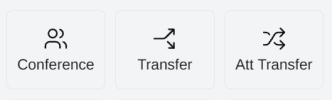
The client's remote control mode has a limited list of functions:
Here hold/unhold is not supported.
So you cannot return to the caller, only these are available during a call:
1791806456309.png
Otherwise a second call starts that is not linked to the original one.
If you want more flexibility use only the D735 physical phone buttons.

3. Preselected device: Sometimes it will be the M900 and other times it will be the D735. It depends which one registered first. It also depends if one goes offline briefly, the client will switch to your next available device (M900).

Does the specific user need a complex setup with D735 + headset + DECT + client in terminal server?
 

Latest Posts

Forum statistics

Threads
112,225
Messages
591,372
Members
165,308
Latest member
zafran