3CX failed to establish a TCP connection to activate.3cx.com

Status
Not open for further replies.

mynetsupport

Free User
Joined
Mar 14, 2023
Messages
3
Reaction score
0
Hi all,
Encounter this error message on my Self-hosted/ On-Premise 3CX Server License page.
"3CX failed to establish a TCP connection to activate.3cx.com. Ensure that the local or border firewalls are configured to allow outbound traffic to activate.3cx.com"

Test ping to activate.3cx.com is working.
Try access activate.3cx.com on browser and bring me to a blank page. (See attachment)
3CX Server dns already set as 8.8.8.8
Restart the server a couple of time, but still same error.

Current system run on Debian 10, Windows Hyper-VM.
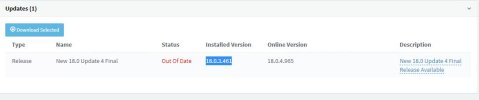
3CX version - 18.0.3.461 (Installed) (see attachment)
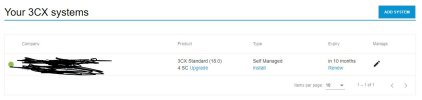
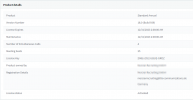
License on 3CX portal still activate.(see attachment)

Please advise how can I fix this issue. Thanks in advance.

 

Attachments

  • 3cx web result.JPG
    3cx web result.JPG
    20.9 KB · Views: 83
  • 3cx version.JPG
    3cx version.JPG
    26.2 KB · Views: 84
  • Portal License.JPG
    Portal License.JPG
    38.7 KB · Views: 82
The certificate of our activation server has been renewed. Your PBX must be updated to v18.0.8.917 in order to activate.
Is there any documentation/publication for this? Can't see it in the build history so wondering how we can catch these things in the future.
 
documentation/publication for this
The blog I linked above:
https://www.3cx.com/blog/releases/v18-u8-final/
"As a result of the SSL certificate renewal on the license server, update 8 is required to activate, see or refresh your license information after you renew your subscription.

If you’re on update 7 and below you cannot access the license page. You will need to update to version 18 update 8. If you are on update 8 & 7A this does not apply."

...which was posted a few days after the forum post https://www.3cx.com/community/threa...ction-to-activate-3cx-com.122087/#post-571595
 
How to upgrade to update 8 when the 3CX says that the system is up to date. Our version is 18.0 update 7 ?!
 
@services9 It’s not showing the update or beta/hotfix? Is the license expired?
 
It's your responsibility, to ensure your 3CX installation stays up-to-date. Neglecting updates can result in this situation. To continue using 3CX smoothly, backup your PBX, uninstall it, and install the latest 3CX version ( during reinstallation load the backup).
I think the problem is that you changed the certificate before the release of U8 final. So a lot of pbx are on u7 und cant reactivate or refresh the licence because of this.
 
I think the problem is that you changed the certificate before the release of U8 final. So a lot of pbx are on u7 und cant reactivate or refresh the licence because of this.
Certificates must be renewed once a year and 3CX cannot control this process.
 
  • Like
Reactions: Charles_3CX
Certificates must be renewed once a year and 3CX cannot control this process.
I know, but the PBX update u8 was at alpha level at this time. That was the problem. No automatic update...
 
Here is what worked for us without setting up a new server.
This was tested on version 18.0.5.418 running on Debian, so it should work with other 18 minor versions too.
Before proceeding please make sure to take a full backup or better a VM snapshot.

Connect to your 3CX server over SSH and run the following command which will install the latest version of 3CX including the debian packages which require updating:

sudo apt-get upgrade

Once the setup is complete (5 to 7 minutes) you will end up with 3CX version 18.0.8.935 and your licenses will be activated normally.

The procedure below wasn't tested but we believe that it should work and it is probably safer than the above since you will be installing all candidate versions one by one until you reach 18.0.8.917 which is not a beta version.

Connect to your 3CX server over SSH:
apt-mark hold 3cxpbx (This will hold the 3cxpbx version intact while running the command below)
apt-get upgrade (this will update the debian packages on the server only)
apt-mark unhold 3cxpbx (This will allow you to upgrade 3cxpbx)

Check from the 3CX web interface under updates which is the candidate version number and copy it next to the "=" in the following command:

apt-get install 3cxpbx=candidate-version-here (You can also check if the version number you typed is valid by running the following command: apt-cache policy 3cxpbx)
Once the setup is complete check again on the web interface which is the next candidate version and issue the same command with the new candidate version until you reach the latest stable version 18.0.8.917.

Please note that the procedure described above could have been easily scripted and provided by 3CX as a workaround of setting up a new server.

Thank you
 
  • Like
Reactions: dmoorenot
Reinstall and restore is maybe 15 minutes... and supported!
 
WTF 3CX, Are you guys kidding???

- License not able to refresh due to activation server update.
- 3CX administration console reports "failed to establish TCP connection"
- License "expires" (because not resfreshed from server) and there's no way to install updates via admin console, because there's no valid license, because it can't be refreshed... Death lock situation here

And now you say to reinstall the whole system and restore from backup? That's some brilliant SW engineering!
Not to mention all the Firewall guys scratching their heads because sysadmins are reporting "3CX fails to establish TCP connection to activation server".

You really need to put your stuff together.
You can try the solution we offered here: https://www.3cx.com/community/threa...to-activate-3cx-com.119668/page-2#post-573190
 
Here is what worked for us without setting up a new server.
This was tested on version 18.0.5.418 running on Debian, so it should work with other 18 minor versions too.
Before proceeding please make sure to take a full backup or better a VM snapshot.

Connect to your 3CX server over SSH and run the following command which will install the latest version of 3CX including the debian packages which require updating:

sudo apt-get upgrade

Once the setup is complete (5 to 7 minutes) you will end up with 3CX version 18.0.8.935 and your licenses will be activated normally.

The procedure below wasn't tested but we believe that it should work and it is probably safer than the above since you will be installing all candidate versions one by one until you reach 18.0.8.917 which is not a beta version.

Connect to your 3CX server over SSH:
apt-mark hold 3cxpbx (This will hold the 3cxpbx version intact while running the command below)
apt-get upgrade (this will update the debian packages on the server only)
apt-mark unhold 3cxpbx (This will allow you to upgrade 3cxpbx)

Check from the 3CX web interface under updates which is the candidate version number and copy it next to the "=" in the following command:

apt-get install 3cxpbx=candidate-version-here (You can also check if the version number you typed is valid by running the following command: apt-cache policy 3cxpbx)
Once the setup is complete check again on the web interface which is the next candidate version and issue the same command with the new candidate version until you reach the latest stable version 18.0.8.917.

Please note that the procedure described above could have been easily scripted and provided by 3CX as a workaround of setting up a new server.

Thank you
Hello,

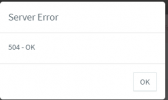
I have tried it, but I don't think it is 100% correct. The 3CX web console now displays the correct version number, but when I click on "Update" and search for updates, no further updates are displayed, only "504 - OK".

Thank you.
 
@tila Depending on your timing you may need today's 8B update.
 
You don't need to re install. You just need to go to update 8b that's all. And you don't need to do this now unless you have to renew today. Please see blog post...
 
Hello,

I have tried it, but I don't think it is 100% correct. The 3CX web console now displays the correct version number, but when I click on "Update" and search for updates, no further updates are displayed, only "504 - OK".

Thank you.

Hello,

On which version did you manage to get while using our procedure?

You can try the following:
sudo apt-get update [this will pull all the latest information from the repositories about upcoming updates]
sudo apt-cache policy 3cxpbx [This will show which version is currently installed and whether there are candidate versions available].

Once you run the above, try checking for updates on the webUI again, unless if you are already at the latest version.

Thank you
 
Many thanks for the replies.

I understand that Update 8b is intended to correct communication with the licensing server and it appears to be working properly for us:

1694529579384.png

However, we are experiencing an issue when attempting to update the PBX from the web interface as it displays a "504 - OK" error message

1694529622057.png

The output of the sudo apt-cache policy 3cxpbx command is as follows:

3cxpbx:
Installed: 18.0.8.939
Candidate: 18.0.8.939

Although the system is up-to-date according to this output, it seems that it is not entirely up-to-date. As suggested by @global67, we have attempted to update the system using sudo apt update && upgrade, but the system is only displaying the aforementioned error message instead of the next update for the Fanvill FW.

Do you have any suggestions on how to resolve this issue?
 
Last edited:
Many thanks for the replies.

I understand that Update 8b is intended to correct communication with the licensing server and it appears to be working properly for us:

View attachment 37230

However, we are experiencing an issue when attempting to update the PBX from the web interface as it displays a "504 - OK" error message

View attachment 37231

The output of the sudo apt-cache policy 3cxpbx command is as follows:

3cxpbx:
Installed: 18.0.8.939
Candidate: 18.0.8.939

Although the system is up-to-date according to this output, it seems that it is not entirely up-to-date. As suggested by @global67, we have attempted to update the system using sudo apt update && upgrade, but the system is only displaying the aforementioned error message instead of the next update for the Fanvill FW.

Do you have any suggestions on how to resolve this issue?

Hello,

You are probably receiving this error message because 18.0.8.939 is the latest version available and there are no further candidate versions to be installed.

https://www.3cx.com/blog/change-log/phone-system-change-log/

Once a newer version is available , you will probably stop receiving that message.

Try accessing this URL from an incognito window:
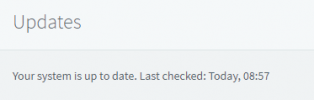
https://my-phone-system-url/#/app/updates/all
It should state the following: "Your system is up to date. Last checked ..."

Thank you
 
Hello,

You are probably receiving this error message because 18.0.8.939 is the latest version available and there are no further candidate versions to be installed.

https://www.3cx.com/blog/change-log/phone-system-change-log/

Once a newer version is available , you will probably stop receiving that message.

Try accessing this URL from an incognito window:
https://my-phone-system-url/#/app/updates/all
It should state the following: "Your system is up to date. Last checked ..."

Thank you
Hi,

From an incognito window it is the same... But on an another system it is working:

1694588277840.png

I am not 100% sure that it is a normal behavior, but thanks :)
 
Hi,

From an incognito window it is the same... But on an another system it is working:

View attachment 37245

I am not 100% sure that it is a normal behavior, but thanks :)

I dont see this as being an issue to be honest, but first I want to make sure that you did not use the apt-mark hold command while being at this current version. If you did just use apt-mark unhold 3cxpbx

Also check if apt-get update works fine, if it does you really shouldnt worry about it.

Lastly a server reboot might help, you never know!

Thank you
 
I dont see this as being an issue to be honest, but first I want to make sure that you did not use the apt-mark hold command while being at this current version. If you did just use apt-mark unhold 3cxpbx

Also check if apt-get update works fine, if it does you really shouldnt worry about it.

Lastly a server reboot might help, you never know!

Thank you
I have/had more PBX´s with the version 18.0 UPdate 7 (Build 312). As experiment I have done both your recommended method (update/upgrade and hold&unhold) and by both system now i have the same result ;-)

Reboot also has done (many times ;-)) and the apt-get update also works fine. So I really don´t know what can it be ....
Thanks
 
Status
Not open for further replies.

Forum statistics

Threads
111,971
Messages
590,060
Members
164,885
Latest member
webcom2000