3CX failed to establish a TCP connection to activate.3cx.com

Status
Not open for further replies.

mynetsupport

Free User
Joined
Mar 14, 2023
Messages
3
Reaction score
0
Hi all,
Encounter this error message on my Self-hosted/ On-Premise 3CX Server License page.
"3CX failed to establish a TCP connection to activate.3cx.com. Ensure that the local or border firewalls are configured to allow outbound traffic to activate.3cx.com"

Test ping to activate.3cx.com is working.
Try access activate.3cx.com on browser and bring me to a blank page. (See attachment)
3CX Server dns already set as 8.8.8.8
Restart the server a couple of time, but still same error.

Current system run on Debian 10, Windows Hyper-VM.
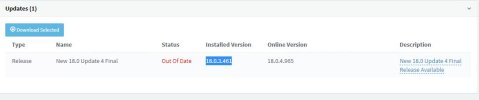
3CX version - 18.0.3.461 (Installed) (see attachment)
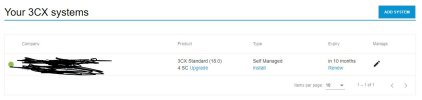
License on 3CX portal still activate.(see attachment)

Please advise how can I fix this issue. Thanks in advance.

 

Attachments

  • 3cx web result.JPG
    3cx web result.JPG
    20.9 KB · Views: 83
  • 3cx version.JPG
    3cx version.JPG
    26.2 KB · Views: 84
  • Portal License.JPG
    Portal License.JPG
    38.7 KB · Views: 82
I have/had more PBX´s with the version 18.0 UPdate 7 (Build 312). As experiment I have done both your recommended method (update/upgrade and hold&unhold) and by both system now i have the same result ;-)

Reboot also has done (many times ;-)) and the apt-get update also works fine. So I really don´t know what can it be ....
Thanks

I am sorry to hear that, we don`t have that issue on the PBX we upgraded.
I have one last suggestion for the moment ,try the following command but take a snapshot first just to be "safe".

sudo apt-get autoremove
[This will remove packages which are currently not being used/required by the system, it should not affect anything else.]
sudo apt-get update

Check if that resolves the issue.

Thank you!
 
The update over cli could have broke something. I wouldn't update via the CLI without instructions from support.
 
I am sorry to hear that, we don`t have that issue on the PBX we upgraded.
I have one last suggestion for the moment ,try the following command but take a snapshot first just to be "safe".

sudo apt-get autoremove
[This will remove packages which are currently not being used/required by the system, it should not affect anything else.]
sudo apt-get update

Check if that resolves the issue.

Thank you!
thanks, I will test it, but first at the evening
 
  • Like
Reactions: global67
The update over cli could have broke something. I wouldn't update via the CLI without instructions from support.
I have tried to do that from the webgui, but it didn´t showed me any update, that was the reason, why I hav tried it over cli ...

But thanks
 
You don't need to re install. You just need to go to update 8b that's all. And you don't need to do this now unless you have to renew today. Please see blog post...
It won't let me install the update. It says "Maintenance Expired. Updates are not available". I tried calling 3cx US and since they are in Florida, they are closed (it was only 3:45PM PST when our clients started calling us).. Now what?
One client has almost a year left on their license..
 
We will check and revert ASAP
 
  • Like
Reactions: tila
It won't let me install the update. It says "Maintenance Expired. Updates are not available". I tried calling 3cx US and since they are in Florida, they are closed (it was only 3:45PM PST when our clients started calling us).. Now what?
One client has almost a year left on their license..
Hello please respond to our PM that we have send you earlier and we will have a look at your issue
 
please let us know if the issue has been resolved as per our session
Unfortunately the same result ...
Hello what is causing the issue seems to be an ipv6 routing issue (your machines cannot reach the 3CX downloads server over IPV6) which is also why you couldn't see the update even when the systems were on U7. This is also why you get a 504 when you go to updates now as the connection times out. Please let us know if your issue has been resolved once you make the changes discussed in our session
 
Worked with apt-get update & apt-get upgrade :)
 
Did 3CX resolve the issue for you? was it a routing issue?

Thank you
Hi,

after I have disabled the ipv6 networking it has started to working ;-)

So thank you for all :)
 
The speed of updates, along with the removal of the ability for consumers to individually choose deployment options for a phone system, as soon as the image and suggested servers are USA-based, and also the discontinuation of support for old versions that have worked for years, raises concerns about a rapid departure from customer-centric policies. Such a policy increasingly makes me contemplate the switch to alternative systems.
 
I must admit I'm pretty annoyed by how 3CX is handling these things. I do not have the time to constantly 'baby-sit' 3CX on-premise installations for our branches and when they had to "renew" their maintenance license I assumed that a version less than half a year old is actually OK.

What is even more annoying is the fact you can't actually update to a version which CAN communicate with the license-server to renew its license because maintenance is expired as it is not checked remotely but stored locally. So you end up with a catch-22 that you can't update to a new version, but the new version is needed to communicate with the license-server. AAARRGGHHH

And don't tell me reinstalling and restoring is easy: It is, but some settings are actually not stored in the backup, so you end up with a scenario where you have to thoroughly check settings to see if they were properly restored.

In the past (I've been using a on-premise installation since V10 (10+ years ago) and updates have caused major operation issues in the past, hence why I'm reluctant to update whenever you bring out a new version which adds nothing. We had a perpetual version and where perfectly happy with that since it worked flawless. Not only did we increase our cost of operation, it also adds more maintenance time and possible issues.

Add to that the required changes to infrastructure for V20 (Split-DNS required) and you keep making it more and more effort for me to keep these things running on premise. I recently renewed 3 instances for 5 years, but I'm beginning to reconsider this policy.

Please please please start rethinking design-choices and make it so on-premise installations don't need constant baby-sitting and modifying infrastructures just because you want to make some stuff easier on your side.
 
I must admit I'm pretty annoyed by how 3CX is handling these things. I do not have the time to constantly 'baby-sit' 3CX on-premise installations for our branches and when they had to "renew" their maintenance license I assumed that a version less than half a year old is actually OK.

What is even more annoying is the fact you can't actually update to a version which CAN communicate with the license-server to renew its license because maintenance is expired as it is not checked remotely but stored locally. So you end up with a catch-22 that you can't update to a new version, but the new version is needed to communicate with the license-server. AAARRGGHHH

And don't tell me reinstalling and restoring is easy: It is, but some settings are actually not stored in the backup, so you end up with a scenario where you have to thoroughly check settings to see if they were properly restored.

In the past (I've been using a on-premise installation since V10 (10+ years ago) and updates have caused major operation issues in the past, hence why I'm reluctant to update whenever you bring out a new version which adds nothing. We had a perpetual version and where perfectly happy with that since it worked flawless. Not only did we increase our cost of operation, it also adds more maintenance time and possible issues.

Add to that the required changes to infrastructure for V20 (Split-DNS required) and you keep making it more and more effort for me to keep these things running on premise. I recently renewed 3 instances for 5 years, but I'm beginning to reconsider this policy.

Please please please start rethinking design-choices and make it so on-premise installations don't need constant baby-sitting and modifying infrastructures just because you want to make some stuff easier on your side.
I think you already know, but 3CX would likely respond that you can use Hosted By 3CX and not worry about any of this (updates, split DNS, etc).
 
  • Like
Reactions: Charles_3CX
I think you already know, but 3CX would likely respond that you can use Hosted By 3CX and not worry about any of this (updates, split DNS, etc).

I know, but that is besides the point. The point I'm trying to make is that choices are being made which make it harder for certain customers (who run on-premise) to seamlessly upgrade. The reason why those choices are made are mostly "because they are easier to program".

There never was a reason for split-DNS because 3CX supported Internal and External IP/FDQN-addresses in the SIP-server fields. I can only think that Split-DNS is necessary for V20 because that support is removed, e.g. easier to program.

My point is that the focus should be more towards customers. Why would you block updating in the GUI with an expired license if you CAN update from the (unsupported) CLI? If you 'fall-back' to an unlicensed version with less functionality why also block updating? It simply makes no sense - but causes a lot of additional issues.
 
I can only think that Split-DNS is necessary for V20 because that support is removed, e.g. easier to program
3CX has said it's for security reasons, so the internal phones can use HTTPS.

In general if there are known "cert expiration" dates then it might be a good idea for 3CX to publish a "you will need to be on at least version ___ by March 17 so plan accordingly" warning. The "pain" level for customers caught out is high.

If 3CX is set to auto update there's not a problem, but IT folks have a long history of not trusting automatic updates from basically all companies.

re: CLI, in general 3CX recommends against updating via command line because that might pull down package updates that 3CX hasn't tested yet. (and just to keep restating it whenever I can, automatic updates via the GUI pull OS security updates; manual updates do not)
 
  • Like
Reactions: bitn2
This is broken, 3CX needs to fix this.
I am at 18 u7, and it says "Maintenance expired. Updates are not available", but apparently I need to be at u8 to update...
3CX is objectively broken if I need to be at u8 to update my registration, but I need to renew my registration to update. who let this happen and are they still employed?

Backup and reinstalling the system has downtime, and it's risky... I've never attempted a backup and restore before, and I don't see how I can be confident it will work comprehensively ahead of time. What am I paying for? 3CX often seems to make things harder than easier... and this is really unacceptable for the money 3CX takes. Maybe this is the sign I need to let 3CX die...

This needs some sort of hit-fix to make it possible to update.
 
This is broken, 3CX needs to fix this.
I am at 18 u7, and it says "Maintenance expired. Updates are not available", but apparently I need to be at u8 to update...
3CX is objectively broken if I need to be at u8 to update my registration, but I need to renew my registration to update. who let this happen and are they still employed?

Backup and reinstalling the system has downtime, and it's risky... I've never attempted a backup and restore before, and I don't see how I can be confident it will work comprehensively ahead of time. What am I paying for? 3CX often seems to make things harder than easier... and this is really unacceptable for the money 3CX takes. Maybe this is the sign I need to let 3CX die...

This needs some sort of hit-fix to make it possible to update.
That is a problem when you didnt update your stuff. If this is to complicated for you, just switch to auto update or use hosted by 3cx. To resolve your problem now, take a backup, reinstall und restore. It takes maybe 15 minutes to get your pbx back running.
 
  • Like
Reactions: N_G
Status
Not open for further replies.

Forum statistics

Threads
111,973
Messages
590,078
Members
164,896
Latest member
sameage