Solved 3CX full backup - failed

Status
Not open for further replies.

regomotiv

Premier Customer
Basic Certified
Joined
Sep 15, 2009
Messages
90
Reaction score
1
Normal backups complete without any issues.

Trying to take a full backup before upgrading to v16 (Windows 10), I get the following error.
Any ideas?

3CX Phone System tried to backup but failed due to the following reason(s):
System.IO.IOException: The request could not be performed because of an I/O device error.

at System.IO.__Error.WinIOError(Int32 errorCode, String maybeFullPath)
at System.IO.FileStream.ReadCore(Byte[] buffer, Int32 offset, Int32 count)
at System.IO.FileStream.Read(Byte[] array, Int32 offset, Int32 count)
at System.IO.Stream.InternalCopyTo(Stream destination, Int32 bufferSize)
at _3cxNetBackupAndRestore._3cxBackup.ZipFile(String dst, IFile src)
at _3cxNetBackupAndRestore.BackupTasks.BaseFilesTask.BackupFiles()
System.IO.IOException: The request could not be performed because of an I/O device error.

at System.IO.__Error.WinIOError(Int32 errorCode, String maybeFullPath)
at System.IO.FileStream.ReadCore(Byte[] buffer, Int32 offset, Int32 count)
at System.IO.FileStream.Read(Byte[] array, Int32 offset, Int32 count)
at System.IO.Stream.InternalCopyTo(Stream destination, Int32 bufferSize)
at _3cxNetBackupAndRestore._3cxBackup.ZipFile(String dst, IFile src)
at _3cxNetBackupAndRestore.BackupTasks.BaseFilesTask.BackupFiles()
 
so you are not sure to have a good backup everywhere you tried ?
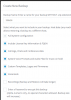
I have good backups, only with the 1st 3 boxes checked - "Sys config, license & Chats"
 
Yes, recordings are not used by all the pbxs owner . if you keep safe recordings folder you previously done by direct copy you are good to go
 
is you local HDD in good condition? do you have SMART infos? is it an old computer ?
 
This backup will work without any errors.
Screenshot from 2020-09-11 01.01.08.png
 
is you local HDD in good condition? do you have SMART infos? is it an old computer ?
Yes, it's old, about 7 years old.
 
Okay , so change HDD or complete computer before V16, 7 years old for a computer with low quality we have now, it's time to give it his retirement ;)
 
Okay , so change HDD or complete computer before V16, 7 years old for a computer with low quality we have now, it's time to give it his retirement ;)
I agree 1000% but I still need full v15.5 backup!!
 
is it possible to make a check disk to see if there are defective sectors on HDD to be excluded and also perhaps problems on partition check disk could fix too.

of course doing that means no pbx running
 
Is it a big PBX config with advanced settings or small one with basic use? perhaps it could be same time to set new one from scratch ?

do you use custom templates? specific wav files for MOH ? if not this backup options are no interest for you,

only thing is Voicemail if you got new you lose it if they are not saved, but like recordings you could go in folder directly and do a copy from there
 
Is it a big PBX config with advanced settings or small one with basic use? perhaps it could be same time to set new one from scratch ?

do you use custom templates? specific wav files for MOH ? if not this backup options are no interest for you,

only thing is Voicemail if you got new you lose it if they are not saved, but like recordings you could go in folder directly and do a copy from there
Yes, I have system voice prompts & specific wav files!
 
run a full disk check before anything else
 
run a full disk check before anything else
Ran chk disc, it found some error, fixed the errors & rebooted.
Tried backup, still get the same I/O error.
 
do you have older v15.5 backup from previous time when pbx was working fine?
 
I have some older backups but they are not full backups.
 
if there's absolutely no way to have a full and actual backup , you surely need to take decision to run with an old one and manually do what could miss after restore
 
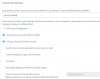
@regomotiv if you can make a successful backup with all the options ticked (except recordings) then there is another way you can move to V16. Follow these instructions at a time when no more calls will be made (ie. after the company closes)

1. Make the backup with everything except Recordings ticked
1600065673386.png

2. Copy the entire contents of your current Recordings folder to the USB HDD manually

3. Follow instructions to upgrade to V16 https://www.3cx.com/docs/upgrading-pbx-v16/

4. When the installation wizard is done, put the entire contents of the Recordings folder you copied earlier, back into the new V16 Recordings folder (so they will be in the exact same place as before the upgrade)

5. Log into the V16 management console for the first time, and go to Settings > Parameters

6. Create a new parameter called RECS_SYNC_REQUIRED and set the Value to 1 then press ok
1600065943339.png

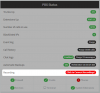
7. Go back to the Dashboard and you will see a new option appear:
1600066019516.png

8. Click this option and wait for the conversion to complete (an email confirmation will be sent when done)

This method will allow you to migrate V15.5SP6 recordings to V16 successfully. It happens automatically under normal conditions, but in your case we are doing it manually to work around the original problem of not being able to take a full backup.

DO NOT use this method again - it is only meant to be used once when you update V15.5 to V16.
If you use it on any recordings made by V16, it may mess up their names ;)
 
Unfortunately, even that option failed with the same I/O error.
 
I ended taking a full W10 image backup (using Veeam) & restoring to a new pc.
Now I am able to take a full 3CX backup & have upgraded this install to v16 via the restore method.

Thanks to all for the help.
 
  • Like
Reactions: JohnS_3CX
Status
Not open for further replies.

Latest Posts

Forum statistics

Threads
112,322
Messages
591,883
Members
165,469
Latest member
footandankle.my3fcx.us