- Joined
- Sep 10, 2019
- Messages
- 4
- Reaction score
- 0
Hello,
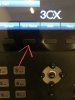
I have a problem got the PhoneBook working oh the Phone. I got the right (stored) Name when someone is calling, but I cannot access the remote Phone Book of 3CX via the "3CX PBook" Button on the Yealink Phone.
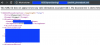
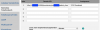
I checked htat there is the right link provisioned to the phone("http://my3cxip:5000/provisioning/rxxxxxxx/yealink_phonebook.xml") and I have access to it if I enter the link in a browser.
(There is a XML file with a few contacts I entered to test)
The "3CX pBook" Button is set to "XMLMenu" via the provisioning from the 3CX, so I assume I should have access to the external PhoneBook of the 3CX..
But If I press this button nothing happens.. btw on all phones that are provisioned with this 3CX (Version 16.0.910)
Has anybody suggestions?
Thanks..
I have a problem got the PhoneBook working oh the Phone. I got the right (stored) Name when someone is calling, but I cannot access the remote Phone Book of 3CX via the "3CX PBook" Button on the Yealink Phone.
I checked htat there is the right link provisioned to the phone("http://my3cxip:5000/provisioning/rxxxxxxx/yealink_phonebook.xml") and I have access to it if I enter the link in a browser.
(There is a XML file with a few contacts I entered to test)
The "3CX pBook" Button is set to "XMLMenu" via the provisioning from the 3CX, so I assume I should have access to the external PhoneBook of the 3CX..
But If I press this button nothing happens.. btw on all phones that are provisioned with this 3CX (Version 16.0.910)
Has anybody suggestions?
Thanks..
 I think the remote Phonebook on the 3CX is able to be browsed by the yealink phone..