3CX SMTP - Office365 Encrypted Outgoing Emails

Status
Not open for further replies.

jasonhille

Silver Partner
Advanced Certified
Joined
Sep 13, 2019
Messages
24
Reaction score
7
We are attempting to test Office365 SMTP configurations. We've configured an Office365 user/email account (in Azure) and have set a rule to have any emails sent using this account be automatically encrypted for top level security. As 3CX doesn't have an integration for 2FA/MFA with O365 , an app password was generated for this account, but doesn't appear to be working.

Please assist or direct me in solutions to this so we can begin testing.
 
@jasonhille please check your Office 365 account and check if the email has been bounced.
Most common reason for these scenarios is if extension with user 's email was created before the actual email exited at your Mail Server.
Further more you may check the Management Console logs if you click the Test button from the pbx and find the response from your mail server if you get any error.
PBX must be in Verbose to have complete log.
 
Last edited:
@NikosT_3CX I should have been a bit more specific. I am getting a 5.7.3 Authentication error when attempting to authenticate with Office365 account created for use in Settings -> Email Settings. Based on 3CX V16 documentation, this is an O365 email account where all manner of outgoing 3CX emails are generated and delivered. We are thinking that this issue is related to 2FA/MFA and an app password is not working. If there is a different method by which to use Office365 to send Encrypted Emails, please let me know.

We have other SMTP methods to fall back on and are successful. However, our MSP security SLA model requires sensitive information like passwords, images, and encryptable files to be encrypted before being sent to the user.

Screenshot 2021-06-21 120929.jpg
 
Last edited:
You don't need the app password to encrypt the emails. Authentication and encryption are two different things. If you think the app password is the issue, then test it without the app password. You can also test the account using another mail client. But first I would try using the correct user name which should be in email format.
 
Typically the username is also the email address too.
 
  • Like
Reactions: jasonhille
You don't need the app password to encrypt the emails. Authentication and encryption are two different things. If you think the app password is the issue, then test it without the app password. You can also test the account using another mail client. But first I would try using the correct user name which should be in email format.
Thank you for the input. I am, however, already aware of the difference. My ultimate goal is to encrypt emails using an O365 account and the app password is only used to authenticate the account with the O365 without 2FA/MFA.

@NikosT_3CX What you're saying is that there is currently no other method of using an O365 account that has 2FA/MFA enabled on it .. or any account from a 3rd party email vendor, for that matter?
 
I get a 4.7.0 Temporary Server Issue error when trying the full email address, but I just learned that the password for the account I'm attempting to use has changed by our O365 team. I have some testing to do when I get the password for the account which may have been part of my issue up until this point. If possible, please keep this thread open in case others have ideas for O365 account being used to send encrypted emails.

Thanks. On stand by.
 
  • Like
Reactions: NikosT_3CX
Some new information to include.

O365 has 2 types of factor authentication. 2-factor and multi-factor. MS includes 2-factor as a basic service for O365 licenses known as Microsoft Security Defaults. This is not the same as MFA and doesn't include the ability to set app passwords. MFA must be enabled on O365 license. Just an FYI.
 
Some new information to include.

O365 has 2 types of factor authentication. 2-factor and multi-factor. MS includes 2-factor as a basic service for O365 licenses known as Microsoft Security Defaults. This is not the same as MFA and doesn't include the ability to set app passwords. MFA must be enabled on O365 license. Just an FYI.
Have you got any links to support this?

AFAIK in 365 it used to be called 2FA and they changed it to MFA.

I only see MFA in 365 and this is set in Microsoft Security Defaults and MFA is standard.

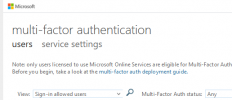
1624432741531.png

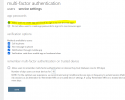
1624432761167.png

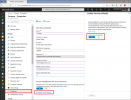
1624432802480.png
 
Have you got any links to support this?

AFAIK in 365 it used to be called 2FA and they changed it to MFA.

I only see MFA in 365 and this is set in Microsoft Security Defaults and MFA is standard.

View attachment 22642

View attachment 22643

View attachment 22644

That is an excellent question. 2FA is a legacy term and Microsoft has adopted MFA to encompass the variety of ways to 2-factor authenticate. The reason I use 2FA as the legacy term is because Microsoft Security Defaults shown below only provides a single 2FA action which available to entry level 365 licenses up to I believe E2. E3 and above licenses, Security Defaults includes other forms of 2FA making it MFA.

security-defaults-azure-ad-portal.png

In any case, I have tested various ways to use an O365 account and I still come up with a 5.7.3 error. My last resort is to disable MFA for this single account and test. This is not ideal for security reasons, but 3CX should probably work with MS APIs to better streamline this feature.
 
That is an excellent question. 2FA is a legacy term and Microsoft has adopted MFA to encompass the variety of ways to 2-factor authenticate. The reason I use 2FA as the legacy term is because Microsoft Security Defaults shown below only provides a single 2FA action which available to entry level 365 licenses up to I believe E2. E3 and above licenses, Security Defaults includes other forms of 2FA making it MFA.

View attachment 22663

In any case, I have tested various ways to use an O365 account and I still come up with a 5.7.3 error. My last resort is to disable MFA for this single account and test. This is not ideal for security reasons, but 3CX should probably work with MS APIs to better streamline this feature.
Your other option is to purchase an Azure Premium 1 license which will enable you to set up conditional access and you can limit it to your 3CX IP.
 
Your other option is to purchase an Azure Premium 1 license which will enable you to set up conditional access and you can limit it to your 3CX IP.

Thank you for your continued advice. That is actually what we are currently working on. I'll post any results as soon as completed.
 
Thank you for your continued advice. That is actually what we are currently working on. I'll post any results as soon as completed.
I've also tried to locate any documentation that would suggest MFA is more than 2 layers of security when logging in and I do not believe it is. I think MFA is referring to the fact that for the 2nd authentication type i'm not limited to 1 other option. So, I could do it via text, phone call, mobile app.

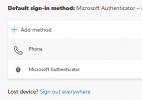
So, you'll see I have multiple ways to 2FA in my account

1624457436249.png

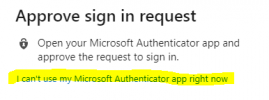
So after I do my 1st authentication, it's on to my 2nd auth (my app)

1624457591118.png
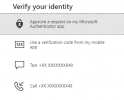
So instead I use another form of auth, hence MFA.

1624457617804.png

I dont believe there is a 2FA or MFA. It is simply MFA.
 
You can also turn off access to OWA so user cannot log in to Outlook on the web to further protect the account.
 
I've also tried to locate any documentation that would suggest MFA is more than 2 layers of security when logging in and I do not believe it is. I think MFA is referring to the fact that for the 2nd authentication type i'm not limited to 1 other option. So, I could do it via text, phone call, mobile app.

So, you'll see I have multiple ways to 2FA in my account

View attachment 22664

So after I do my 1st authentication, it's on to my 2nd auth (my app)

View attachment 22665
So instead I use another form of auth, hence MFA.

View attachment 22666

I dont believe there is a 2FA or MFA. It is simply MFA.

If this was misunderstood in my previous post, I apologize. I, also, understand MFA as you've posted here.

We have OWA disabled for this account as you've suggested, as well. It seemed appropriate since the email account would only be used for outgoing emails and there would essentially be no need to log into it to check anything.
 
I'm not sure why there isn't any documentation with 3CX on Office365 Email Settings if it is an option for use.

I have tried using an App Password; no luck.
I have tried disabling MFA for the account and just use standard password; no luck.
I have tried Conditional Access Control and added the PBX public IP; no luck.
I have tried disabling "Authenticated SMTP", waiting 24 hours, re-enabling it, waiting 24 hours, and trying again; no luck

Is there no documentation on this anywhere? This a little frustrating.
 
I dont understand why you're putting all this effort into this and wasting your time.

I have tried disabling MFA for the account and just use standard password; no luck.
You're doing something wrong.

There is literally a dropdown under mail server for Office 365 and all you need is the username and password.

With MFA turned off, this will not be a problem. If it isnt working, it's because you didnt wait long enough for 365 to replicate this setting across it's servers (up to 20 minutes).

If you still need to pursue this MFA thing then try reading this https://techcommunity.microsoft.com...l-smtp-through-office-365-with-mfa/m-p/163867 and use the "custom SMTP server" option.

You've already set up the encryption side of it and now it sounds like you're trying to protect the account. Let me tell you that using an app password and a normal password makes no real difference as it's still a static password that can be brute-forced unlike MFA this is why app password option is removed for users when turning on MS security defaults.

I've pointed you in the right direction with conditional access so if you still cant figure that out I suggest you open up a case with Microsoft Support for further guidance or post on theirs Microsoft Answers forum and ask the community how to protect your 365 account.

I'm going to now out now - good luck sir!
 
I dont understand why you're putting all this effort into this and wasting your time.


You're doing something wrong.

There is literally a dropdown under mail server for Office 365 and all you need is the username and password.

With MFA turned off, this will not be a problem. If it isnt working, it's because you didnt wait long enough for 365 to replicate this setting across it's servers (up to 20 minutes).

If you still need to pursue this MFA thing then try reading this https://techcommunity.microsoft.com...l-smtp-through-office-365-with-mfa/m-p/163867 and use the "custom SMTP server" option.

You've already set up the encryption side of it and now it sounds like you're trying to protect the account. Let me tell you that using an app password and a normal password makes no real difference as it's still a static password that can be brute-forced unlike MFA this is why app password option is removed for users when turning on MS security defaults.

I've pointed you in the right direction with conditional access so if you still cant figure that out I suggest you open up a case with Microsoft Support for further guidance or post on theirs Microsoft Answers forum and ask the community how to protect your 365 account.

I'm going to now out now - good luck sir!

I can certainly appreciate you not understanding where I'm coming from and I thank you for and respect your opinion.

As stated previously in this thread, we have other general SMTP sources to fall back on. All of those options are far less secure than using O365, if O365 is a reliable option. If I'm looking for maximum security on critical information such as the plain text welcome emails exposing passwords and attachments used for provisioning, I'm going to try to use all the tools at my disposal to reach that maximum. That is why I'm putting all this effort and "wasting my time" on this.

Because the licensing and deployment for an entire organization is being setup, we jumped the gun using conditional access when it actually hasn't been configured yet. We, like you, believe conditional access should resolve our issue, but it seems we're trying to rush things with deployment procedures from MS are slower than anticipated. We're also a MSP so we have other tasks that pull us away from this project.

From this project and the obstacles I've fast, it is undeniable that 3CX doesn't have proper support for a feature they have implemented into 3CX and many posts on this thread have pointed to MS support related links. While I find the support and help of my fellow peers in this 3CX community highly invaluable, on this particular feature, no one seems to have a solid resolution from 3CX's standpoint.
 
Status
Not open for further replies.